M.DRIVE.DB-21.GEN.ENG
Ed.
2021 Rev.04
Pag. 26 di 31
13.3 DRIVE REPLACEMENT (SET-UP AND SETTING)
This procedure is used to change the setting of the drive in order to use it with all turrets type and motor
produced. Follow the timeline (chapter 13.2.1) for understand the correct setup to apply to the drive:
A new turret is supplied with its own drive already pre-set and ready to work with 400 V
VOLTAGE.
In case of 230V power supply or any other situation might be necessary to re-set the drive
with the sequence N°1 and N°2 described below:
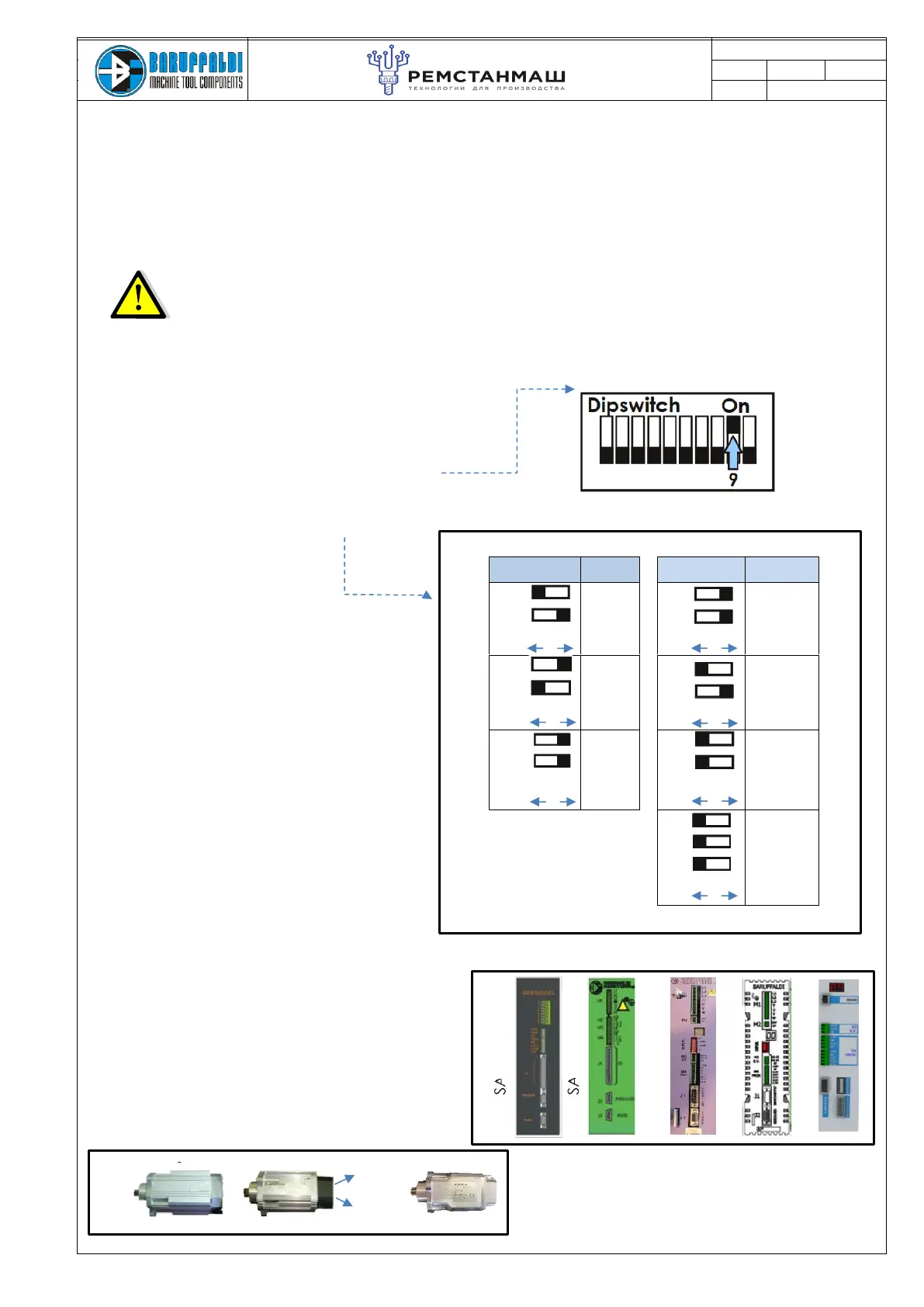
DIPSWITCH N°
MOTOR
TYPE
DIPSWITCH N°
TURRET
TYPE
1
2
MAGNETIC
BLQ43L45
5
6
K2
(TB SERIES)
1
2
LAFERT
5KHz
B5602P-
01101
5
6
K5
(TB SERIES)
1
2
LAFERT
10KHz
B5602P-
01121
BARUFFALDI
10KHz
MB21
5
6
K3
(TAB SERIES)
4
5
6
K5-BIS
(TBH SERIES)
Magnetic Lafert MB21
5KHz
10KHz
Sequence of operations N°1:
1. Drive OFF (24Vdc Off)
2. Set to OFF all dipswitch
3. Set to ON dipswitch n°9 (turret setting mode)
4. Set the input motor and turret type as the
tables below.
5. Turn ON the drive (auxiliary supply 24V dc)
Display shows ="AF"
6. Set to on the dipswitch n°10 and after 5” set
them off
7. The message on the display "SA" means that
the setup has been saved
8. Switch OFF the drive
SA.01A.TB
DB21
5. Turn ON the drive (auxiliary supply 24V
dc) Display shows ="AF"
6. Set to on the dipswitch n°10 and after 5”
set it off (ACQUISITION PROCEDURE)
7. The message on the display "SA" means
that the setup has been saved
8. Switch OFF the drive
SA.02A.TB
DMS08-BF
DMS08-BF
DB-21
ON
OFF
ON
OFF
ON
OFF
ON
OFF
ON
OFF
ON
OFF
ON
OFF


 To Next Page