M.DRIVE.DB-21.GEN.ENG
Ed.
2021 Rev.04
Pag. 28 di 31
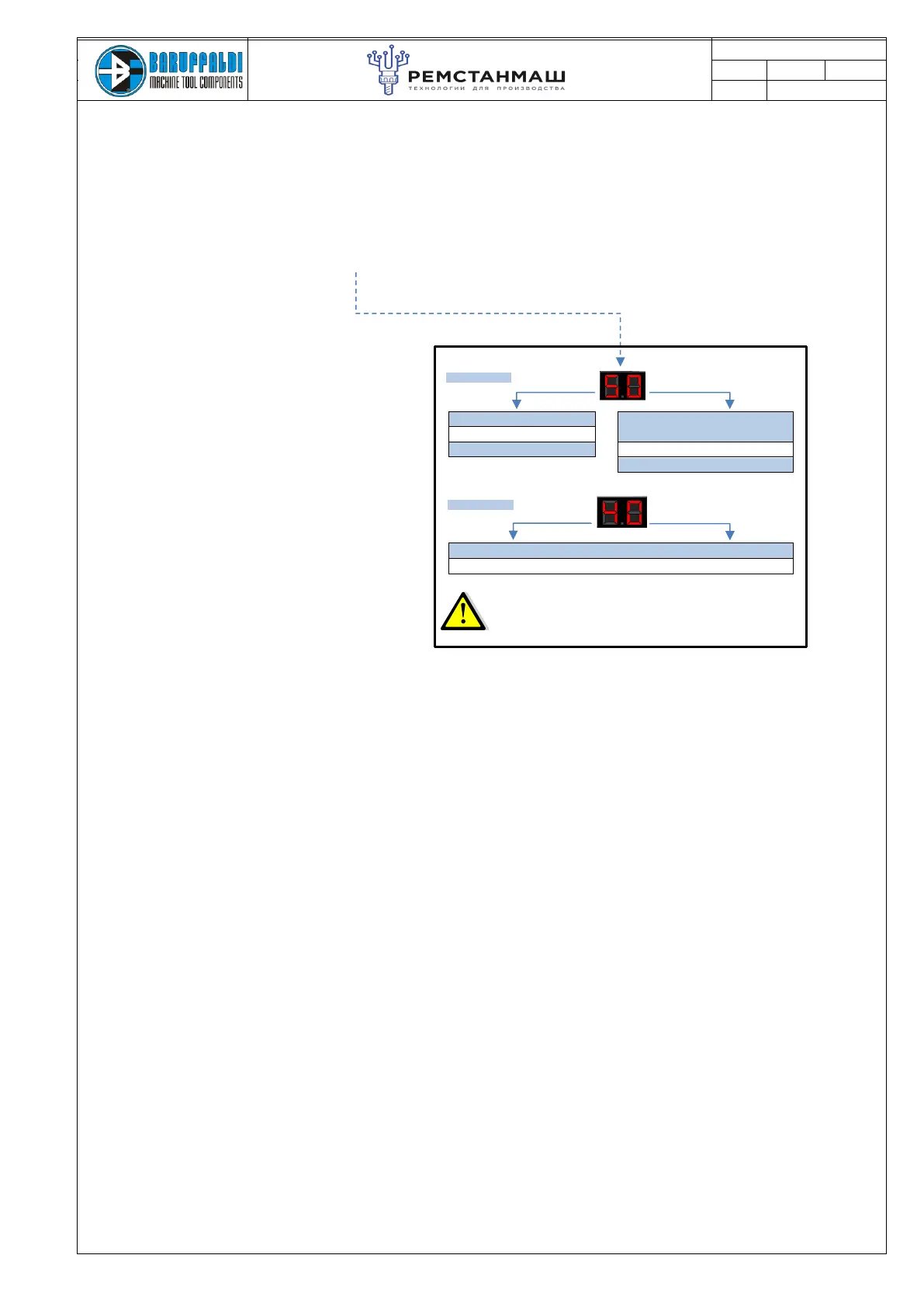
The display will alternate the turret set up and the voltage set up
5 - CODE FOR K5 TURRETS
+
0 - CODE FOR LAFERT 10KHz MOTOR
3 - CODE FOR K3 TURRETS
0 - CODE FOR BD21 10KHz MOTOR
2 - CODE FOR K2 TURRETS
1 - CODE FOR LAFERT 5KHz MOTOR
2 - CODE FOR MAGNETIC MOTOR
40 - CODE FOR 400V INPUT VOLTAGE SETUP
23 - CODE FOR 230V INPUT VOLTAGE SETUP
In the case of WRONG SET UP could be activate one of the following alarms:
- Voltage not set-up or incorrect (EE)
- Resolver failure 8.0 at startup
- Locking Error (5.x) after position inquiry
- Position Error (6.x) after position inquiry
6. Switch the drive OFF and ON again, check on the display
that the drive setup is correct.
The display will flash for 4 seconds: first indication the
turret series and motor setup, then as second indication the
input voltage selected (see tables below)
VOLTAGE SET UP
TURRET SET UP


 To Next Page