RoboClaw Series
Brushed DC Motor Controllers
RoboClaw Series User Manual
15
Motion Studio Overview
Motion Studio
The BasicMicro Motion Studio software suite is design to congure, monitor and maintain
RoboClaw. It's used to congure all the available RoboClaw modes and options. Motion Studio
can be used to monitor and control RoboClaw. It can be download from https://www.basicmicro.
com. Once installed, each time Motion Studio is run it will check for the latest version online.
Connection
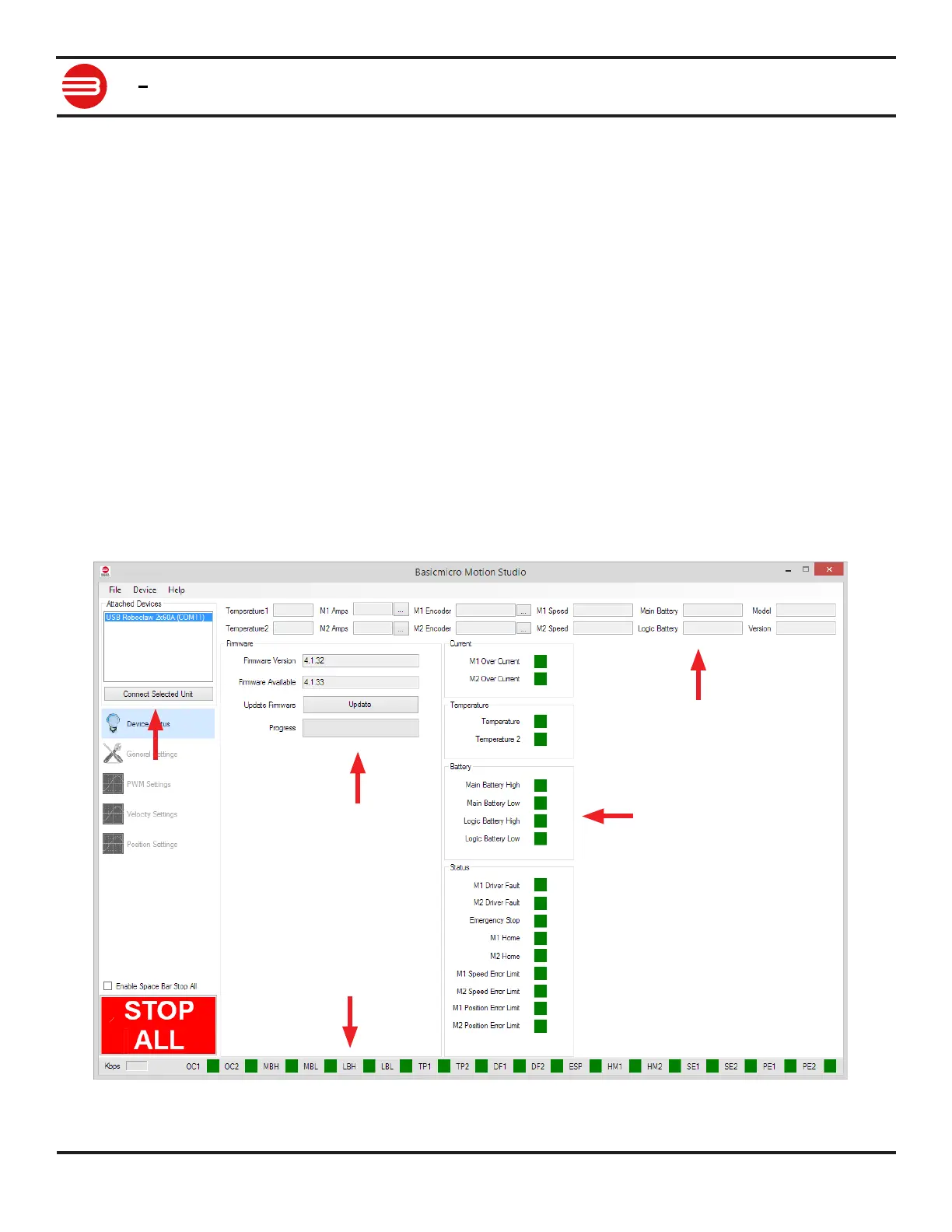
This is the rst screen shown when rst running Motion Studio. From this screen you can select
a detected RoboClaw and connect (1). More than one RoboClaw can be connected at a time. Box
(1) is where the desired RoboClaw is selected.
After the RoboClaw is detected and it's rmware version is checked (2), if a newer rmware
version is available it can be updated by clicking the Update Firmware button (2).
Fields (3,4,5) display current values and status. The elds at the top of the screen (3) show the
current value of each monitored parameter and are updated live once a RoboClaw is connected.
Status indicators (4,5) indicate the current condition of the named monitor parameter. Green
indicates operationing within the dened parameter. Yellow indicates a warning. Red indicates a
fault.
2
4
1
5
3


 To Next Page