RoboClaw Series
Brushed DC Motor Controllers
RoboClaw Series User Manual
29
Conguration Using Motion Studio
Mode Setup
Download and install the Motion Studio application from https://www.basicmicro.com. A PC with
Windows 7 or newer is required. Motion Studio will check for a newer version each time it is ran.
It will then search for the USB RoboClaw Windows Driver to verify installation. If the USB driver
is not found Ion Studio will install it.
1. Open the Motion Studio application.
2. Apply a reliable power source such as a fully charged battery to power up RoboClaw.
3. Connect the powered RoboClaw to a USB port on your computer with Motion Studio already
open. The RoboClaw USB driver may need to be installed before Motion Studio will automatically
handling installing the required driver.
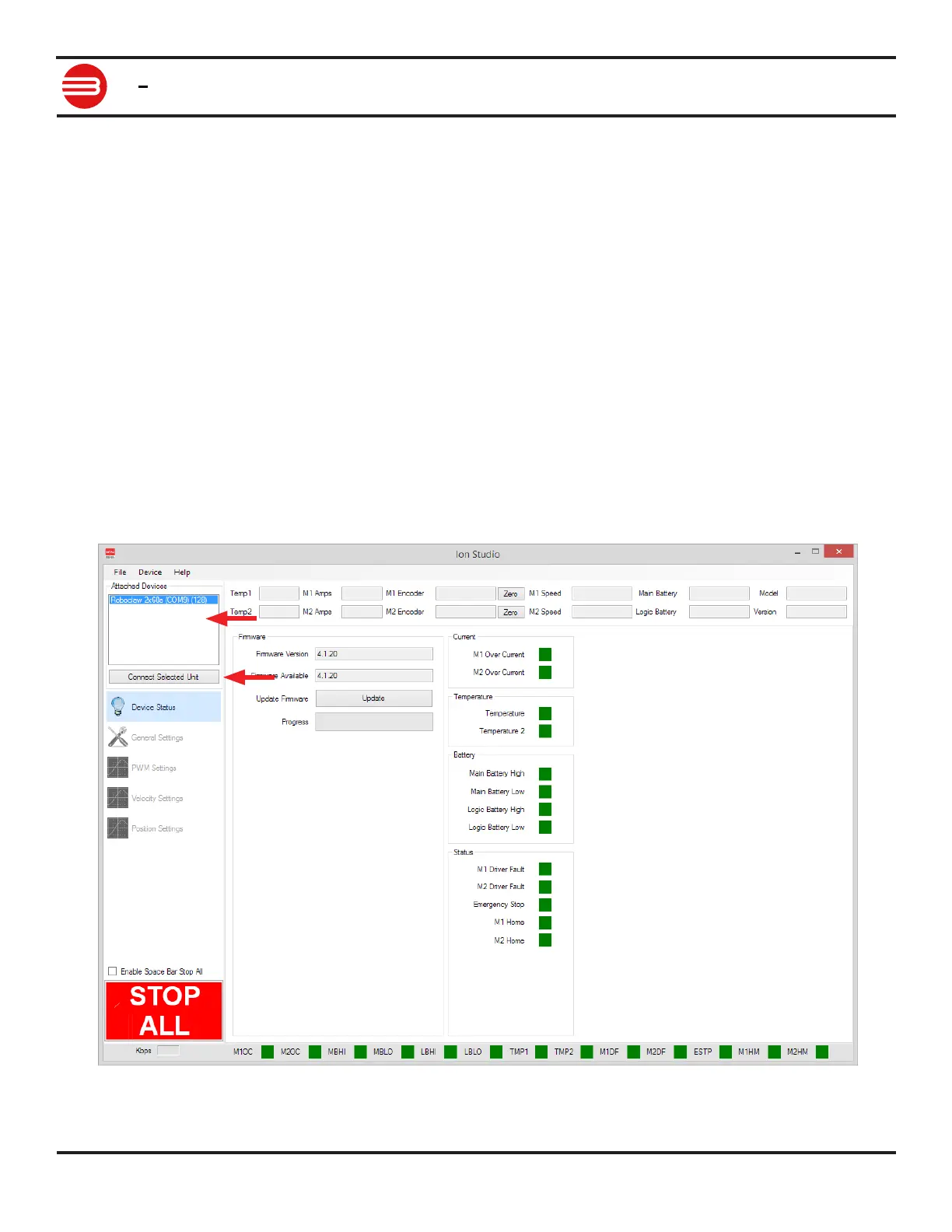
4. When RoboClaw is detected, it will appear in the Attached Device window (1).
5. Once RoboClaw appears in the Attached Device window (1), click the connect button (2).
1
2


 To Next Page