Image Acquisition Control
116 Basler scout
7.7 Exposure Time Parameters
Many of the camera’s image acquisition modes require you to specify an exposure time. There are
two ways to set exposure time: by setting "raw" values or by setting an "absolute value". The two
methods are described below. You can use whichever method you prefer to set the exposure time.
The exposure time must not be set below a minimum specified value. The minimum exposure time
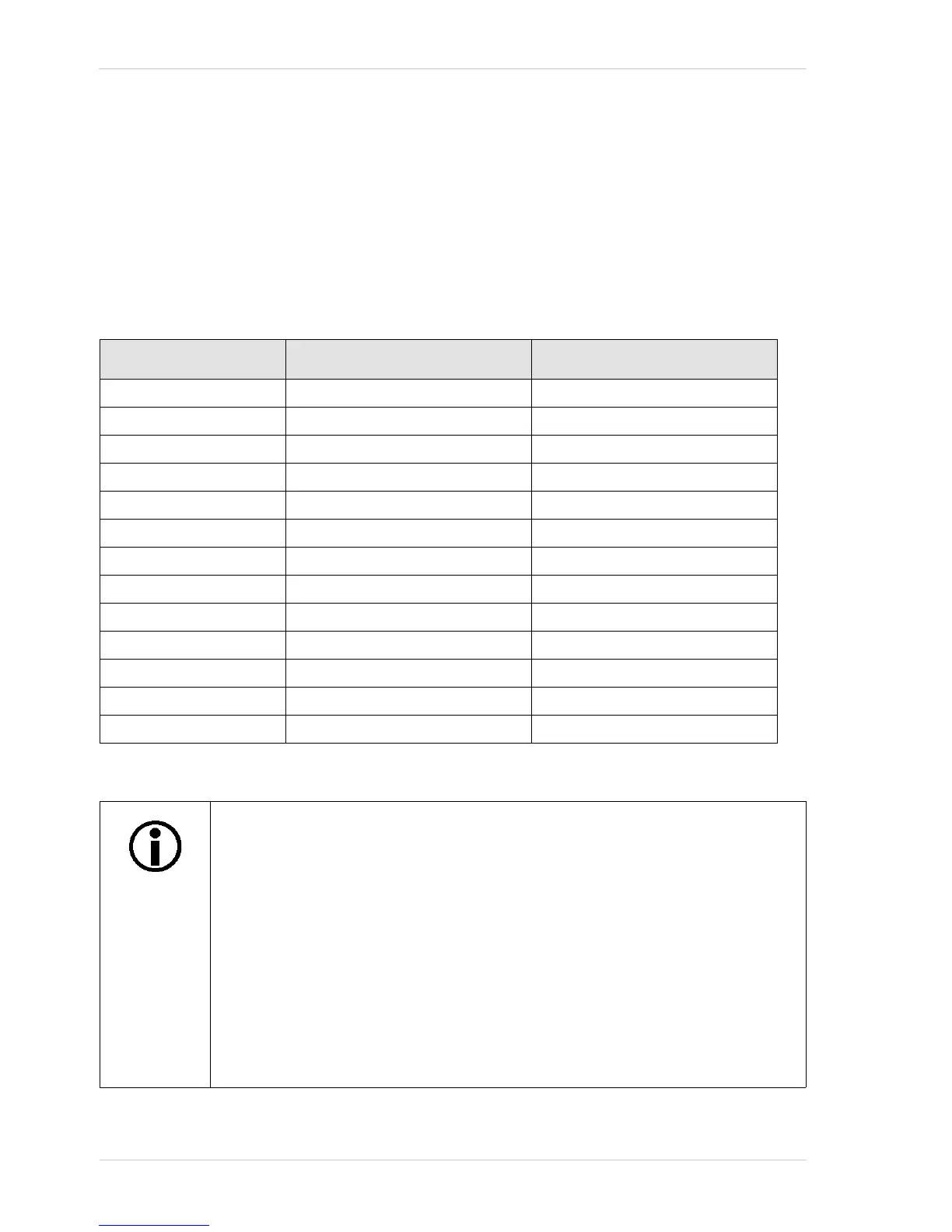
varies by camera model as shown in Table 13.
The maximum exposure time that can be set also varies by camera model as shown in Table 13.
Camera Model Minimum Allowed Exposure Time Maximum Possible Exposure Time
scA640-70fm/fc 24 µs 10000000 µs
scA640-74fm/fc 24 µs 10000000 µs
scA640-120fm/fc 16 µs 10000000 µs
scA750-60fm/fc 124 µs 126976 µs
scA780-54fm/fc 26 µs 10000000 µs
scA1000-20fm/fc 52 µs 10000000 µs
scA1000-30fm/fc 32 µs 10000000 µs
scA1300-32fm/fc 22 µs 10000000 µs
scA1390-17fm/fc 34 µs 10000000 µs
scA1400-17fm/fc 38 µs 10000000 µs
scA1400-30fm/fc 28 µs 10000000 µs
scA1600-14fm/fc 31 µs 10000000 µs
scA1600-28fm/fc 31 µs 10000000 µs
Table 13: Minimum Allowed Exposure Time and Maximum Possible Exposure Time
Exposure time can not only be manually set (see below), but can also be
automatically adjusted.
Exposure Auto is an auto function and the "automatic" counterpart to manually
setting an "absolute" exposure time. The exposure auto function automatically
adjusts the Auto Exposure Time Abs parameter value.
In contrast to the manually set "absolute" exposure time, the automatically
adjusted "absolute" exposure time is not restricted to multiples of the current
exposure time base. The automatic adjustment is not available when trigger width
exposure mode is selected.
For more information about auto functions, see Section 9.11.1 on page 214.
For more information about the Exposure Auto function, see Section 9.11.3 on
page 223.



 To Next Page