Home
Basler
Security Camera
Scout
Page 86
Basler Scout - Page 86
300 pages
Manual
Save Page as PDF
To Next Page
To Next Page
To Previous Page
To Previous Page
Loading...
I/O Contro
l
76
Basler scout
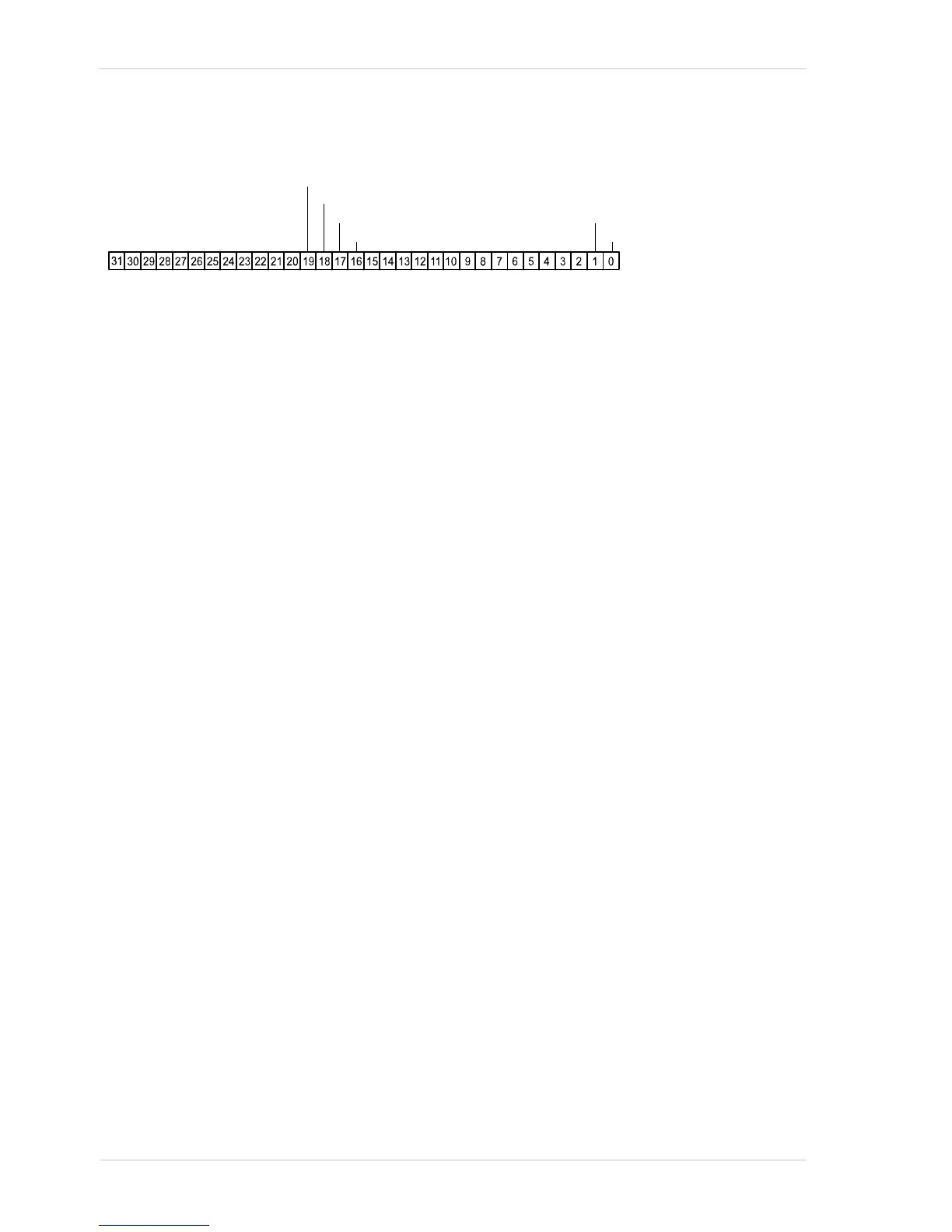
the state of the associated line is cu
rre
ntly low
. If a bit is
1, it indica
tes that the state of the associated
line is current high.
Indicates output line 1 state
Indicates output line 2 state
Indicates output line 3 state
Indicates output line 4 state
Indicates input line 1 state
Indicates input line 2 state
Fig. 42: Line Status All Parameter Bits
85
87
Table of Contents
Main Page
Default Chapter
5
Table of Contents
5
1 Specifications, Requirements, and Precautions
11
Models
11
General Specifications
12
Spectral Response for Mono Cameras
22
Spectral Response for Color Cameras
28
Mechanical Specifications
34
Standard Housing
34
Camera Dimensions and Mounting Points
34
Sensor Positioning Accuracy
37
90° Head Housing
39
Camera Dimensions and Mounting Points
39
Sensor Positioning Accuracy
41
Maximum Thread Length on Color Cameras
42
Mechanical Stress Test Results
43
Software Licensing Information
44
Avoiding EMI and ESD Problems
45
Environmental Requirements
46
Temperature and Humidity
46
Ventilation
46
Precautions
47
2 Software and Hardware Installation
51
3 Tools for Changing Camera Parameters
53
The Pylon Viewer
53
The Pylon API
53
4 Functional Description
55
Overview (All Models Except Sca750-60)
55
Overview (Sca750-60 Only)
57
5 Physical Interface
59
General Description of the Connections
59
Connector Pin Assignments and Numbering
60
IEEE 1394B Socket Pin Assignments
60
12-Pin Receptacle Pin Assignments
61
Pin Numbering
61
Connector Types
62
IEEE 1394B Connector
62
12-Pin Connector
62
Cabling Requirements
63
IEEE 1394B Cable
63
Standard I/O Cable
63
PLC I/O Cable
65
IEEE 1394B Device Information
65
Camera Power
66
Input and Output Lines
67
Input Lines
67
Voltage Requirements
67
Line Schematic
69
Output Lines
70
Voltage Requirements
70
Line Schematic
70
Output Line Response Time
73
6 O Control
75
Configuring Input Lines
75
Assigning an Input Line to Receive a Hardware Trigger Signal
75
Using an Unassigned Input Line to Receive a User Input Signal
76
Configuring Output Lines
77
Assigning a Camera Output Signal to a Physical Output Line
77
Setting the State of User Settable Output Lines
78
Setting an Output Line for Invert
79
Working with Timers
80
Setting the Trigger Source for a Timer
80
Setting a Timer Delay Time
81
Setting a Timer Duration Time
83
Checking the State of the I/O Lines
85
Checking the State of a Single Output Line
85
Checking the State of All Lines
85
7 Image Acquisition Control
87
Image Acquisition Control Modes: Legacy and Standard
87
Means for Controlling Image Acquisition in Standard Mode
89
Acquisition Start and Stop Commands and the Acquisition Mode (Legacy and Standard Mode)
93
The Acquisition Start Trigger in Standard Mode
95
Acquisition Start Trigger Mode (Standard Mode)
96
Acquisition Start Trigger Mode = off
96
Acquisition Start Trigger Mode = on
96
Acquisition Frame Count (Standard Mode)
97
Setting the Acquisition Start Trigger Mode and Related Parameters (Standard Mode)
97
Using a Software Acquisition Start Trigger (Standard Mode)
99
Introduction
99
Setting the Parameters Related to Software Acquisition Start Triggering and Applying a Software Trigger Signal
99
Using a Hardware Acquisition Start Trigger (Standard Mode)
100
Introduction
100
Setting the Parameters Related to Hardware Acquisition Start Triggering and Applying a Hardware Trigger Signal
101
The Frame Start Trigger in Standard Mode
102
Frame Start Trigger Mode (Standard Mode)
103
Frame Start Trigger Mode = off
103
Frame Start Trigger Mode = on
104
Setting the Frame Start Trigger Mode and Related Parameters
105
Using a Software Frame Start Trigger (Standard Mode)
106
Introduction
106
Setting the Parameters Related to Software Frame Start Triggering and Applying a Software Trigger Signal
107
Using a Hardware Frame Start Trigger (Standard Mode)
108
Introduction
108
Exposure Modes
109
Frame Start Trigger Delay
111
Setting the Parameters Related to Hardware Frame Start Triggering and Applying a Hardware Trigger Signal
111
The Acquisition Start Trigger in Legacy Mode
113
Acquisition Start Trigger Mode (Legacy Mode)
114
Acquisition Start Trigger Mode = off
114
Acquisition Start Trigger Mode = on
115
Setting the Acquisition Start Trigger Mode and Related Parameters
116
Using a Software Acquisition Start Trigger (Legacy Mode)
117
Introduction
117
Setting the Parameters Related to Software Acquisition Start Triggering and Applying a Software Trigger Signal
118
Using a Hardware Acquisition Start Trigger (Legacy Mode)
119
Introduction
119
Exposure Modes
121
Acquisition Start Trigger Delay
123
Setting the Parameters Related to Hardware Acquisition Start Triggering and Applying a Hardware Trigger Signal
124
Exposure Time Parameters
126
Setting the Exposure Time Using "Raw" Settings
127
Setting the Exposure Time Using "Absolute" Settings
128
Use Case Diagrams
129
Overlapping Exposure and Sensor Readout (All Models Except Sca750-60)
138
Guidelines for Overlapped Operation
139
Exposure Must Not Overlap Sensor Readout (Sca750-60 Only)
140
Acquisition Monitoring Tools
141
Exposure Active Signal
141
Acquisition Status Indicator
142
Trigger Ready Signal (All Models Except Sca750-60)
142
Trigger Ready Signal (Sca750-60 Only)
145
Acquisition Trigger Wait Signal (Standard Mode Only)
147
Acquisition Timing Chart
150
Maximum Allowed Acquisition Frame Rate (All Models Except Sca750-60)
153
Effect of the Packet Size Setting on the Maximum Allowed Frame Rate
156
Maximum Allowed Acquisition Frame Rate (Sca750-60 Only)
158
Effect of the Packet Size Setting on the Maximum Allowed Frame Rate
161
8 Pixel Data Formats
163
Setting the Pixel Data Format
163
Pixel Data Formats for Mono Cameras
165
Mono 8 Format (Equivalent to DCAM Mono 8)
165
Mono 16 Format (Equivalent to DCAM Mono 16)
167
Mono 12 Packed Format
169
YUV 4:2:2 Packed Format (Equivalent to DCAM YUV 4:2:2)
171
YUV 4:2:2 (YUYV) Packed Format
171
Pixel Data Output Formats for Color Cameras
172
The Bayer Color Filter
172
Color Filter Alignment
173
Bayer BG 8 Format (Equivalent to DCAM Raw 8)
174
Bayer RG 8 Format (Equivalent to DCAM Raw 8)
176
Bayer BG 16 Format (Equivalent to DCAM Raw 16)
178
Bayer BG 12 Packed Format
180
YUV 4:2:2 Packed Format (Equivalent to DCAM YUV 4:2:2)
182
YUV 4:2:2 (YUYV) Packed Format
185
Mono 8 Format (Equivalent to DCAM Mono 8)
187
Pixel Transmission Sequence
189
9 Standard Features
191
Gain
191
Black Level
198
White Balance (on Color Models)
200
Digital Shift
201
Digital Shift with 12 Bit Pixel Formats
201
Digital Shift with 8 Bit Pixel Formats
203
Precautions When Using Digital Shift
205
Enabling and Setting Digital Shift
205
Integrated IR Cut Filter (on Color Models)
207
Area of Interest (AOI)
208
Changing AOI Parameters "On-The-Fly
210
Binning (All Models Except Sca750-60)
211
Considerations When Using Binning
212
Reverse X
214
Luminance Lookup Table
217
Lookup Table (All Models Except Sca750-60)
217
Lookup Table (Sca750-60 Only)
220
Gamma
223
Auto Functions
224
Common Characteristics
224
Modes of Operation
225
Auto Function AOI
226
Using an Auto Function
230
Gain Auto
231
Exposure Auto
233
Auto Function Profile
235
Balance White Auto
236
Disable Parameter Limits
238
Debouncer
239
Trigger Delay
241
Acquisition Status
243
Event Reporting
245
Test Images
247
Device Information Parameters
251
Configuration Sets
253
Saving User Sets
254
Selecting a Factory Setup as the Default Set
255
Loading a Saved Set or the Default Set into the Active Set
256
Selecting the Startup Set
257
10 Chunk Features
259
What Are Chunk Features
259
Making the "Chunk Mode" Active
260
Frame Counter
261
Time Stamp
264
Trigger Input Counter
266
Line Status All
269
CRC Checksum
271
11 Using Multiple Cameras on a Single Bus and Managing Bandwidth
273
Using Multiple Cameras Where All Devices Are 1394B
273
Using Multiple Cameras Where 1394A and 1394B Devices Are Mixed
275
Recommended Packet Size
278
12 Troubleshooting and Support
279
Tech Support Resources
279
Obtaining an RMA Number
279
Troubleshooting with the Camera LED
280
Troubleshooting Charts
281
My Camera Is Not Being Recognized
282
I Do Not Get an Image
283
I Can Not Get the Full Frame Rate
284
I Get Poor Image Quality
286
Before Contacting Basler Technical Support
288
Revision History
291
Index
297
Related product manuals
Basler scout GigE
374 pages
Basler Camera
272 pages
Basler GigE SERIES
376 pages
Basler A504k
128 pages
Basler pilot
250 pages
Basler BIP2-XXXXc
124 pages
Basler ace CL
77 pages
Basler L304kc
180 pages



 To Next Page