55
© Baxi Heating UK Ltd 2017
Baxi Optional 7 Day Wireless Sensor &
24hr Wireless Sensor
18.0 External Low Voltage Controls
18.7 Connecting the Optional 7 Day Wireless Sensor
& 24hr Wireless Sensor (kit includes a Sensor &
Receiver - the Receiver is wired into the boiler).
NOTE: The yellow link wire between terminals 1 & 2 on
terminal block M1 MUST be removed when fitting the
7 Day Wireless Sensor & 24hr Wireless Sensor.
1. Ensure that the power to the boiler is isolated.
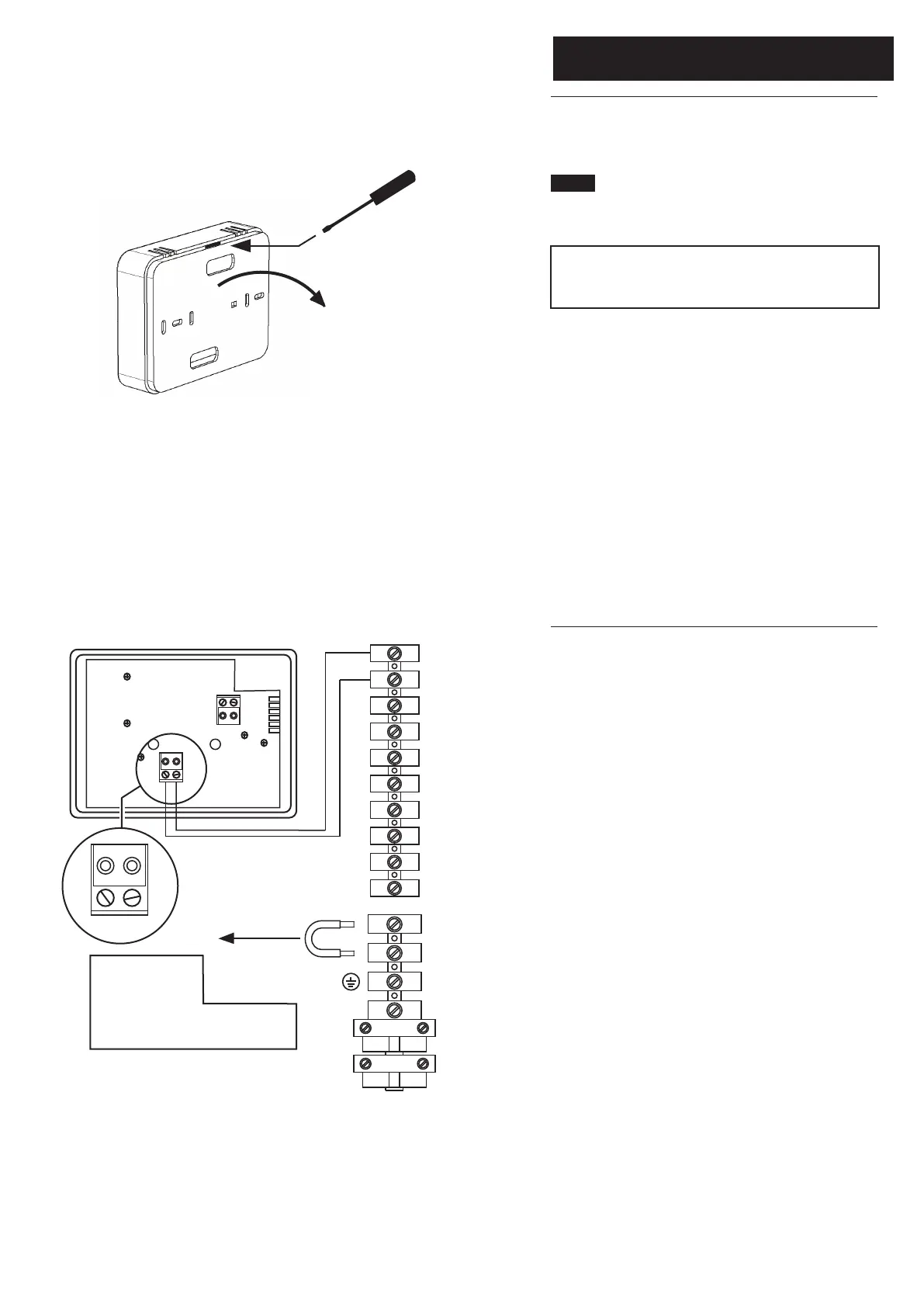
2. Remove the backplate from the receiver unit by pressing
down on the rear tab and easing apart.
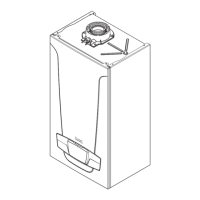
3. Locate the receiver and use wiring as described in the
literature supplied with it.
4. Pass the wiring through the slots in the backplate and
connect as shown opposite to the OT connection on the
receiver backplate and 1 & 2 open therm connections (not
polarised) of boiler terminal M2.
5. Complete fitting as described in the sensor/receiver
literature, turn the power back on and set the controls to the
requirements of the user.


 To Next Page