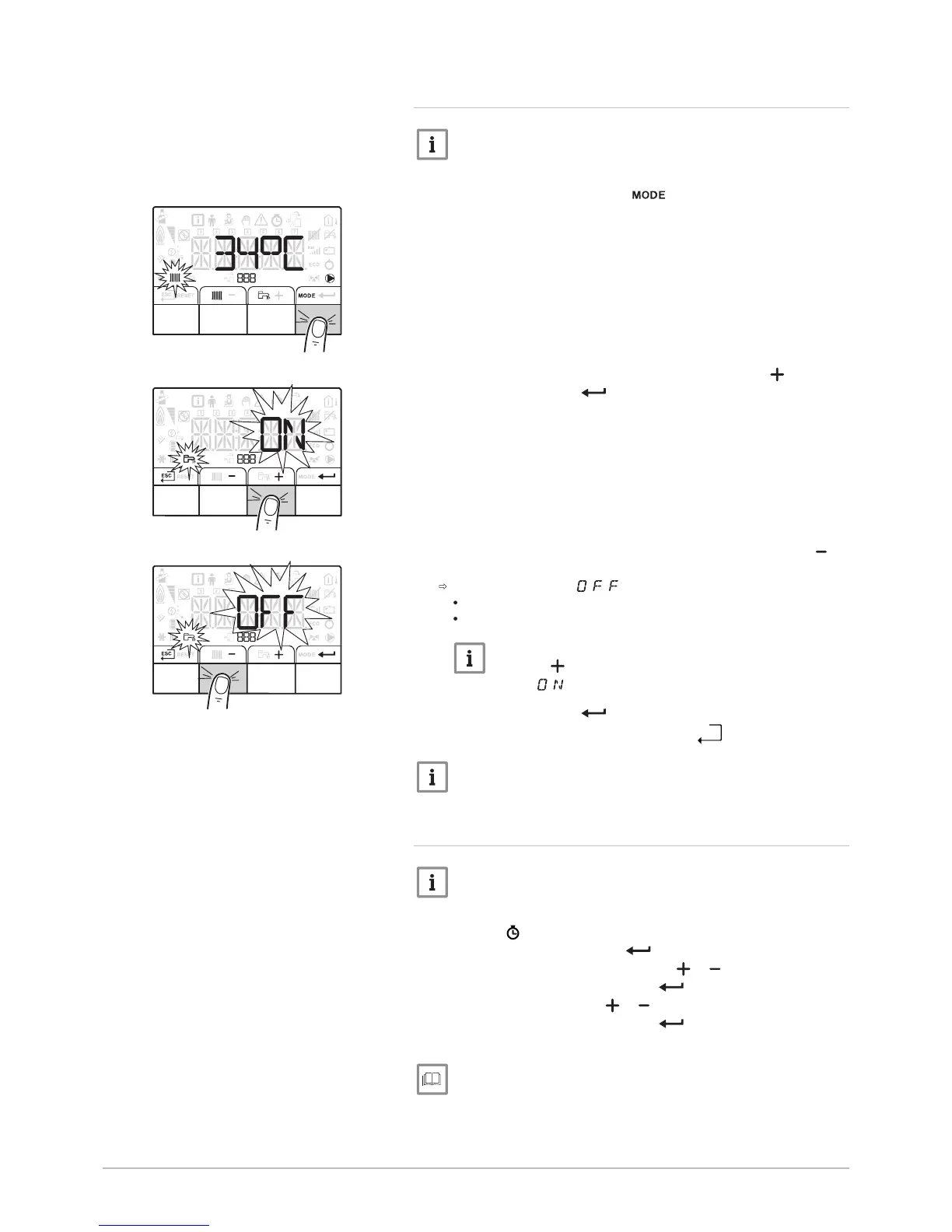
5.3.2 Stopping domestic hot water production
Important
Domestic hot water production can be managed via the TIME
PROG sub-menu dedicated to timer programming.
1. Go to stop mode by pressing the key.
2. Select domestic hot water production mode pressing the key.
3. Confirm by pressing the key.
4. Select domestic hot water production shut-down by pressing the
key.
The screen displays: .
The frost protection function continues to run.
Production of domestic hot water has been shut down.
Important
Press the key to restart the appliance: the screen will
display .
5. Confirm by pressing the key.
6. Go back to the main display by pressing the
key.
Important
The display disappears after a few seconds of inactivity.
5.3.3 Shutting down the cooling function
Important
If the heating function is shut off, then the cooling will also be shut
off.
1. Access the menu.
2. Confirm access by pressing the key.
3. Select CIRCA or CIRCB by pressing the or key.
4. Confirm the selection by pressing the key.
5. Select TP.C by pressing the or keys.
6. Confirm the selection by pressing the key.
7. Modify the timer program to stop cooling.
For more information, see
Switching off the heating, page 23
Fig.26
24 iMPI V200 7700954 - v03 - 13082018


 To Next Page