6 Settings
6.1 Modifying the User parameters
Caution
Altering the factory settings may impair operation of the appliance.
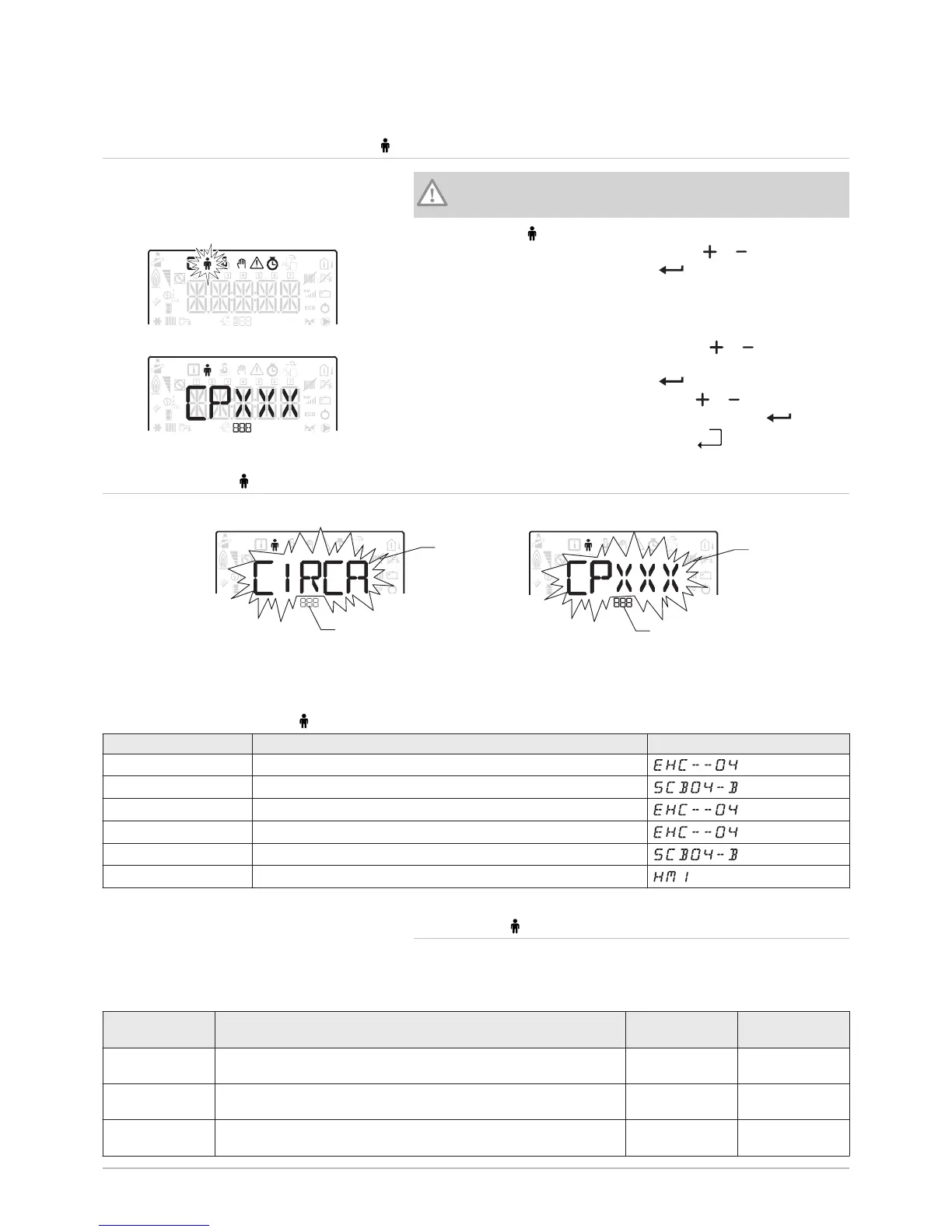
1. Go to the User menu.
2. Select the desired sub-menu by pressing the or key.
3. Confirm the selection by pressing the key.
4. Select the required parameter by pressing the or keys to scroll
through the list of adjustable parameters.
5. Confirm the selection by pressing the key.
6. Modify the value of the parameter using the or keys.
7. Confirm the new value of the parameter by pressing the key.
8. Go back to the main display by pressing the
1 Sub-menu available
2 Name of the PCB or circuit
3 Setting parameters
Tab.14
List of User sub-menus
Sub-menu Description Name of the PCB or circuit
CIRCA Main heating circuit
CIRCB Additional heating circuit B
ECS Domestic hot water circuit
EHC-04 Central unit PCB EHC-04
SCB-04 Additional PCB for circuit B
HMI HMI control panel
6.2.1 User \CIRCA and CIRCB menu
CP : Circuits Parameters = Heating circuit parameters
Tab.15
Parameter Description Factory setting
CIRCA
Factory setting
CIRCB
CP010 Zone flow temperature setpoint, used when the zone is set to a fixed
flow setpoint.
not available 50
CP080 User Room Setpoint Zone Activity temperature
Can be set from 5 °C to 30 °C
16 16
CP081 User Room Setpoint Zone Activity temperature in activity zone 2
Can be set from 5 °C to 30 °C
20 20
Fig.29


 To Next Page