2. Set the value of the heating water temperature set point by pressing
the or key.
3. Confirm the new value of the heating water temperature set point by
pressing the
key.
4. Go back to the main display by pressing the
key.
Important
To force domestic hot water production, select the DP200
parameter available in the User menu.
6.4.5 Setting the timer programming
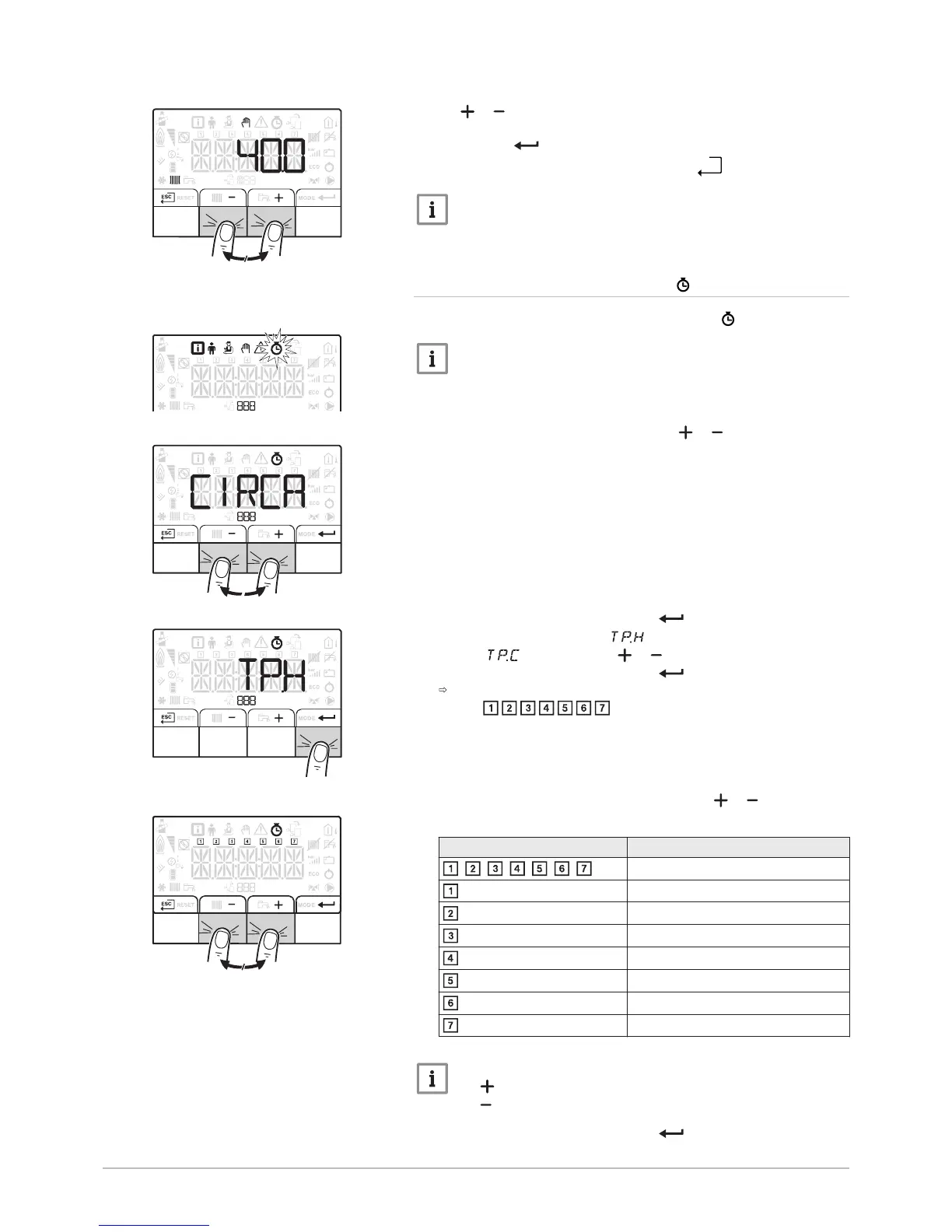
1. Access the COUNTERS/ TIME PROG / CLOCK menus.
Important
When using a programmable room thermostat, this menu is not
displayed.
2. Select the desired circuit by pressing the or key.
3. Confirm the selection by pressing the key. Select the timer
programming for the heating or the timer programming for the
cooling by pressing the or key.
4. Confirm the selection by pressing the key.
The icons dedicated to the days of the week all flash at the same
time: .
5. Select the desired day number by pressing the or key until the
icon dedicated to the desired day flashes.
Day selected Description
, , , , , , every day of the week
Monday
Tuesday
Wednesday
Thursday
Friday
Saturday
Sunday
Important
The key is used to move to the right.
The key is used to move to the left.
6. Confirm the selection by pressing the key.
Fig.40


 To Next Page