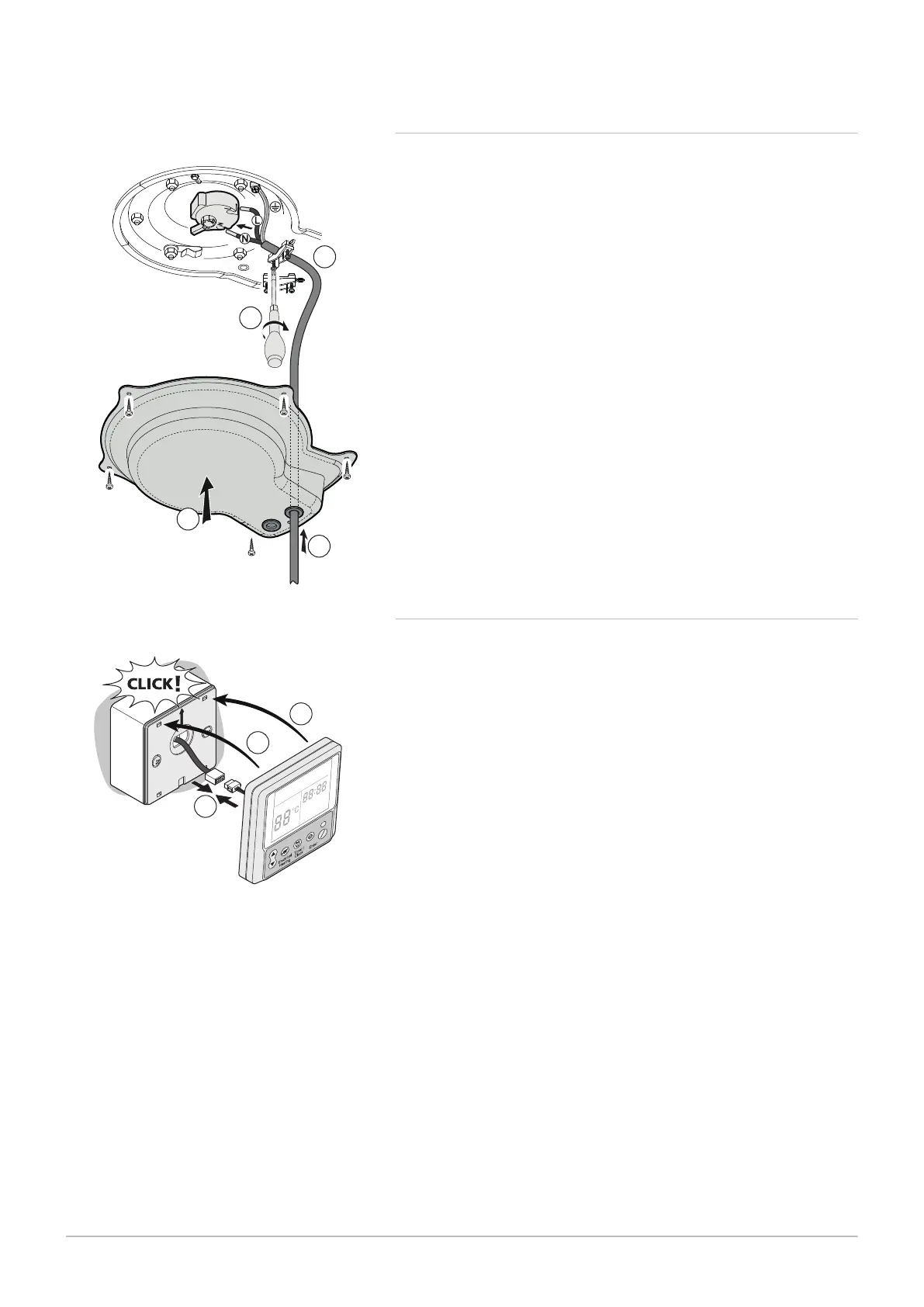
7.5.4 Connecting the electrical connections of the domestic hot
water tank with no outdoor unit
The 1.5 mm
2
section power supply cable for the electrical connection of
the domestic hot water tank is provided by the installer.
1. Feed the electrical power supply cable through the lower cover of the
domestic hot water tank.
2. Connect the earth wire to the inspection hatch.
3. Connect phase and neutral to the thermostat of the domestic hot
water tank.
4. Tighten the traction arrestor to hold tight the power supply cable.
5. Secure the lower cover with screws.
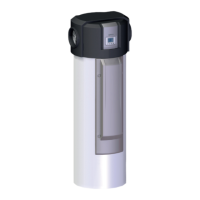
7.5.5 Connecting the control panel display
During installation, leave enough cable length to allow removal of the
control panel for maintenance.
1. Connect the control panel display.
2. Clip the display fascia onto the control panel support.
Fig.44
Fig.45
7 Installation
42 7740327 - v03 - 03122019


 To Next Page