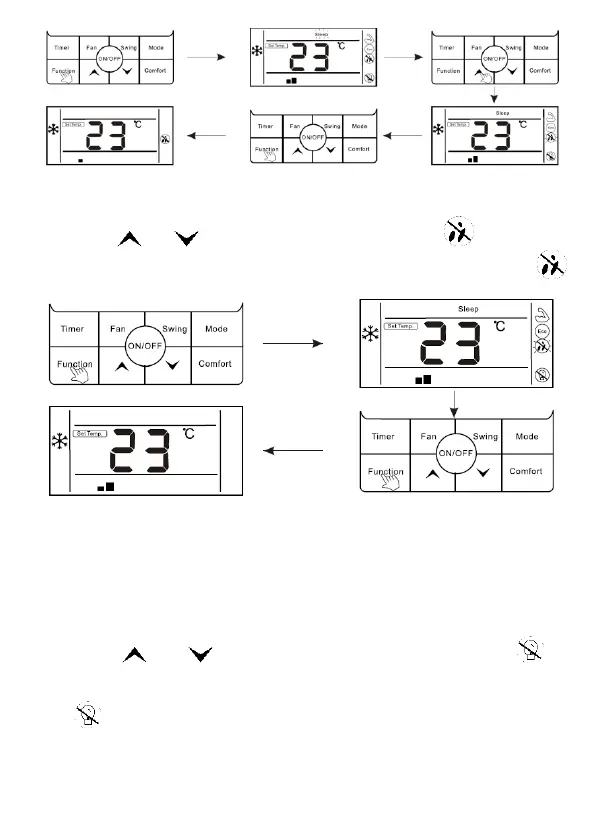
Cancel fungus-proof function:
1. When mildew proof function is ON, press "Function" button to enter the interface
of function selection.
2. Press " " or " " button to mildew proof function, icon " " is flashing.
3. Press “Function” button again to cancel mildew proof function, icon will " "
disappear.
The setting of "Light Sensation" function
Light sensation function: Detect the On and Off of indoor lamplight and switch to
low fan speed when the lamplight is off, which can reduce the noise and create a
comfortable sleep environment for users.
Enter light sensation function:
1. In the state of running, press "Function" button to enter the interface of function
selection.
2. Press " " or " " to switch to light sensation function, icon " " is
flashing.
3. Press Function button again to enter light sensation function, at this moment,
icon" " is lighting.
4. When light sensation function is on, if the indoor lamplight is OFF and lasts for
20minutes, the unit will automatically enter sleep mode. If the indoor lamplight is ON,
and lasts for 20 minutes, the unit will cancel sleep mode and run according to the
setting fan speed.



 To Next Page