36
DBA DIAGNOSTICS
Determine if Bill Acceptor has power:
Turn game ON—The bill acceptor should make noise as stacker cycles and
green lights on outside bezel should flash.
If NO power:
Use meter to measure 110 AC voltage at cable going into Bill Acceptor from
power strip.
If power is OK:
Clean Bill Acceptor path to make sure there is nothing jamming unit.
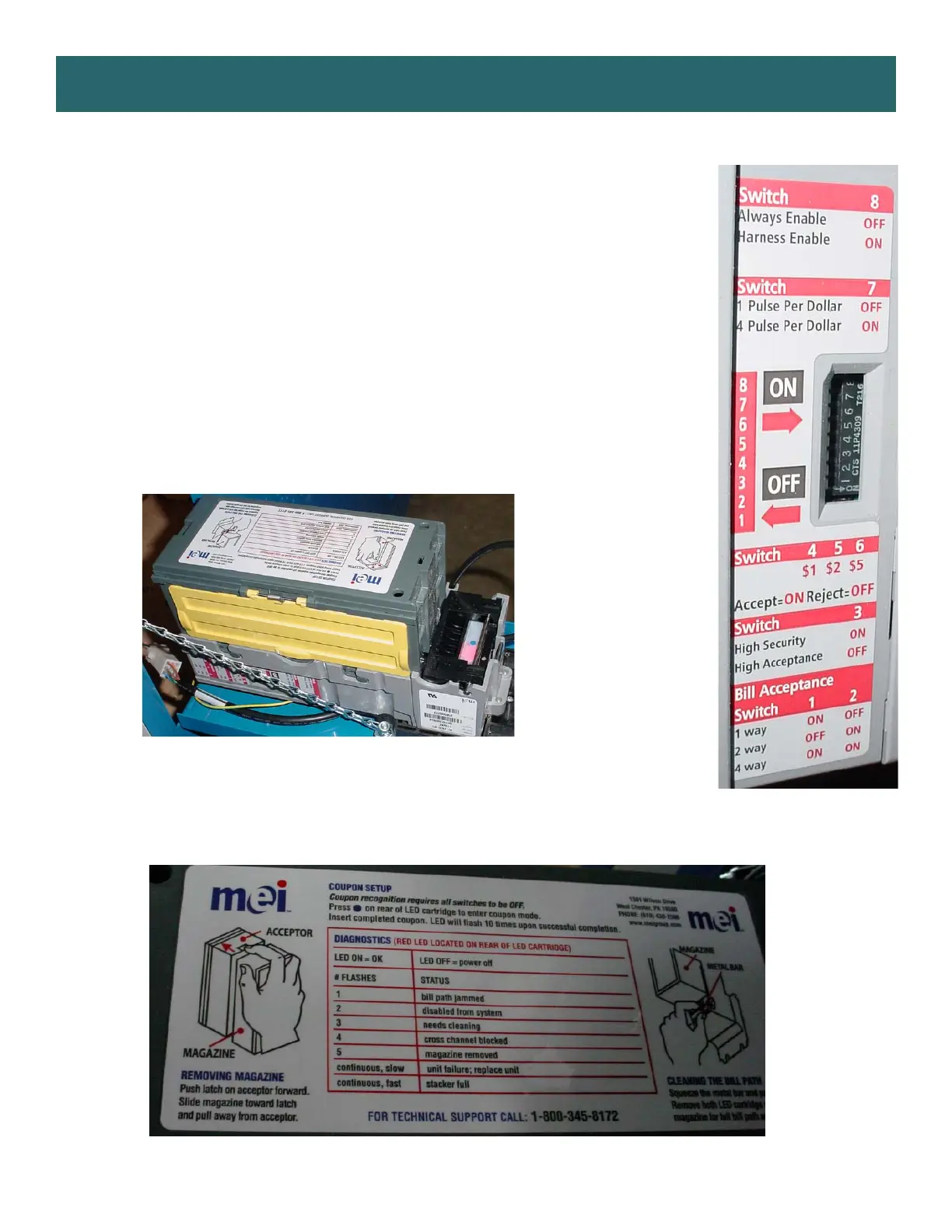
Check dipswitch settings on side of acceptor.
Make sure switch # 8 is OFF for Always Enable
ERROR CODES
Count the number of flashes on front bezel of Bill Acceptor and follow chart for repair.
Note: There are many different models and brands of Bill Acceptors that are used on
redemption games. Your Bill Acceptor may differ from the unit shown.
Standard DBA is MEI # AE2451-U5E Part # A5AC9091


 To Next Page
 Loading...