The Menus
bbe BenthoTorch Manual Page 73
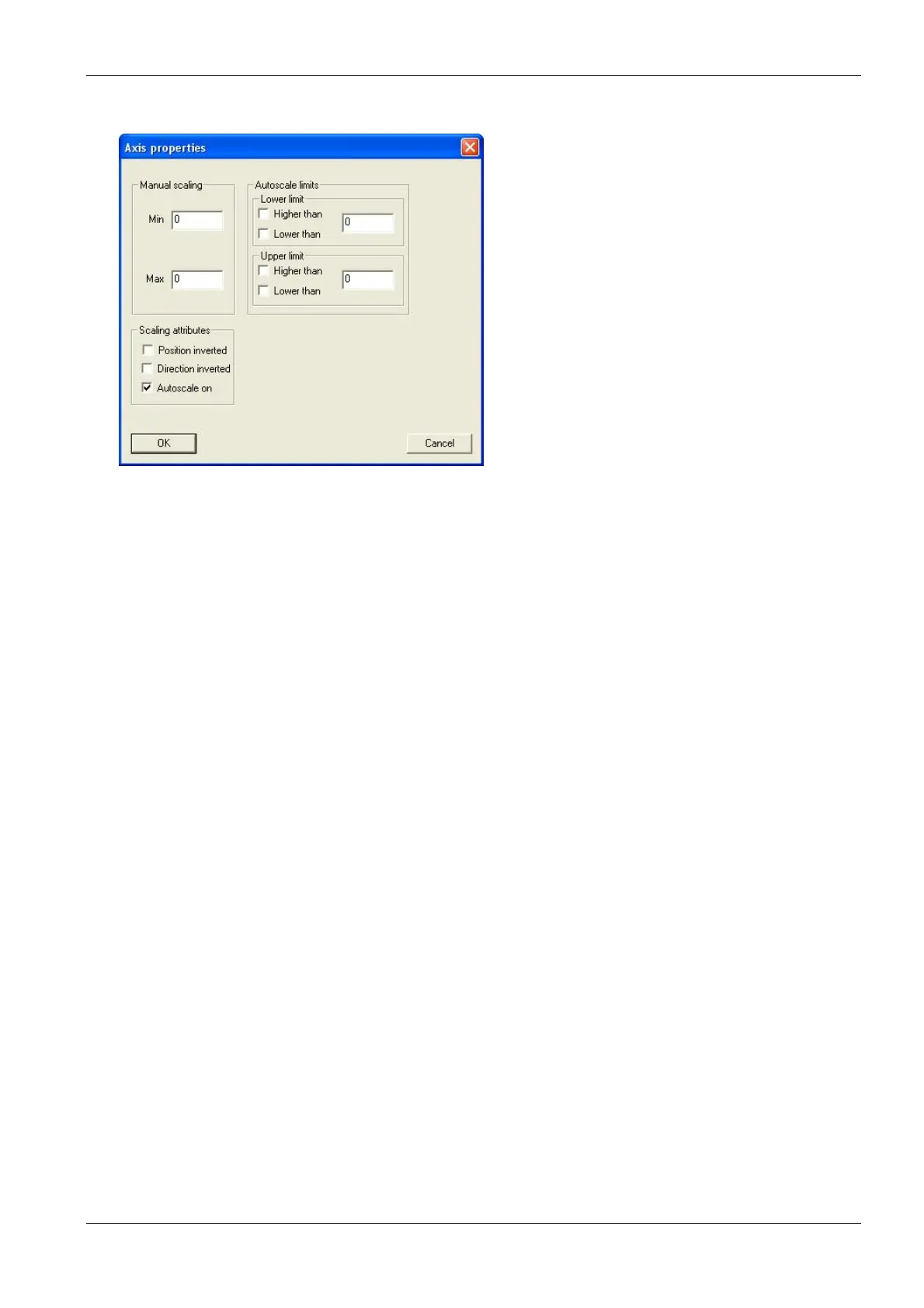
For the second axis, the properties can be set as shown above. Additionally available scaling options are:
Manual scaling: enter fixed values for the minimum and the maximum of this axis - enter 0 for both to
disable this feature.
Auto-scale on: enables the auto-scaling feature - the axis will be scaled so that all selected data are
visible.
Auto-scale limits: these settings are used to obtain a nice looking graph in two special situations:
datasets with very low noise:
In the auto-scaling mode, the graph looks as if there are extreme variations, but the
range is very small due to the auto-scaling. In this case, it is better to use the option:
lower limit: lower than and
upper limit: higher than
This leads to a minimum span in the graph.
datasets with outliners:
In this case, it is difficult to analyze the data because the auto-scaling generates a
high span value. To prevent this, please use:
lower limit: higher than for outliners with low values and
upper limit: lower than for outliners with high values
This leads to an optimized span in the graph.
15. Click “Next”
Attributes
This sets the color and size of the dots and lines as well as the color of the background.
16. Set the value in the attributes window according to your needs.



 To Next Page