- 5 -
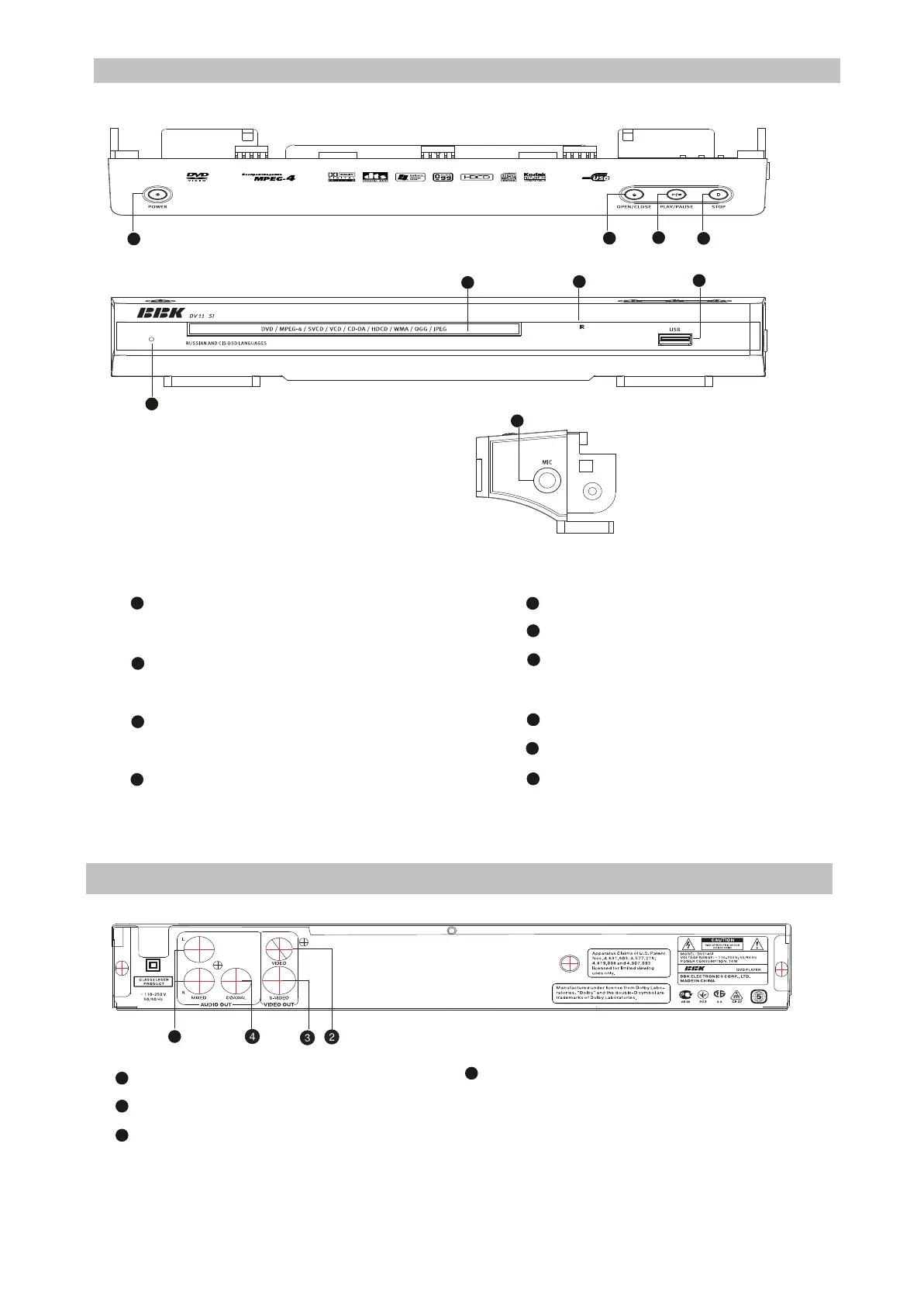
2.2 Controls and functions
2.2.1 Front and side panels control
1
POWER button(Press to switch ON/OFF
the device)
OPEN/CLOSE button(Press to open/close
the disc tray)
The indicator of operating mode/Standby mode
Sensor of infrared beams
2
3
Microphone input
STOP button(Press to stop the playback)
PLAY/PAUSE button(Press to
playback/pause)
Disc tray
USB port
Phones jack
5
6
7
8
9
10
11
NOTE:
#Presence and location of the buttons, sockets and regulators depend on a model of DVD player.
2
9
2.2.2 Rear Panel general view
Stereophonic audio output
Socket of video output S-Video
Socket of composite video output
1
2
3
4
5
Socket of coaxial digital audio output
NOTE:
#Presence and location of the buttons, sockets and regulators depend on a model of DVD player.
1
2
3
5
6
7
8
9
10
DV214SI
1
8



 To Next Page