- 6 -
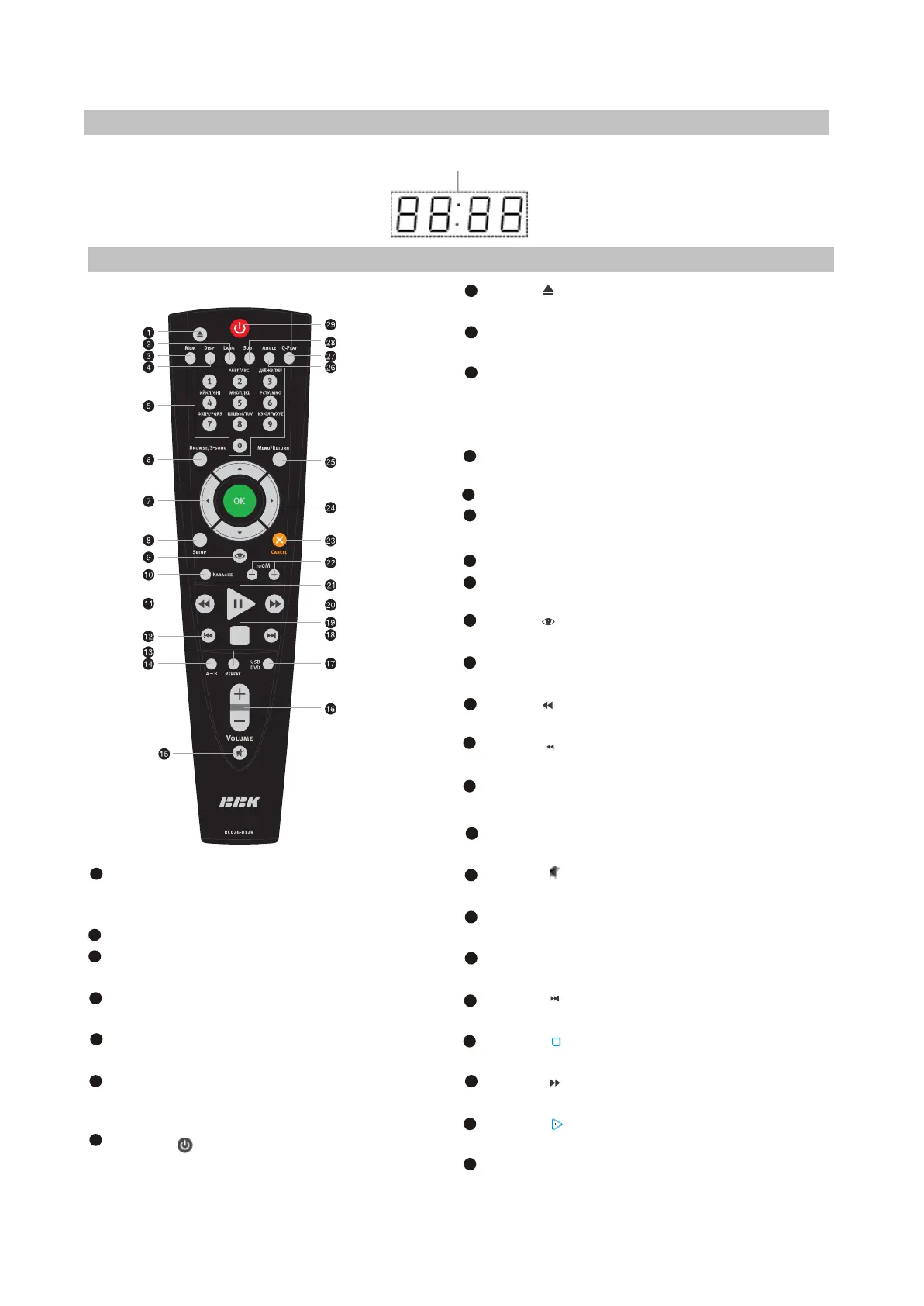
2.2.3 LED display general view
Playback time
2.2.4 Remote Control general view
[ ]
[ ]
[ ]
[ ]
Button
Press to open / close the disc tray.
LANG Button
Press to change the language
MEM button
Press to memorize the point where playback was
stopped/playback from the previously
memorized point.
DISP button
Press to display the disc information.
NUMeric buttons
BROWSE button
Press to turn on/off the browser function
Cursor buttons(UP/DOWN/LEFT/RIGHT)
SETUP button
Press to switch to setup mode.
Button
Press to turn on/off the Virtual Keyboard function.
KARAOKE button
Press to set karaoke function.
Button
Press to reverse scanning.
Button
Press to playback from the previous point.
REPEAT button
Press to repeat playback.
A-B buttons
Press to repeat the selected portion.
Button
Press to turn on/off the sound.
VOLUME+/-button
Press to adjust the volume.
DVD/USB button
Press to switch DVD/USB models.
Button
Press to playback from the following point.
Button
Press to stop playback.
Button
Press to forward scanning.
Button
Press to play/pause the playback.
ZOOM+/-button
Press to zoom in/out the image.
1
2
3
4
5
6
7
8
9
10
11
12
13
[ ]
[ ]
[ ]
[ ]
[ ]
14
15
16
17
18
19
20
21
CANCEL button
Press to go one level/cancel current
operation.
OK button
MENU button
DVD-disc menu/PBC function
ANGLE button
Press to change camera angle
Q-PLAY button
Press to turn the Q-Play mode on.
SUBT button
Press to change the subtitles
language/JPEG mode.
Button
Press to switch the device on/into standby.
22
23
24
25
26
27
28
29



 To Next Page