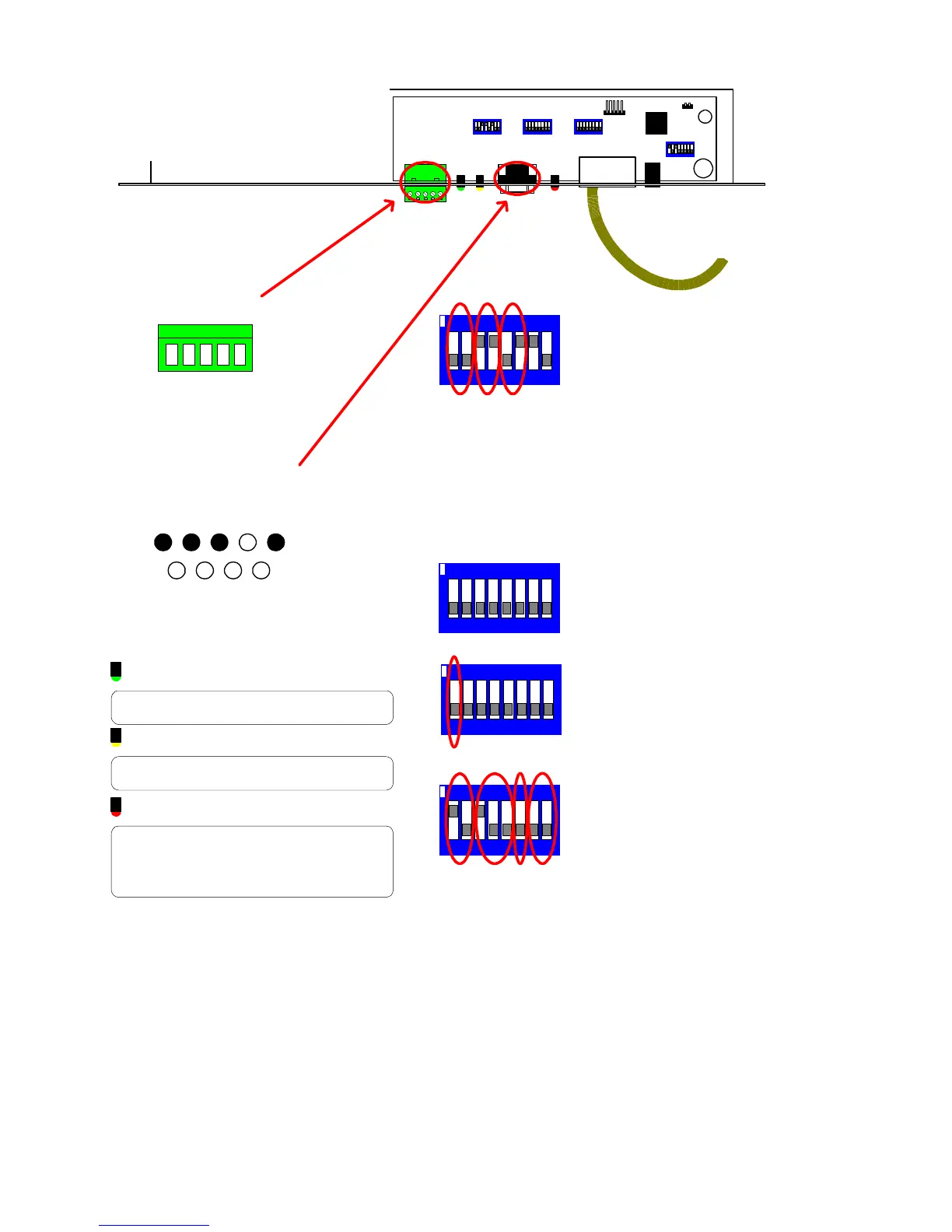
TX1500 Manual Combined 1Oct03 PSC Page 30 of 31 BBUS Interface
02005 Iss 2
LD1
B-BUS
SW4
SW2SW1
SW3
LD2
LD3
POWER
1/2 = BBUS Address
SW4/1 SW4/2 Addr Keyboard No
OFF OFF 0 1
ON OFF 1 2 (Default)
OFF ON 2 3
ON ON 3 4
3/4/5 = Default Monitor Selection
SW4/3 SW4/4 SW4/5 Monitor
OFF OFF OFF 1
ON OFF OFF 2 (Default)
OFF ON OFF 3
ON ON OFF 4
OFF OFF ON 5
ON OFF ON 6
OFF ON ON 7
ON ON ON 8
6 = Control Protocol Selection
SW4/5 Protocol
OFF TX1000 (Default)
ON TX1500
7/8 Remote Tx1500 keyboard modes
SW4/7 SW4/8 Mode
OFF OFF Normal mode (SW3/1 OFF)
ON ON Matrix End (SW3/1 ON)
OFF ON Keyboard End (SW3/1 ON)
ON
1/2 BBUS Address
3/4/5 Default Monitor
6 Protocol Selection
SW4 Settings
7-8 Remote keyboard modes
71 2 3 54 6 8
Chassis Mount DB9 Male
1 2 3 4 5
7 8 96
+V OUT
RS232 IN
RS232 OUT
GND
RS232
RJ45 to TX1500 BBUS
5 RB/-(IN)
RS485/422
4 RA/+(IN)
3 TA/+(OUT)
2 TB/-(OUT)
1 GND
TX1500 BBUS Interface
Software Version 02005V7.MOT
29 August 2003
LED guide
GREEN LD1
Flashes when the interface sends an LED status to the
RS232 port.
YELLOW LD2
Flashes when interface receives a command from the
RS232 port.
RED LD3
BBUS comms status.
OFF = Unit de-powered
ON = Unit Powered but not communicating with the
Tx1500.
Pulsing Very Fast = Comnunicating correctly.
1/2 = BBUS termination
Must be ON only when the interface is at the
end of line.
Default = OFF
3/4 = RS485 termination
Must be ON only when the interface is at the
end of line. Default = ON.
5/6 = RS232 or RS485 selection.
SW1/5 SW1/6 Input
OFF OFF None
ON OFF RS485
OFF ON RS232 (Default)
ON ON DO NOT USE
7 = MUST BE ON
7 81 2 3 54 6
ON
1/2 BBUS Termination
3/4 RS485 Termination
5/6 RS232/RS485 selection
8 Future expansion
SW1 Settings
7 MUST BE ON
7 81 2 3 54 6
ON
SW3/1 Select mode
OFF BBUS Mode - RS232 control
ON Remote keyboard mode
Running Tx1500 keyboard over a RF link,
fibre or other network.
SW3 - Mode
7 81 2 3 54 6
ON
SW2 - all OFF



 To Next Page