RX45Q User’s Manual
33
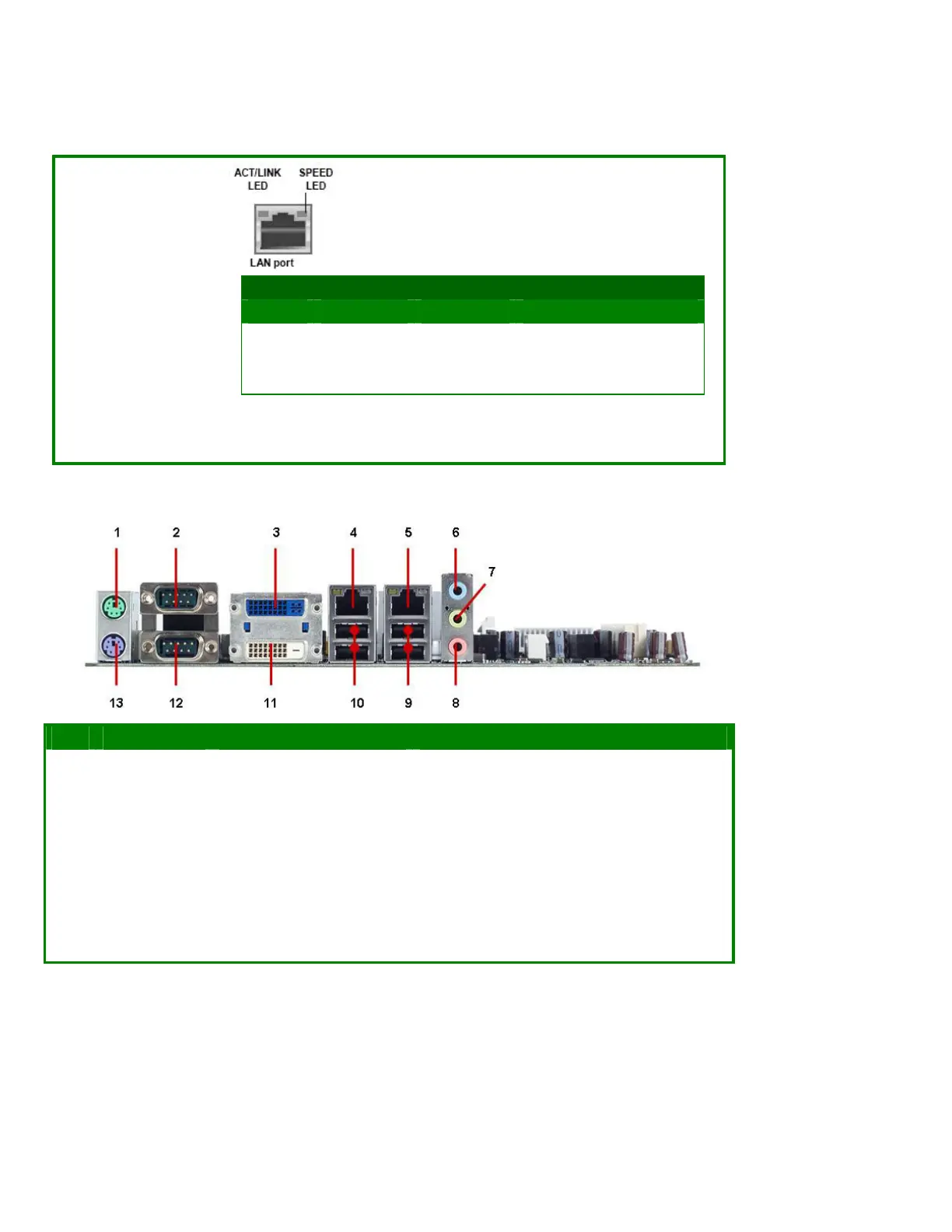
table below for the LAN port LED indications. The
optional 10/100 Mbps LAN controller allows 10/100
Mbps connection to a Local Area Network (LAN)
through a network hub.
ACT / LINK LED SPEED LED
Status Description Status Description
OFF No link OFF 10Mbps connection
Orange Linked ORANGE 100Mbps connection
Blinking Data activity GREEN 1Gbps connection
6 AUDIO1 Line-In port (Light Blue). This port connects a tape, CD, DVD player, or other
audio sources.
No Label Function Description
7 AUDIO1 Line-Out port (Lime) This port connects a headphone or a speaker. In
4-channel, 6-channel, and 8-channel configuration,
the function of this port becomes Front Speaker Out.
8 AUDIO1 Microphone port (Pink) This port connects a microphone.
9,10 LAN1_USB12,
LAN2_USB34
USB 2.0 connector These two 4-pin Universal Serial Bus (USB) ports are
available for connecting USB 2.0 devices.
11 DUAL DVI DVI connector DVI-D display output
12 DUAL COM COM1 connector D-Sub 9-pin, male
13 KBMS1 PS/2 KB connector This port is for a PS/2 keyboard



 To Next Page