8
OPERATION
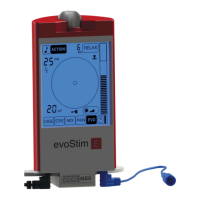
The ergonomics of evoStim
®
E unit is
based on the rotation of the upper knob and the
touch screen. Through the knob it is possible to set/
modify the stimulation intensity or the value of the
various parameters; through the push-button,
integrated in the knob, you can switch-ON/OFF or
pause the unit. Using the touch screen you can
select the programs and variables to change.
① - Upper knob with integrated push-button
② - Parameters of the program (3 digits)
(§ 8.2.2, § 2.2.3, § 8.2.4, § 8.2.5, § 8.2.6).
③ - Touch-area ACTION! (§ 8.2.5).
④ - Touch-area RELAX (§ 8.2.6).
⑤ - Touch-area buzzer enable/disable (§ 8.3.2).
⑥ - Centre of the Concentric-Circles target (CCT)
(§ 8.2.8)
⑦ - Stimulation intensity (2 digits) (§ 8.1.5-8.1.7).
⑧ - Wave-shape (type of impulse) (§ 8.1.4).
⑨ - Low battery indicator (§ 8.3.3).
⑩ - Pause state indicator (§ 8.2.1).
⑪ - Touch-area reset biofeedback input (§ 10.3).
⑫ - Target zone of the linear bar-graph (§ 10.1).
⑬ - Linear Bar-Graph (BG) (§ 10.1).
⑭ - Multi-Circles target (CCT) (§ 10.1).
⑮ - Lock state indicator (§ 8.1.7).
⑯ - Touch-area backlight level (§ 8.3.1).
⑰ - Touch-area programme URGE (§ 9.3).
⑱ - Touch-area programme STRESS (§ 9.4).
⑲ - Touch-area programme MIX (§ 9.5).
⑳ - Touch-area programme PAIN (§ 9.6).
- Touch-area programme EVO (§ 9.7).
- Touch-area programme BIOFEEDBACK
(§ 9.7-10.1-10.4).
- Full-scale biofeedback (3 digits) (§ 8.2.7-8.2.8).
- Stimulation output / EMG input (§ 7.2-8.1).
㉕ - EMG reference (§ 7.3, § 8.1).


 To Next Page