4-17
MEGA3 NFPA Medical Gas Notification System
4107 9016 59.03
Note:
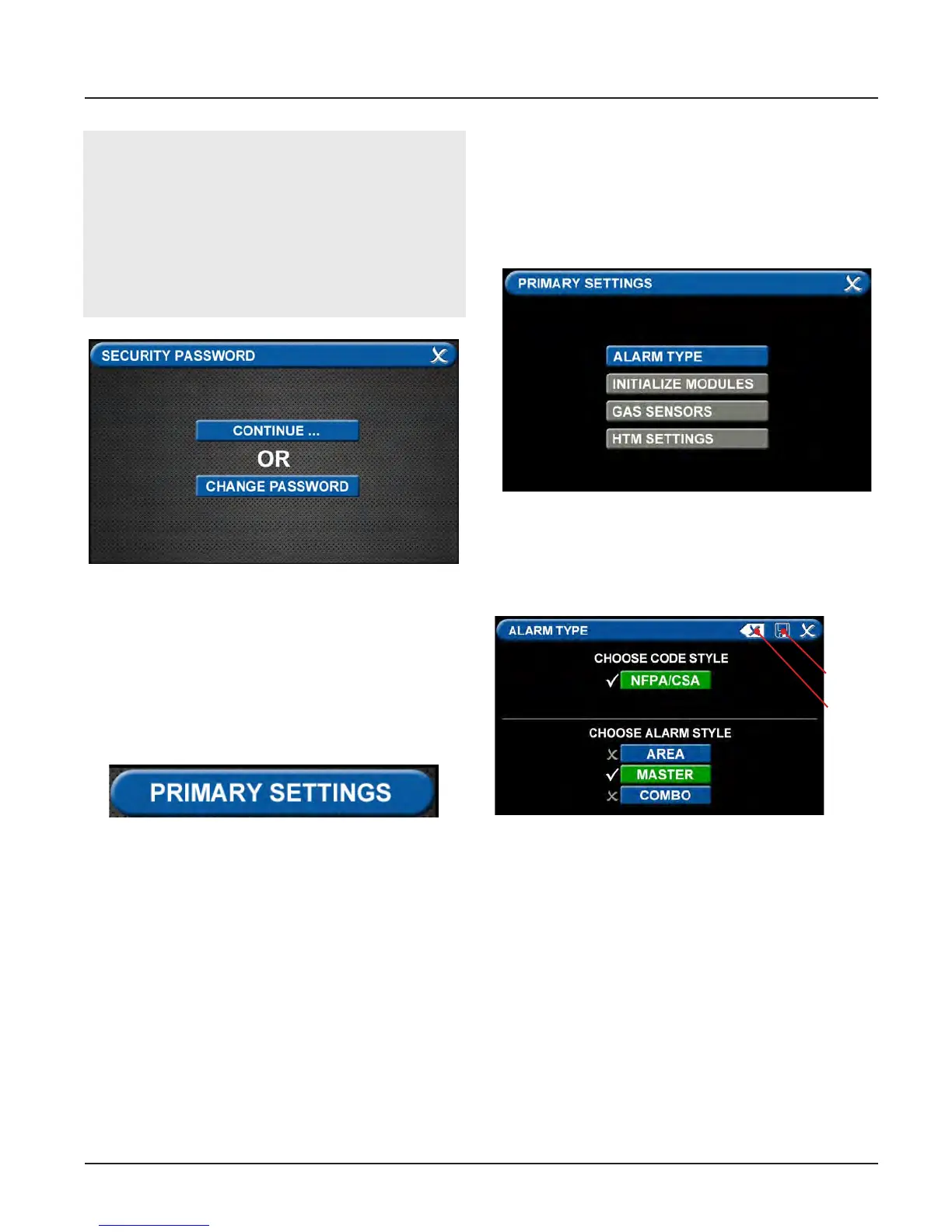
If you would like to change the password,
touch Change Password. Enter a 4-10 digit
password, and touch the Enter button. Con-
firm the new password. Touch the X button
in the upper right to close the SECURITY
PASSWORD screen.
Figure 85: Changing the Security Password
• The CONFIGURATION screen will display
as unconfigured and ready for setup
Primary Settings Tab
The PRIMARY SETTINGS tab allows you to
select the alarm type and initialize boards.
• Touch the PRIMARY SETTINGS tab.
Figure 86: Alarm Type Tab
Alarm Type Tab
The ALARM TYPE screen defines which type
of alarm will be displayed and drives later
setup functions.
• Touch the ALARM TYPE tab.
• Choose a code style based on code re-
quirements.
• Touch the MASTER tab.
• Touch the Save button when you see
checks beside your selections to close the
screen and return to the PRIMARY SET-
TINGS screen.
Note: To clear your selections, touch the
Erase button.
Figure 87: Choosing Code and Alarm Styles
Save
Erase



 To Next Page