4-3
MEGA3 NFPA Medical Gas Notification System
4107 9016 59.03
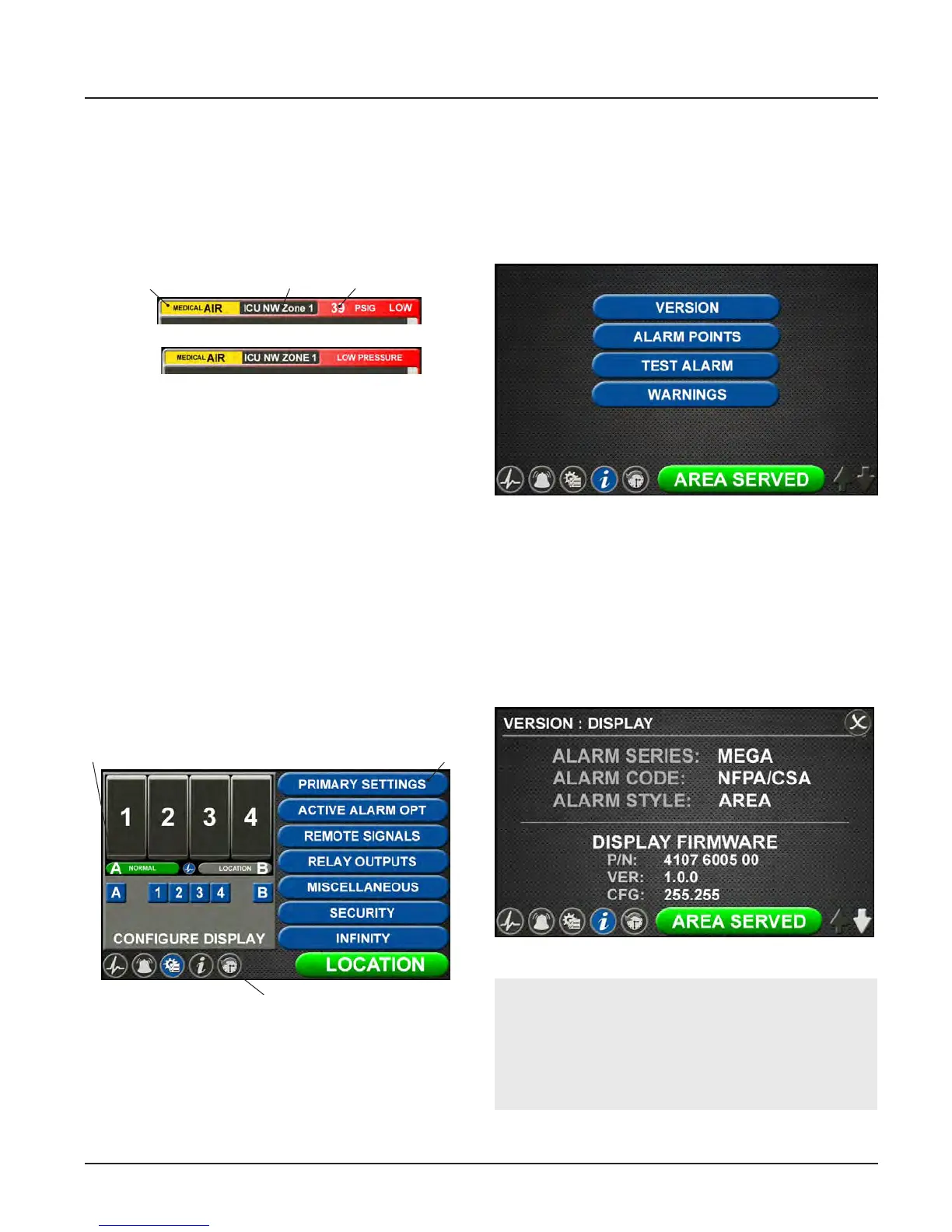
Figure 42: Active Alarm Screen
Area Alarm
Master Alarm
Gas LocationGas Type Gas Pressure
Figure 43: Configuration Screen
Settings
Icon Toolbar
Display
Figure 44: Information Screen
4.1.6 Display Screens
Active Alarm Screen
The ACTIVE ALARM screen provides detailed
information about pressures or signals that
are in alarm condition.
Configuration Screen
The CONFIGURATION screen is used to con-
figure the alarm. The configuration screen is
only accessible with a password. It is divided
into three parts.
The top left section is the Display section. It
contains a small representative view of the
MAIN screen and buttons for configuring the
MAIN screen.
The top right section is the Settings section.
Tabs not accessible are grayed out.
The bottom section is the Icon toolbar.
Figure 45: Version Tab
Information Screen
The INFORMATION screen provides pertinent
information about the alarm — including high
and low alarm values and firmware details —
in one central place.
Version Tab
Touch the VERSION tab to view details about
the:
• Series, code, and style of the alarm
• Firmware version for the main display
board and additional boards
NOTE:
The version screens automatically scroll.
Touch the blinking up or down arrow in the
lower right to stop the automatic scroll and
start the manual scroll.



 To Next Page