4-10
MEGA3 NFPA Medical Gas Notification System
4107 9016 59.03
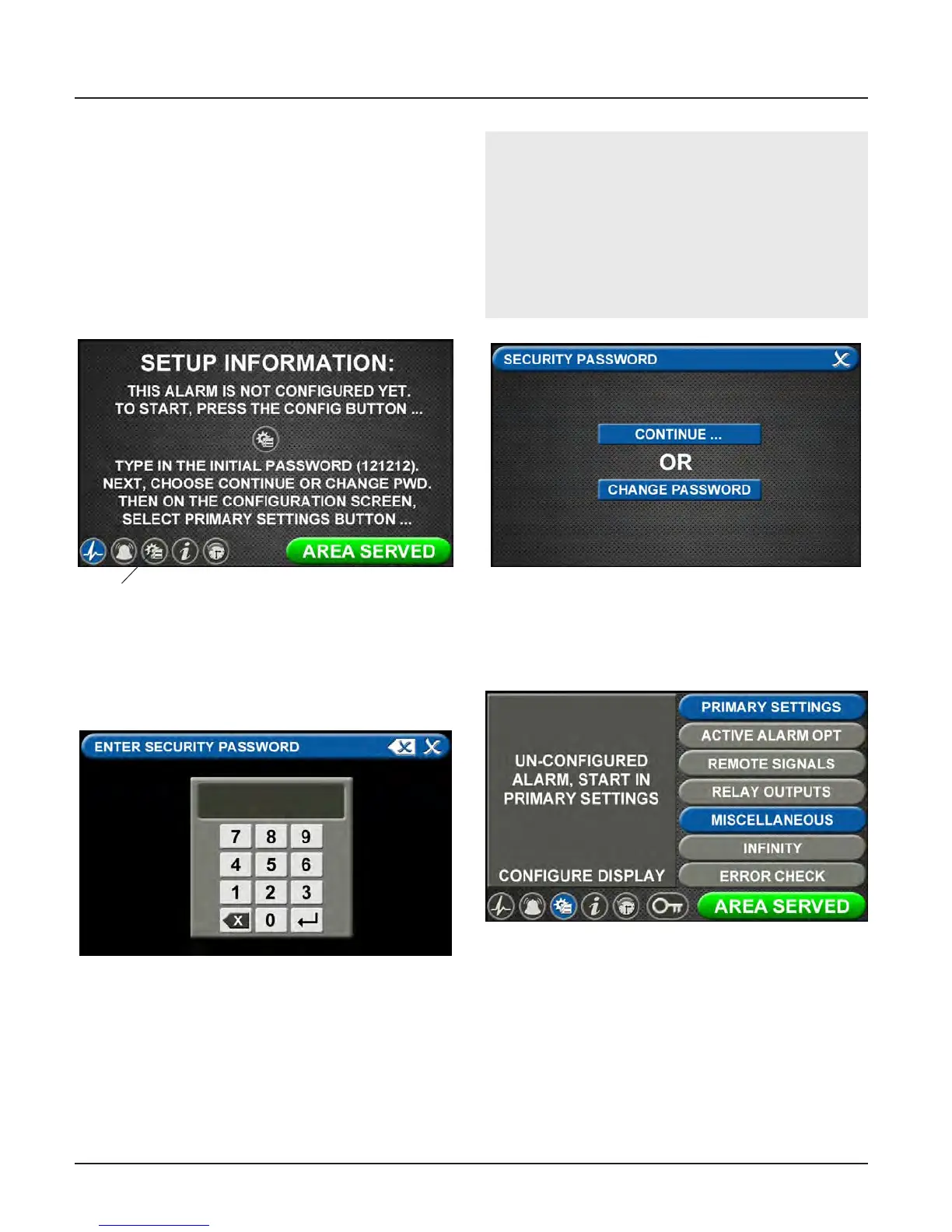
Figure 64: Entering the Security Password
Note:
If you would like to change the password,
touch Change Password. Enter a 4-10 digit
password, and touch the Enter button. Con-
firm the new password. Touch the X button
in the upper right to close the SECURITY
PASSWORD screen.
Figure 65: Changing the Security Password
Figure 66: Unconfigured Configuration Screen
4.3.2 Initial Setup for an Unconfig-
ured Area Alarm
The SETUP INFORMATION screen is the first
screen that users will see on an unconfigured
alarm. (The MAIN screen is the first screen
that users will see on a configured alarm.)
Password Setup - Unconfigured Alarm
• Touch the Configuration button.
Entering the Password
The ENTER SECURITY PASSWORD screen ap-
pears.
• Enter the security password. (The default
password is 121212.)
• Touch the Enter button.
• Touch Continue to advance to the
CONFIGURATION screen.
• The CONFIGURATION screen will display
as unconfigured and ready for setup.
Figure 63: Setup Information Screen
Configuration
Button



 To Next Page