4-25
MEGA3 NFPA Medical Gas Notification System
4107 9016 59.03
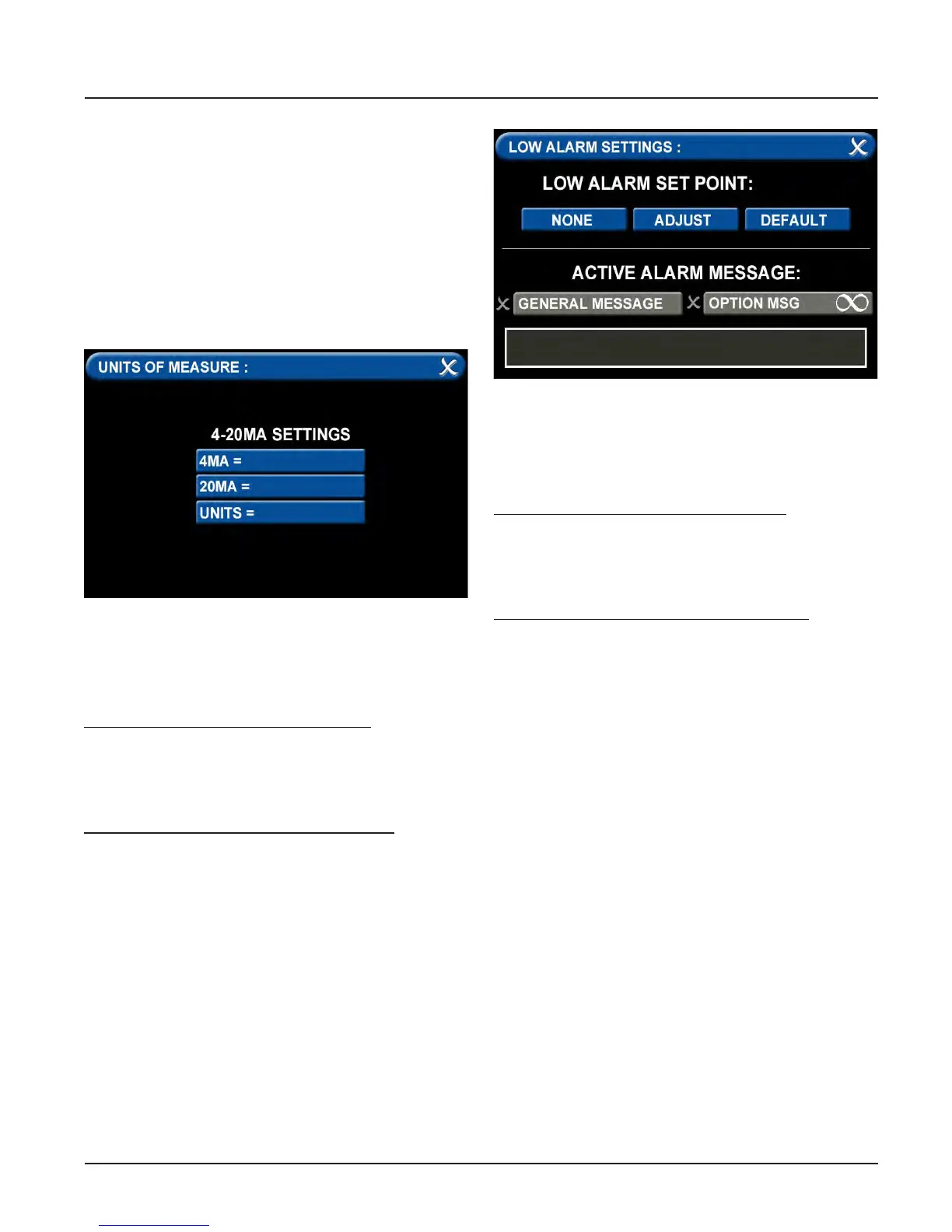
1. Touch the tab for “20MA=” to set the high
measurement point of the device (100
for example) and press the save button to
exit.
2. Touch the tab for “Units=” to set the
method of measurement (percent for
example), type in the measurement type
and press the save button to exit.
3. Touch the X button in the upper right to
close the screen.
F = Low Alarm Settings Tab
You can remove the low alarm set point or
customize the low alarm set point.
To remove the low alarm set point:
1. Touch the NONE tab.
2. Touch the check on the CONFIRM SET-
TINGS CHANGE screen.
To customize the low alarm set point:
1. Touch the ADJUST tab.
2. Enter the new set point.
3. Touch the Save button.
Figure 108: Units of Measure Tab
G = High Alarm Settings Tab
You can remove the high alarm set point or
customize the high alarm set point.
To remove the high alarm set point:
1. Touch the NONE tab.
2. Touch the check on the CONFIRM SET-
TINGS CHANGE screen.
To customize the high alarm set point:
1. Touch the ADJUST tab.
2. Enter the new set point.
3. Touch the Save button.
Configuring Additional 4-20mA Devices
Configure additional 4-20mA devices by
touching the number on the numeric display
that corresponds with the gas badge and
repeating the steps listed above.
Figure 109: Low Alarm Settings



 To Next Page