First operation
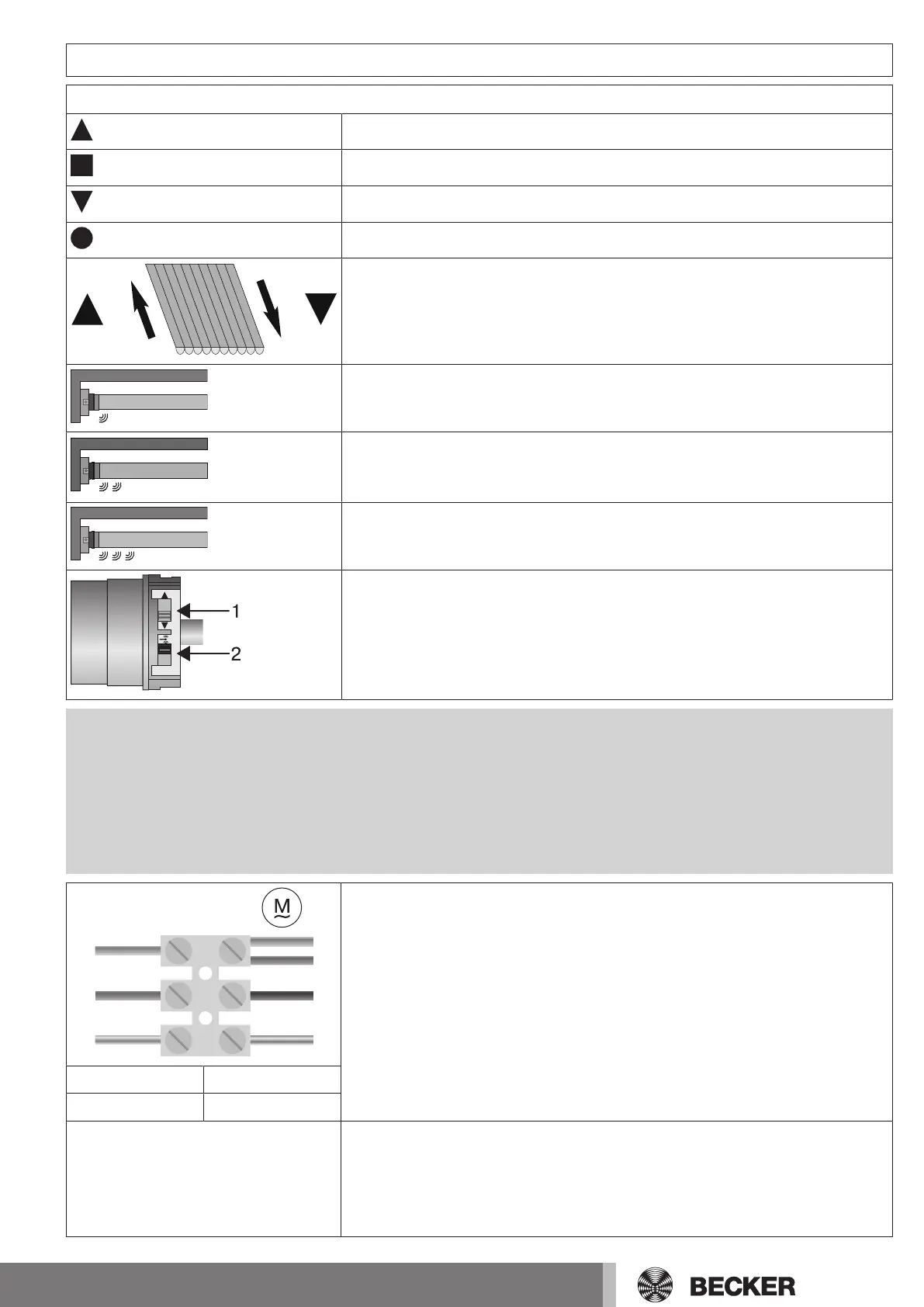
Explanation of symbols
Retract button
STOP button
Extend button
Programming button
The tubular drive clicks once to confirm
The tubular drive clicks twice to confirm
The tubular drive clicks 3times to confirm
1 = direction switch
2 = radio switch
Attention
The tubular drives are designed for short-time operation. An inbuilt thermal protection
switch prevents overheating of the tubular drive. During commissioning (long drop dis-
tance or long running time), the thermoswitch may trigger. The drive will switch off. After a
short cooling-down period, the system is ready for operation again.
The drive does not achieve its full duty cycle until it has cooled to ambient temperature.
Avoid a situation where the thermal protection switch cuts in repeatedly.
N
1
2
1
2
4
3
4
230V AC / 50 Hz
L1
PE
Connecting the tubular drive
Connect the tubular drive to the power supply.
1 = blue 3 = black
2 = brown 4 = green-yellow
Readying the tubular drive for programming
Putting the tubular drive into programming mode by switching on the power
▻ Switch on the power.
► The tubular drive is ready to program for 3minutes
11


 To Next Page