TwinCAT supplement
EL6631-0010 55Version: 3.4.0
Tree name
This tree name no longer corresponds to the PROFINET station name! The Ctrl WORD of the
PROFINET protocol is used to help assign a name. This means that the number that is entered
(range of values 0 - 255) is appended to the existing station name. In addition, the Ctrl WORD must
be linked to a task. It is subsequently necessary to restart TwinCAT. If, e.g., the task now specifies
a value of 11 for the linked Ctrl WORD, its previous station name will change from, for example,
"tcpniodevice" to "tcpniodevice011". The current tree name remains "tcpniodevice000".
The current station names and the IP configuration used can be checked via the "PROFINET diagnosis" tab.
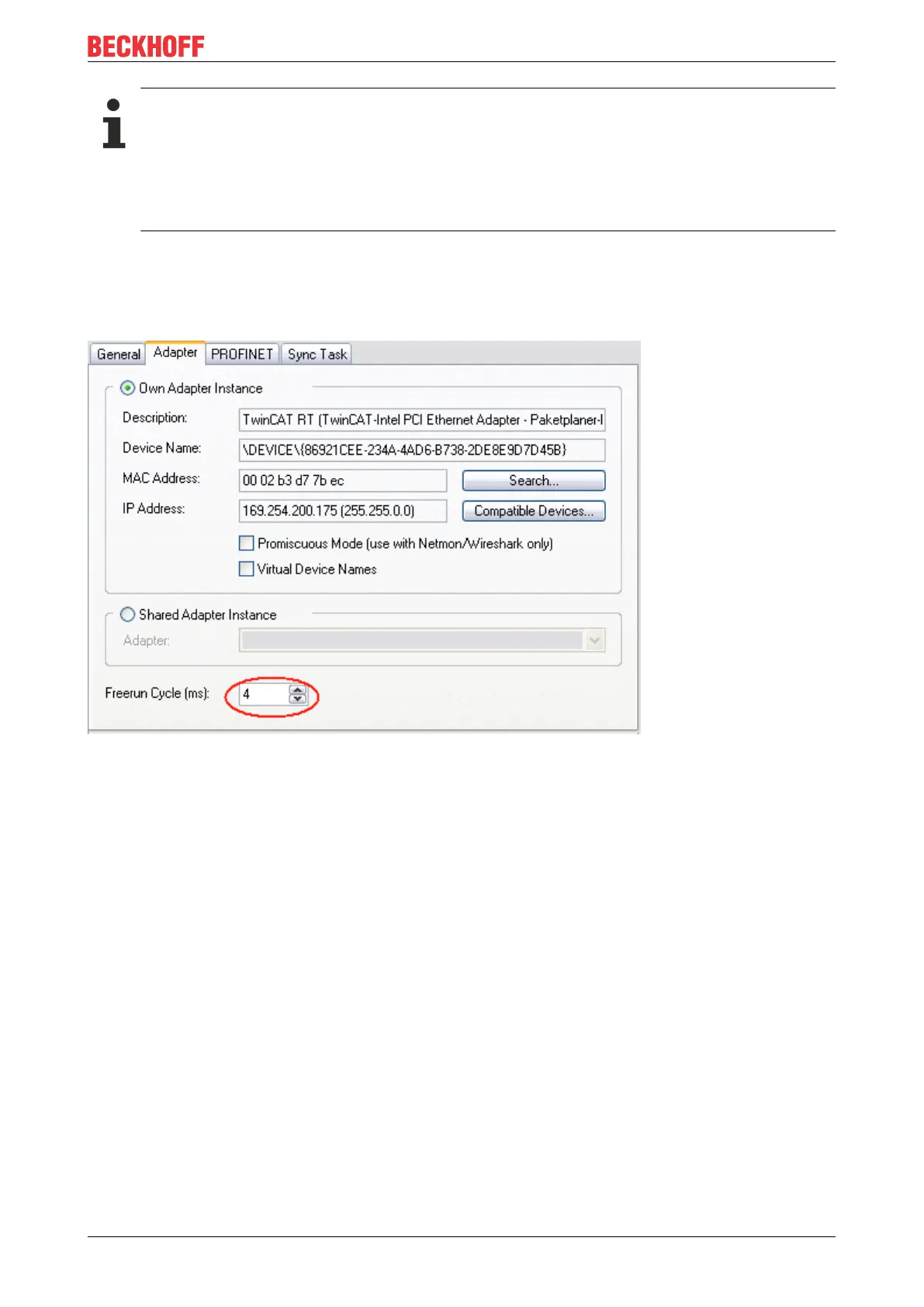
4. Cycle times
The device can be operated in the minimum cycle time of 1 ms defined by PROFINET!
Fig.42: "Adapter" tab, setting the cycle time
If TwinCAT is to be operated in RUN mode, a task must be created. In the simplest case, this is the
aforementioned SyncTask. The call time for the task must not be longer than the PROFINET cycle time! If a
second task is created, e.g. for the PLC, this can also run more slowly.









 To Next Page