HomeWhiz Function / User Manual
11 / 92 EN
In addition, for Set up Echo instruction, user can tap “Set Up Your Echo” link in “Support for Amazon
Echo” page.
“Support for Amazon Echo” page;
https://www.amazon.com/gp/help/customer/display.html?nodeId=201399130
b) Link HomeWhiz app account to Alexa app
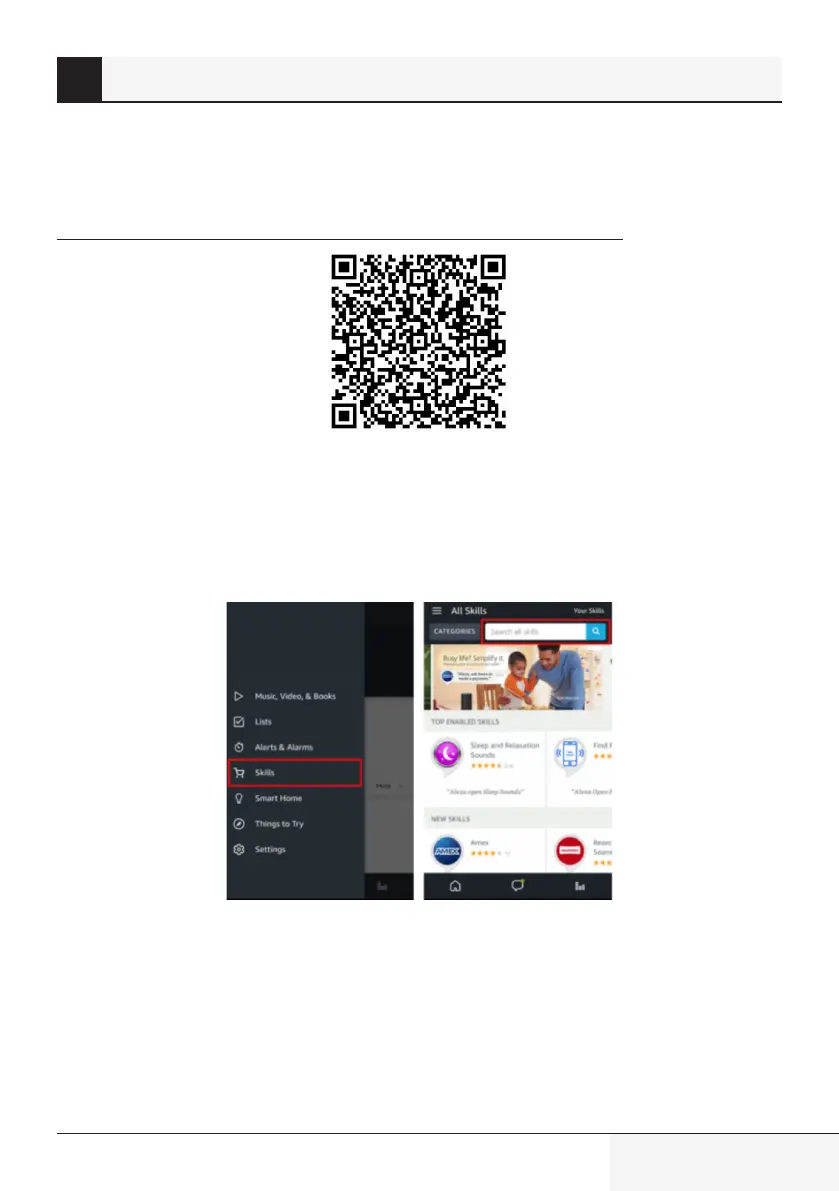
Select the “Menu” option in the top left corner and select “Skills”, and then search “HomeWhiz” in the
search bar.
Select “HomeWhiz” and tap “ENABLE” to enable the skill.
You will be redirected to the account link page.
Type in your HomeWhiz account and password and then tap “Link Now” or ”Sign In” to link your
HomeWhiz account
3 Syncng devce wth Amazon Alexa


 To Next Page
 Loading...