24 / 92 FR
Application HomeWhiz / Manuel d’utilisation
-
Sélectionnez un réseau sans fil pour permettre à Echo d’accéder à Internet. Saisissez le mot de
passe du réseau sans fil, puis touchez «SE CONNECTER». La connexion d’Echo au réseau peut
durer plusieurs minutes.
-
Touchez «CONTINUER» lorsque Echo est connecté au réseau. Après la vidéo d’introduction,
touchez «SUIVANT» pour terminer la configuration.
Pour consulter les instructions de configuration d’Echo, vous pouvez toucher le lien «Configuration d’Echo»
sur la page «Support pour Amazon Echo».
Page «Support pour Amazon Echo»;
https://www.amazon.com/gp/help/customer/display.html?nodeId=201399130
b) Liaison du compte de votre application HomeWhiz avec l’application Alexa
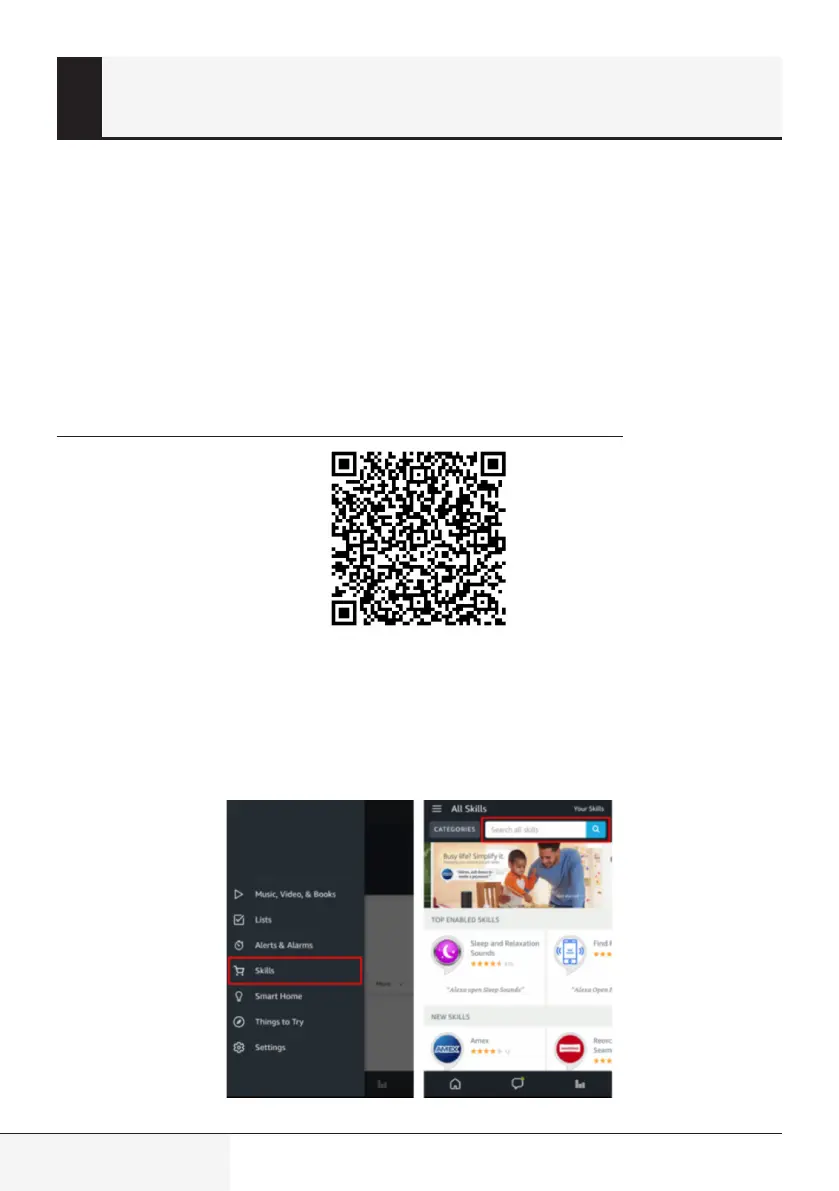
Sélectionnez l’option «Menu» située dans le coin supérieur gauche, puis «Compétences». Ensuite,
recherchez «HomeWhiz» dans la barre de recherche.
Sélectionnez «HomeWhiz» et touchez «ACTIVER» pour activer la compétence.
3 Synchronsaton du clmatseur moble avec
Amazon Alexa


 To Next Page
 Loading...