32 Bedrock SMxx operating manual © Bedrock Audio BV, 2019
The LAEQ logging module has a start/stop button similar to all other modules, but un-
like other modules, it has no “save” button. Since this module is specifically intended for
logging purposes, all data is always saved to a text file. Whenever a new measurement is
started, the measurement number is automatically incremented and a new file is opened.
This means that data is never inadvertently discarded (e.g. by forgetting to press save after
a lengthy session).
LAEQ logging sessions can run for a long time, up to many days. Before starting
a long session, always check if there is enough free storage on the device. When
recording audio (an option available through the settings module), the memory
fills up in 3-4 hours. We recommend disabling audio recording on long sessions.
The log files of sessions that span multiple days are split up. Every day at pre-
cisely midnight, the log file is closed and a new file is opened.
As an example (for the purposes of this manual), we will assume that time averaging takes
place over a window of 15 minutes, resulting in LAEQ15MIN (which is a commonly used
setting for sound exposure monitoring at music venues). However, note that the averaging
time can be adjusted to any period between 1 and 60 minutes.
The LAEQ15MIN as displayed on the screen is the moving average of a series of “LAEQ
current” measurements. The shorter the time period used for LAEQ current, the more
values are used to compute LAEQ15MIN (and the longer your log file will become, since a
line is written for every LAEQ current period). If you choose a short period for LAEQ cur-
rent then you will be able to determine fluctuations in the measured level more accurately,
but you may end up with a lot of data to sort through. There is a trade-off; the optimal
choice depends on the application.
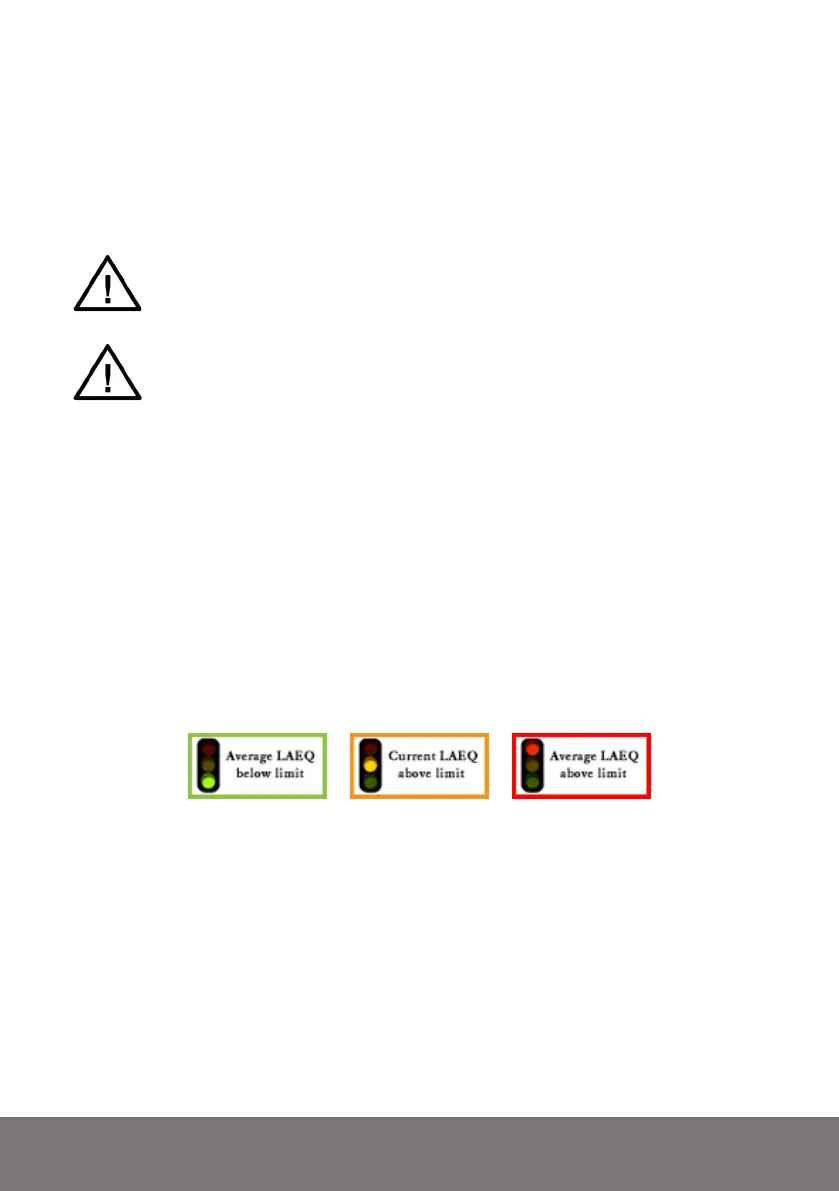
“Traffic light” indicating whether the limit is being exceeded.
If the LAEQ15MIN exceeds the preset level limit, the traffic light indicator will turn red. If
the LAEQ15MIN is still below the limit, but LAEQ current exceeds the limit, this implies
that the LAEQ15MIN will eventually reach the limit if the current levels do not go down.
In that case, the traffic light will be yellow/orange. If the LAEQ15MIN as well as the cur-
rent value are below the limit, then the traffic light shows green.
The first screen of the LAEQ monitoring module (see previous page) gives the levels in
large digits, and creates a quick overview. The second screen (see next page) shows a graph
of the running series of “LAEQ current” measurements, which gives a good feel of how
the overall level is developing.



 To Next Page