58 Bedrock SMxx operating manual © Bedrock Audio BV, 2019
10.2. Settings
The settings module allows you to configure the overall settings of the device, in addition
to the module-specific settings found in each module. The following attributes can be set:
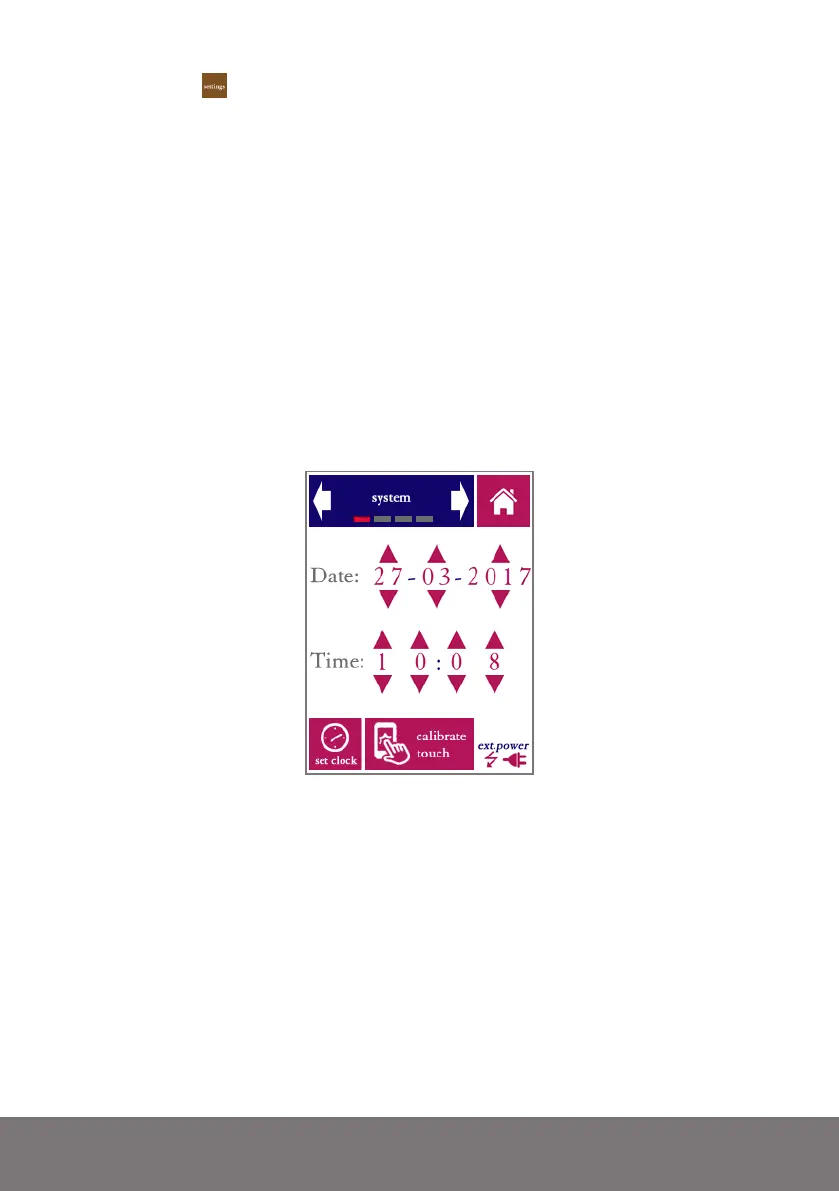
• Time and date (time in 24h format and date in DD-MM-YYY format)
• Calibration of the touch screen digitizer (use with caution)
• Phantom power to the microphone
• Microphone type selection
• Microphone pre-amplifier gain (measuring range)
• Time interval before the backlight automatically switches off to save power
• Brightness of the display (not available on early versions of the SM50)
• Recording of audio during measurements (on / off)
• Text annotations with each measurement (on / off)
The system date and time are changed by means of the arrows (up/down). Note that your
changes are not applied until you press “set clock.”
Date and time in the settings module
The Bedrock SMxx has an internal real-time clock that keeps running even when the de-
vice is powered off. The clock needs to be adjusted if the battery has been depleted com-
pletely, for instance when the device has not been used for a very long time. The system
date and time are used for time-stamping the saved data. If you download measurement
data over USB, the file creation date/time are only accurate if the internal real-time clock of
the device was updated to the right date and time.
Use the “calibrate touch”function if the response of the touch screen appears to be inac-
curate. Calibration takes place by pressing exactly on the indicated marks near the corners
of the screen. Note that touch calibration is needed very rarely; do not activate this function
unless you are experiencing a reduced accuracy of the touch screen digitizer.



 To Next Page