39 EN
Storage
Disconnect the device from the mains power when you are not going to use it for a prolonged
period. Clean the device again if necessary (see the “Cleaning and Care” chapter) and let it dry
completely.
Store the device and all accessories in a dry, clean, frost-free place that is protected from direct
sunlight and cannot be accessed by children or animals.
Troubleshooting
If the device does not work properly, check whether you are able to rectify the problem
yourself. If the problem cannot be solved with the steps that are listed, contact our customer
service department.
Do not attempt to repair an electrical device yourself!
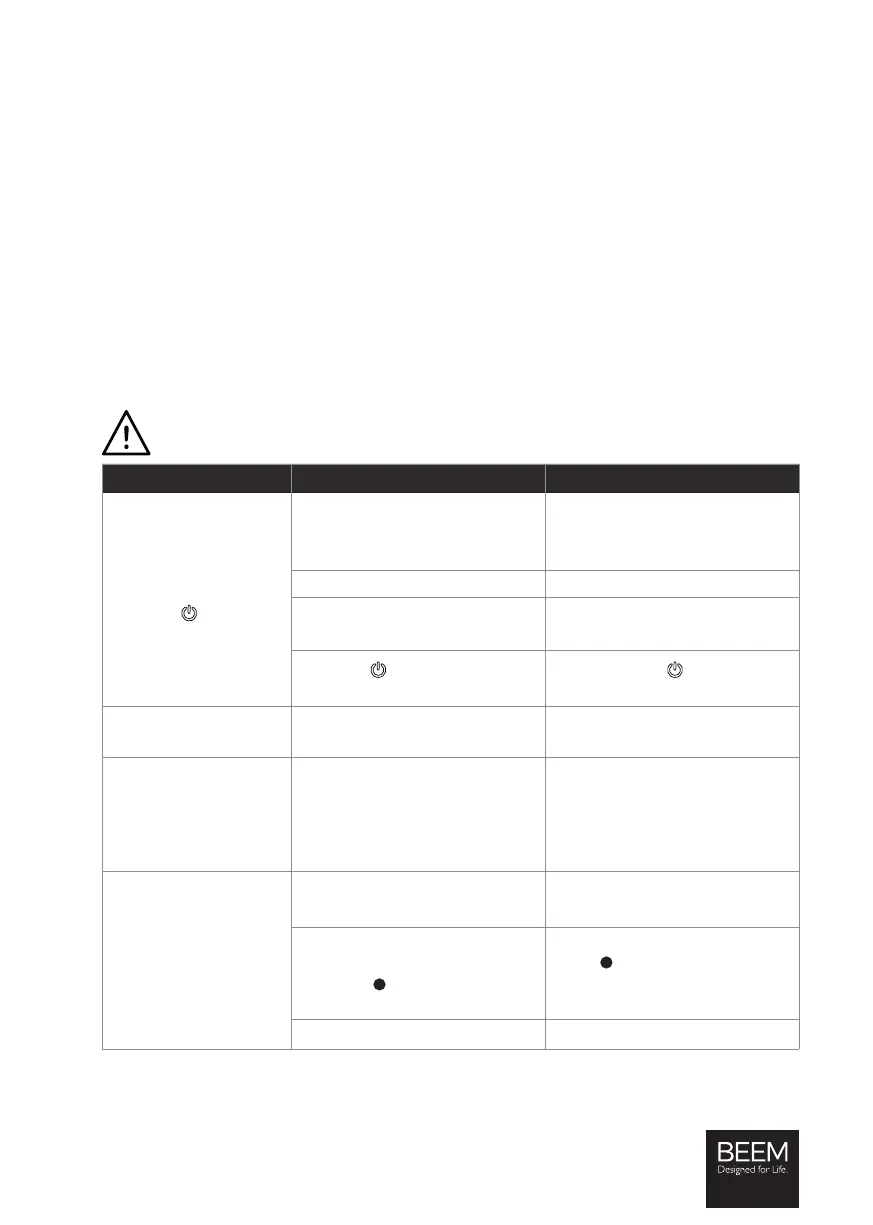
Problem Possible cause Fix
The device cannot be
switched on. /
The
fi eld (4) does
not light up.
The mains plug is not inserted
correctly in the plug socket.
Correct the fi t of the mains plug.
The plug socket is defective. Try another plug socket.
There is no mains voltage.
Check the fuse of the mains
connection.
The fi eld
has not been
touched.
Touch the fi eld to switch on
the device.
The fuse in the fuse box
is triggered.
Too many devices connected to
the same circuit.
Reduce the number of devices in
the circuit.
The brewing process
cannot be started.
The device has not yet reached
the correct brewing temperature.
Wait until the device has heated
up or cooled down suffi ciently.
You can speed up the cooling
process by fl ushing through the
steam nozzle.
Water runs out of the
device.
There is too much water in the
water tank (h).
Pour a little water away.
The steam power control (1) is
not in the
position.
Always move the selector switch
to the
position when there is
no vessel under the portafi lter
outlet (d) or the steam nozzle(6).
The drip tray (e) is full.
Empty the drip tray.






 To Next Page