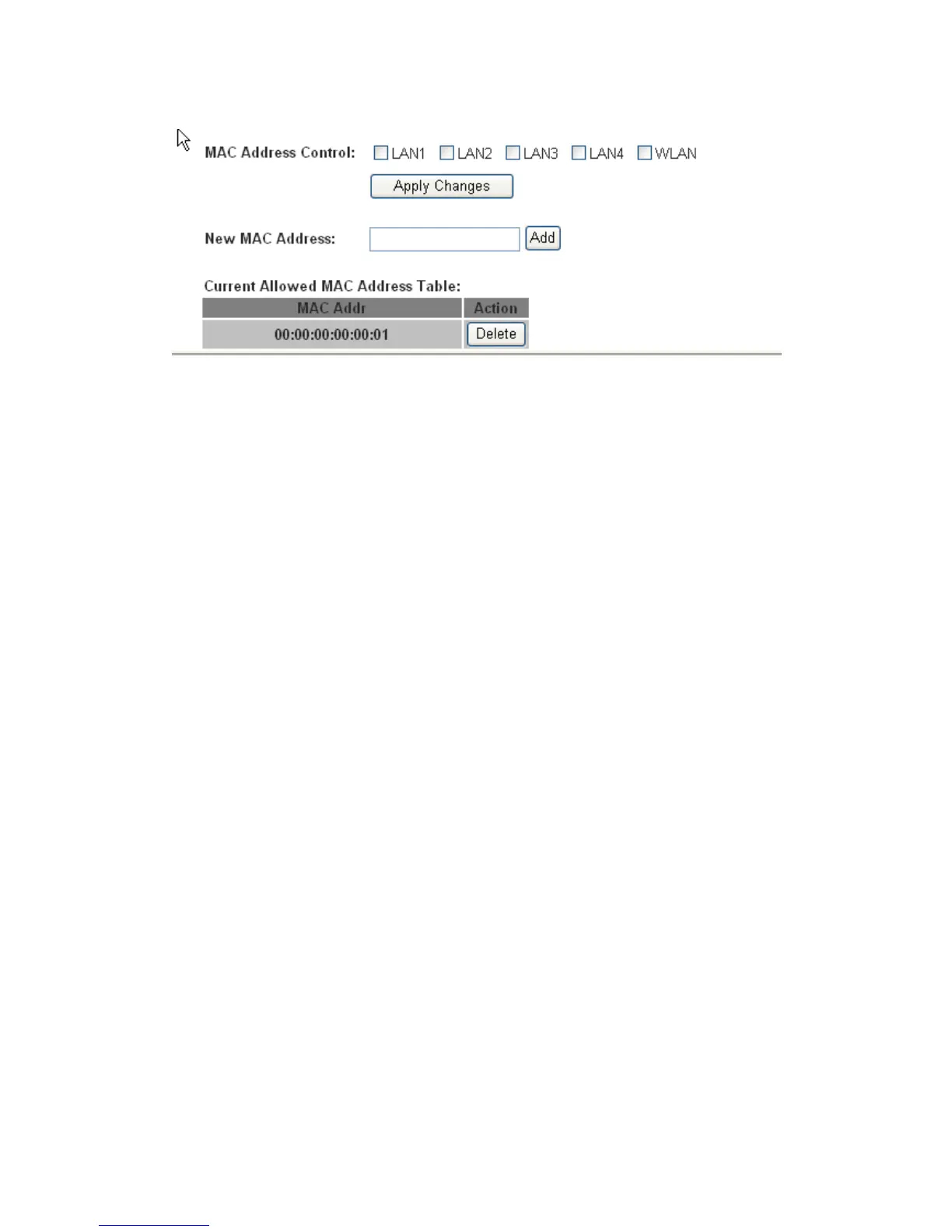
MAC Address Control
select the LAN interface on which you want to run MAC Address Control
New MAC Address
a MAC address to be added
Current Allowed MAC Address Table
it shows the current allowed MAC address list
If you enable the MAC address control on an interface such as “LAN1”, then the traffic from the
specified interface “LAN1” only whose MAC address matches the allowed list will be flowed,
otherwise the traffic will be dropped by the router.
4.1.2 DHCP Setting
Go to the Setup->LAN->DHCP page, you can configure the DHCP mode of your ADSL Router as
None, DHCP Relay or DHCP Server.
4.1.2.1 None
If the DHCP mode is “None”, the router will do nothing when the hosts request an IP address by
DHCP protocol.
4.1.2.2 DHCP Server
The DHCP Server is used to configure correct TCP/IP protocol related parameters for the
computer on your local network. If you enable the DHCP Server function of the ADSL router, you
can make the DHCP Server automatically configure the TCP/IP protocol parameters (such as IP
address, subnet mask, gate way and DNS servers) for the computer on your local network.


 To Next Page