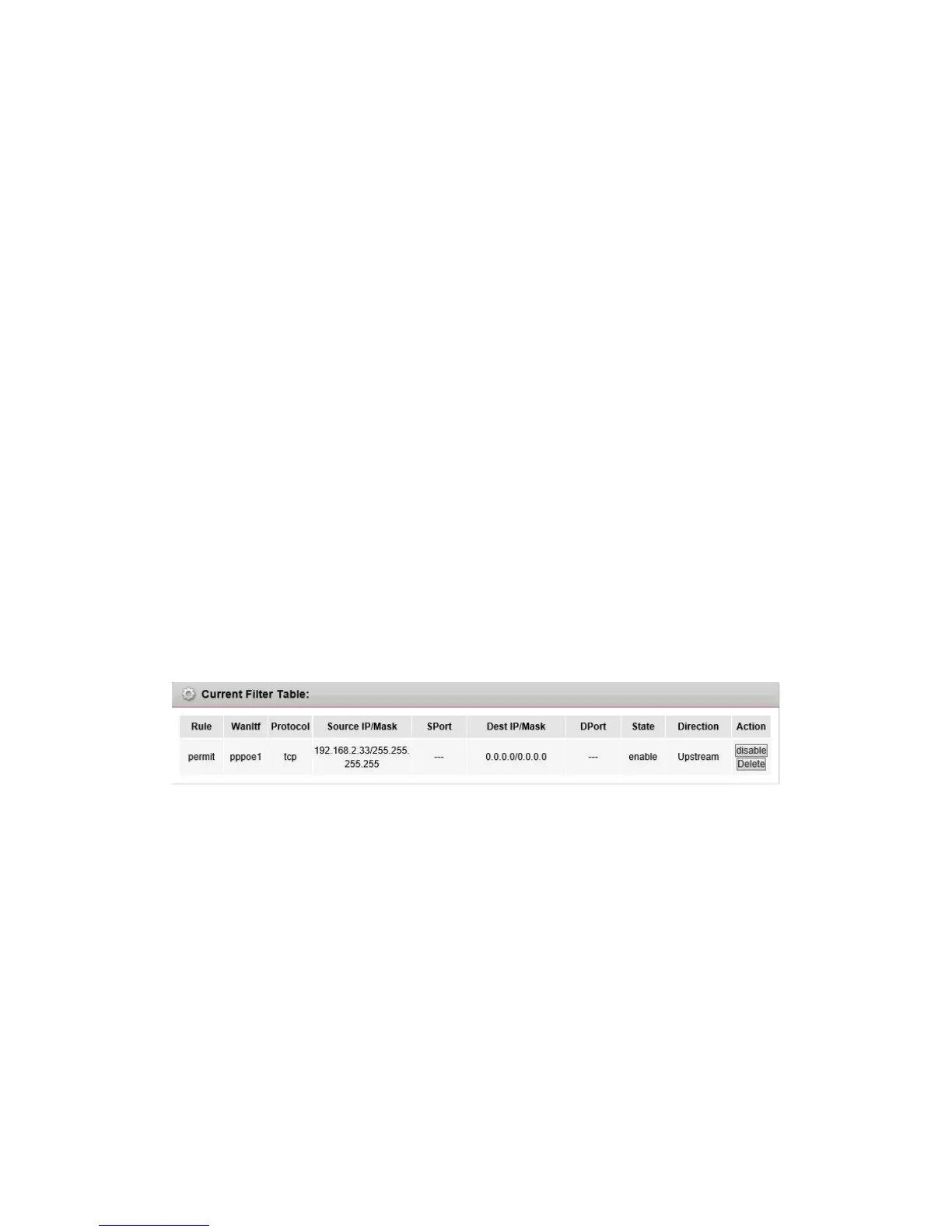
Rule Action
the filter mode of this entry, it can be “Permit” and “Deny”. If the mode is “Permit”, the IP
connection matches the rule will be permitted, if the mode is “Deny”, the IP connection
matches the rule will be denied.
WAN Interface
the WAN interface you want to configure the rule.
Protocol
the protocol of this entry; it can be “IP”, “ICMP”, “TCP” and “UDP”.
Direction
the direction of this entry, it can be “upstream” and “Downstream”.
Source IP Address/ Mask Address
the source IP address and mask address of the entry.
Dest IP Address/ Mask Address
the destination IP address and mask address of the entry.
Sport
If the protocol is “TCP” or “UDP”, you should set the source port of the entry, it can be a
single port or a port range.
Dport
If the protocol is “TCP” or “UDP”, you should set the destination port of the entry, it can be a
single port or a port range.
Enable
enable or disable this filter entry.
Current Filter table
it shows the current filter rules. You can enable or disable or delete the filter entry.
5.1.2 MAC filter
In order to management your local network better, you can use the MAC address filter function to
control the internet access.
Go to Firewall->MAC Filter page, you can set the MAC filtering rules.


 To Next Page