
Why is the MOD LED red on my BeiJer Adapter?
- MMisty DominguezAug 4, 2025
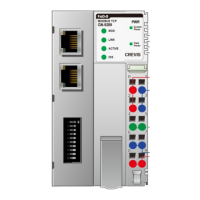
The MOD LED being red indicates a critical error within the firmware. The suggested solution is to contact the sales team and send the module in for repair.
Why is the MOD LED red on my BeiJer Adapter?
The MOD LED being red indicates a critical error within the firmware. The suggested solution is to contact the sales team and send the module in for repair.
What to do if MOD LED Green/Red Toggle on BeiJer Adapter?
The MOD LED toggling between green and red indicates a MODBUS error, possibly a watchdog error. To resolve this, check the Modbus watchdog time value (see index 0x1020).
How to fix BeiJer Adapter when all LED turns off?
If all the LEDs on your BeiJer Adapter are off, it suggests there is no power. Check the main power cable to ensure it is properly connected and the power source is active.
Covers safety symbols, ESD, grounding, power, and environmental precautions for safe operation.
Details physical interface, RJ45 sockets, and RS232 port specifications.
Outlines operating temperature, humidity, mounting, power, and module size specifications.
Explains the function and color of each LED indicator on the GN-9289 module.
Provides detailed diagrams showing the physical measurements of the GN-9289 module.
Guides on attaching modules to DIN rail and total system expansion limits.
Explains the correct method for supplying system and field power to the module.
Instructions for accessing the web server and performing In-Application Programming (IAP) for firmware updates.
Details RJ-45, RS232 ports and explains DIP switch settings for IP address configuration.
Guides on setting IP addresses automatically via BOOTP/DHCP or manually using DIP switch.
Defines the MODBUS register map and provides examples of input/output process images.
Compares protocols, details MBAP header, and lists supported MODBUS function codes.
Details special registers for adapter identification, watchdog, TCP/IP, and expansion slot information.
Lists supported EtherNet/IP objects and details Identity, Port, TCP/IP, and Ethernet Link models.
Provides a guide to diagnose problems by observing LED status on the module.
Lists product GT-Numbers and defines key terms and acronyms used in the manual.