14
Setup
Garage Data
Thismachinehasthecapabilitytoprintoutrecovery,
vacuum,charge,andushinformationforeachvehicle
tested.Theinformationenteredinthelleldsonthe
GarageDatascreenwillappearoneachprintout.
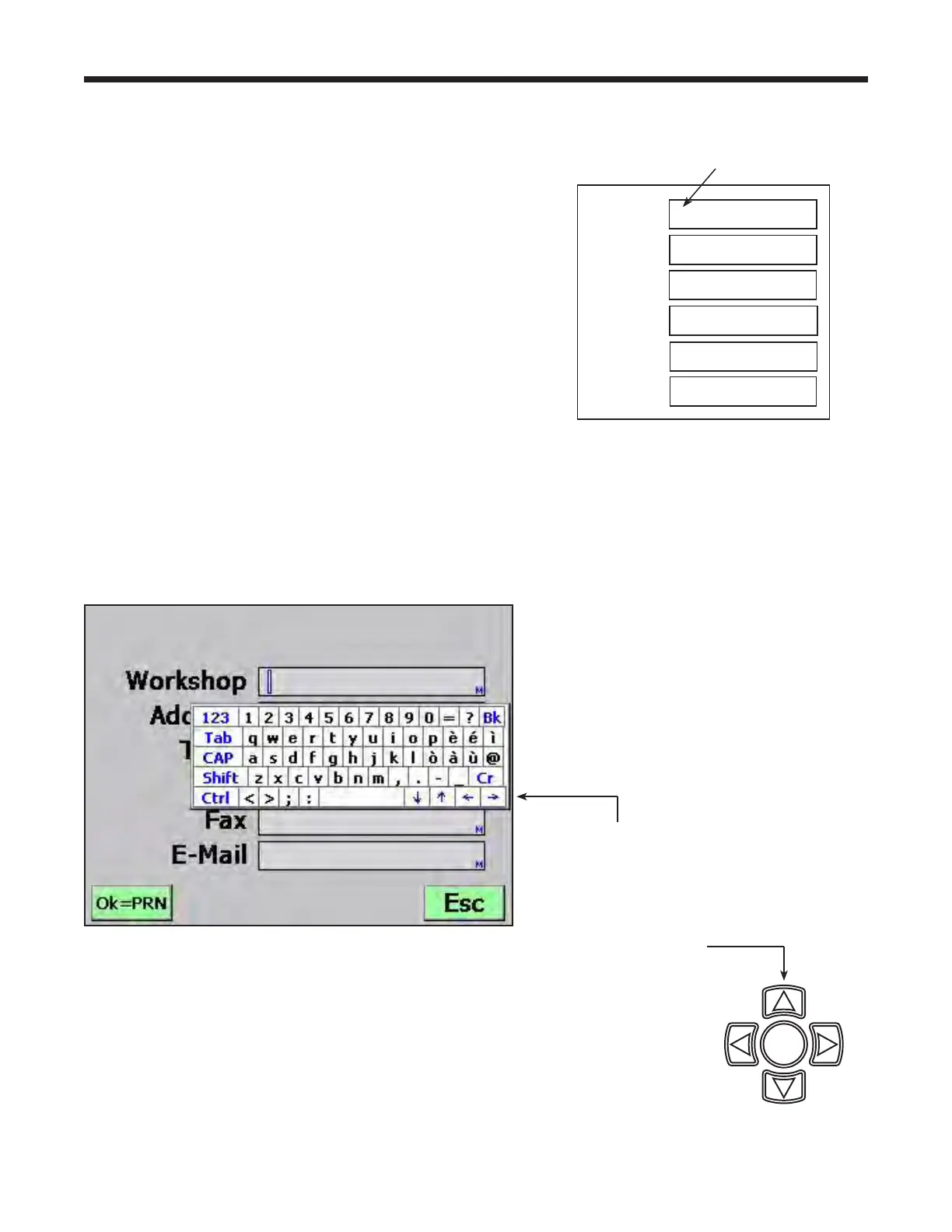
1.Thecursorisblinkingintherstlleld.Referto
Figure4.
2.PresstheMenu keyandavirtualkeyboardappears
asshowninFigure5.
3.Usethearrowkeysonthemachine’skeypadto
movearoundthekeyboard.PressOKtoentera
character.Thecursorwillmovetothenextcharacter.
4.PresstheMenu keytoexitthevirtualkeyboard.
PressOKtosavethedataandmovetothenext
eld.PressESC toreturntotheSetupMenu.
Aprintoutmaybeobtainedanytimethedisplay
screenshowsOK=PRN.Thenitwillbepossibleto
enterspecicvehicleinformation,suchastheVINand
licenseplatenumber.
Workshop
Address
Town
Tel
Fax
E-mail
Figure 4
First Fill Field
Figure 5
Use the arrow
keys in the virtual
keyboard to move
the cursor within
the ll eld.
Use the arrow keys
on the machine’s
keypad to move
around the virtual
keyboard.
OK


 To Next Page