Service Manual iFLEX2 with iSCOUT expert compact (Grove RT-TM)
© 2015 HIRSCHMANN Automation and Control GmbH 43
15 SENSOR CALIBRATION
15.1 ACTIVATING THE SERVICE SCREEN FOR SENSOR CALIBRATION
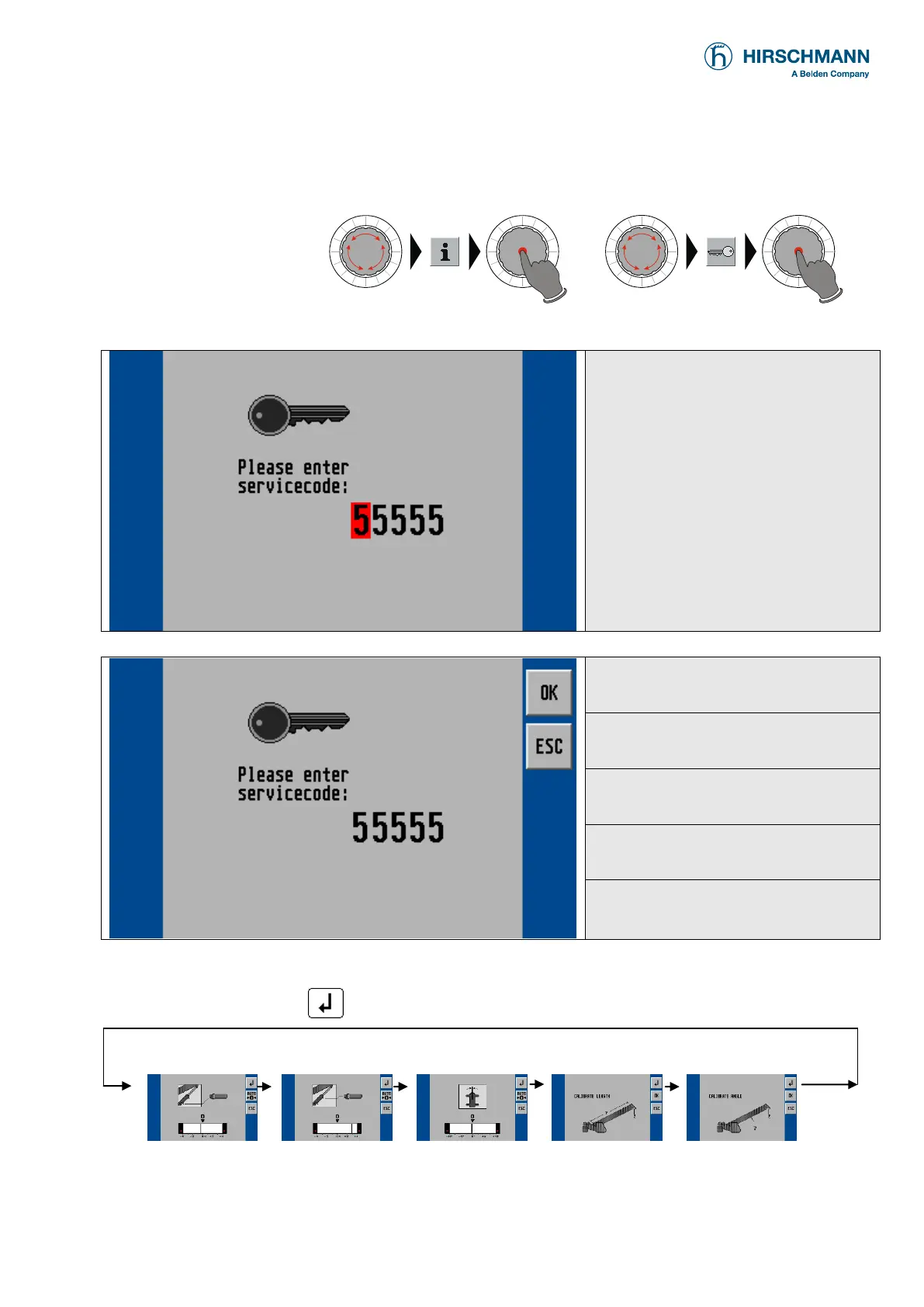
to access the service
screen and sensor
calibration function
(from main menu):
▼ input service code (for access to calibration menus)
For access to the calibration menus
it is necessary to input a matching
5-digit code.
Use the rotary selection wheel to
input a numeral, and then push the
wheel button to select the next digit.
If input is complete the confirmation
screen appears:
▼ input service code (confirmation screen)
OK, confirm selected code
Cancel and return to LMI screen
Now you can follow the calibration procedure step by step or can select the type of calibration by
scrolling with function key . Press "ESC" to finish calibration procedure.
pressure signal
piston side
64356


 To Next Page