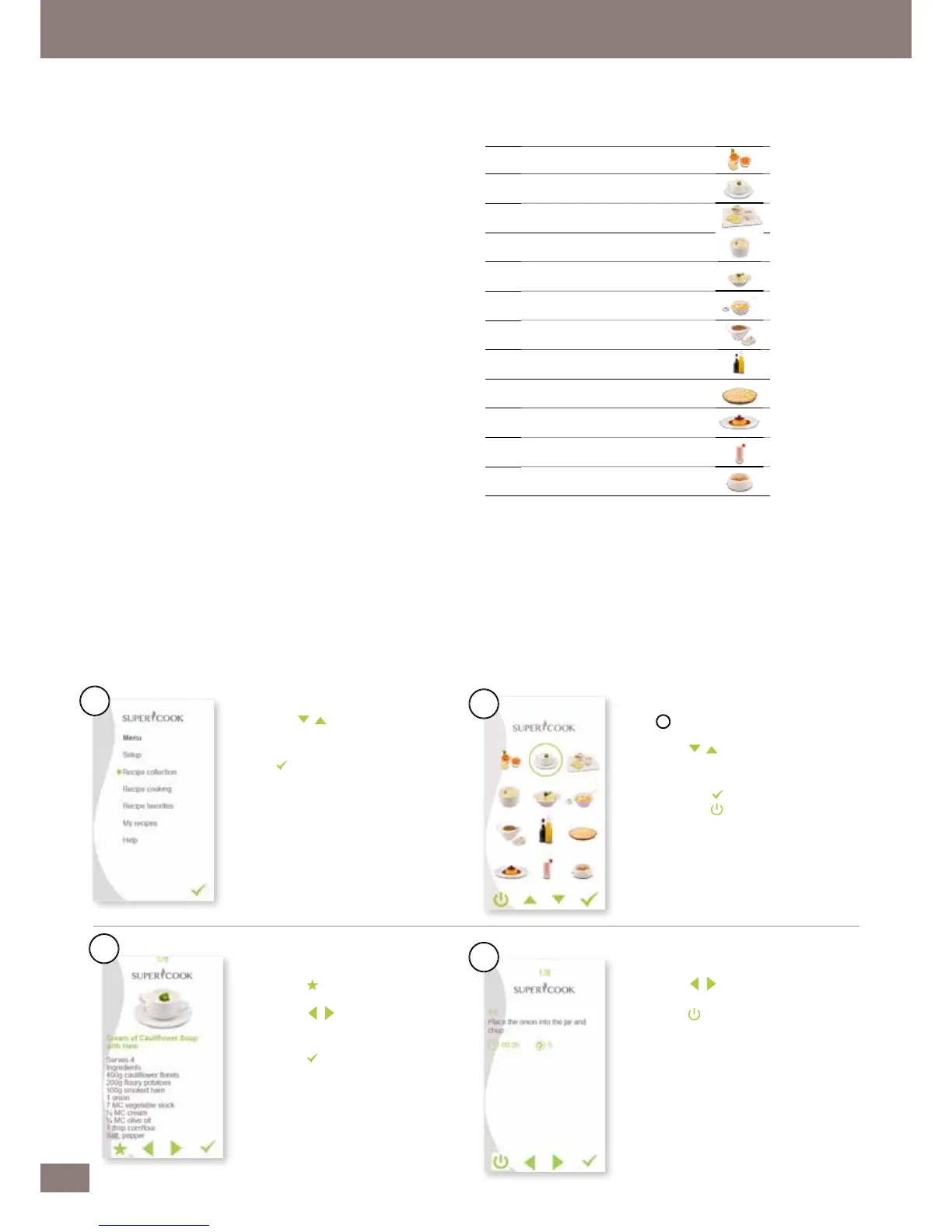
The Recipe collection menu item is your digital recipe book, which you
can use as a reference book. It contains all the recipe categories, all the
recipes and the individual instructions. The categories are designed to
An SD card can save a maximum of 895 recipes although the memory
language. A 1 GB SD card is supplied as standard. In order to save the
maximum number of 895 recipes from www.supercook.me in multiple
languages, you will need a higher capacity SD card.
To gain access to the extensive Library of recipes to download you need
The Serial Number ( S/N ) of the appliance can be found on both the
back of the Yumi Control Module or base of the appliance ( Near Rating
Logging on to Website www.supercook.me
Select English version from choice of languages
Enter Username and Password to Login
How to FREE download existing recipes from the library or
create your own recipe and save it to SD Card
Enter Username and Password to Login
Follow the instructions on how to create your own recipe or make
selection from extensive library to Save to SD Card
through the Recipe collection menu.
to your favorites selection.
within the category selected and
browse the different recipes.
circle indicates the current
and select the category you want.
switch off the control module.
through the recipe pages.
3. Fish and meat main courses
4. Vegetarian main courses


 To Next Page