29
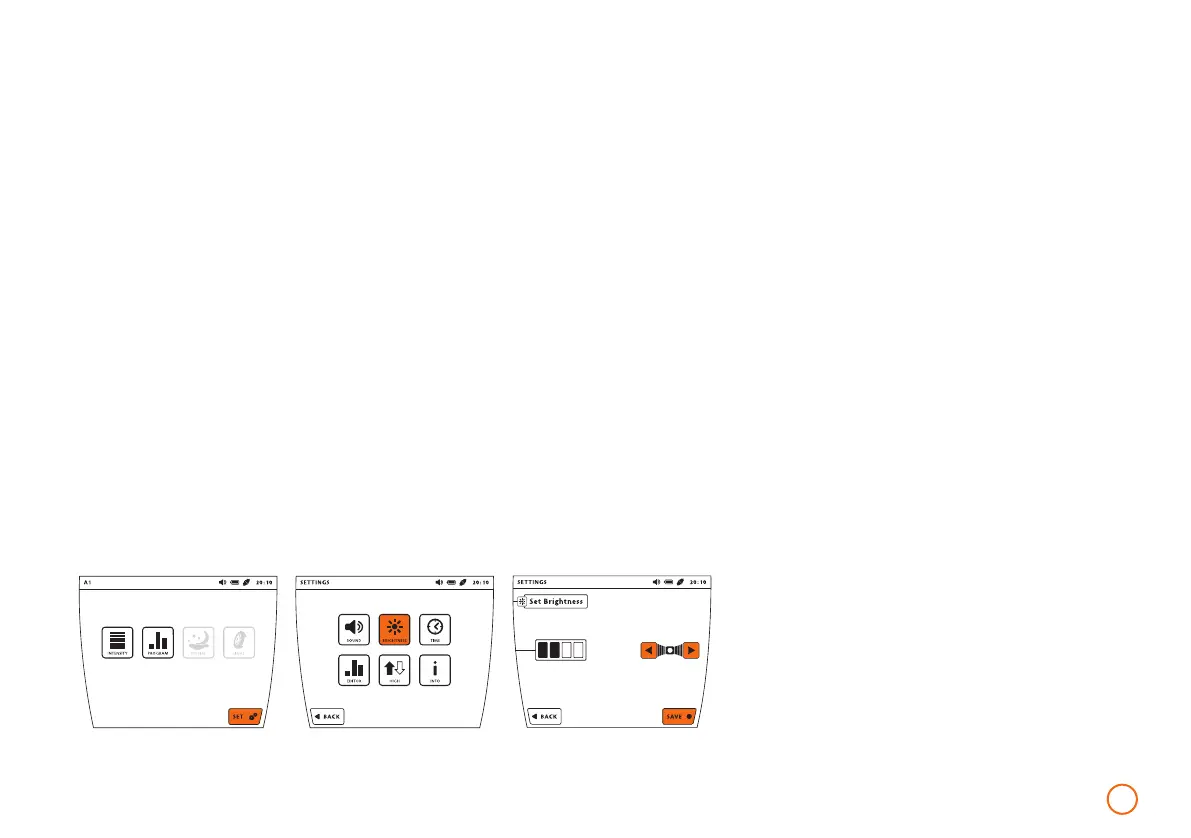
Example – setting the display brightness
Adjusting the display brightness
•
Press the [SET] button.
•
Press the [BRIGHTNESS] button.
•
Now set the brightness with the help
of the arrow keys. The display appears
at the desired brightness.
•
Press the [SAVE] button to save
your settings.
To access the system information
•
Press the [SET] button.
•
Press the [INFO] button.
•
Press the [OK] button to
close the [INFO] window.
Setting the time
•
Press the [SET] button.
•
Press the [TIME] button.
•
Now set the current time with
the help of the arrow keys.
•
Now press [SAVE] to save
your settings.
1960-2002-BEDIENANL-B.BOX-USA-FDA-2020-US-en-v13-Akku Rev20_4.indd 291960-2002-BEDIENANL-B.BOX-USA-FDA-2020-US-en-v13-Akku Rev20_4.indd 29 04.11.2020 08:47:2904.11.2020 08:47:29



 To Next Page