40
120001 Rev K 1-19-18
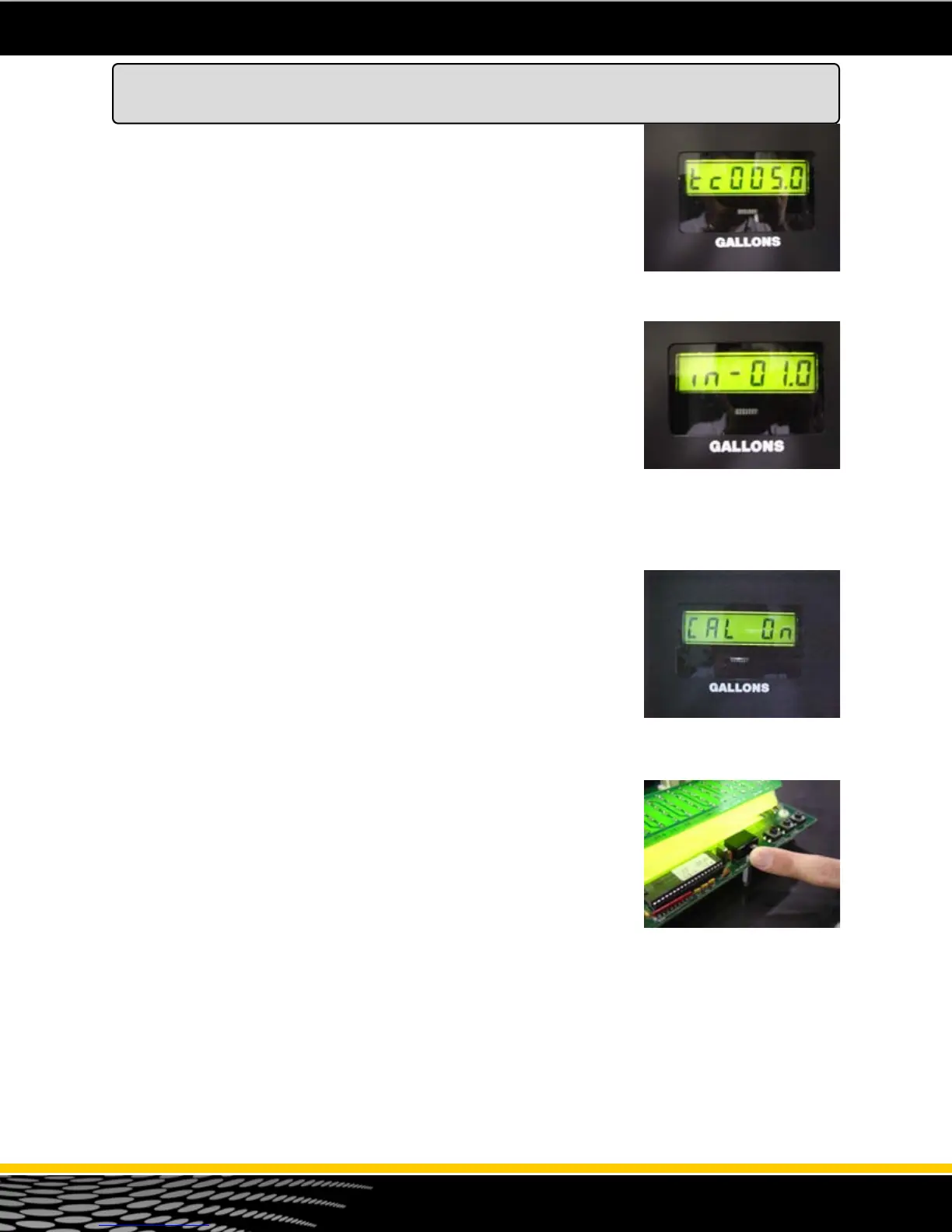
Step 6 - The display should say “tc 000.0” (see figure 32). Enter the Test
Can size that is used for this procedure. Do this by using the “Up” key on
the top of the board. (Typically 5 gallons or 20 liters). Press the “Enter”
button.
Step 7 – Enter the value of the measurement dispensed in the test can, this
will be a positive or negative amount (above or below the “0” mark). If the
test can measurement was “above” by 2 cubic inches, press the “Up” button
twice. If the measurement in the test can was “below” , for example, -1
cubic inch, change the sign to (-) minus by pressing the “down” button so
that the display shows “in –01.0” (see figure 33) . Press the “Enter” button
for the system to accept the information.
Step 8 - The system displays a message that shows “Cal On” with the
current calibration parameter (see figure 34).
Step 9 - Turn the ecal switch to the “Off” position and reseal (see figure 35).
Figure 34 - After inputting calibra-
tion value, it should show “Cal
ON”.
Figure 32 - Enter test can sam-
ple. In this example - 5 gallons.
Figure 33 - Entering a value that
represents a test can reading that
was “low” by 1 cubic inch. Any
low reading (in the test can) will
always be input as a negative
number.
Figure 35 - Turn the e-cal switch
off when finished.
How to Electronically Calibrate the SB-100 Meter
(E-Cal Option)



 To Next Page