14 Touring the camera
English
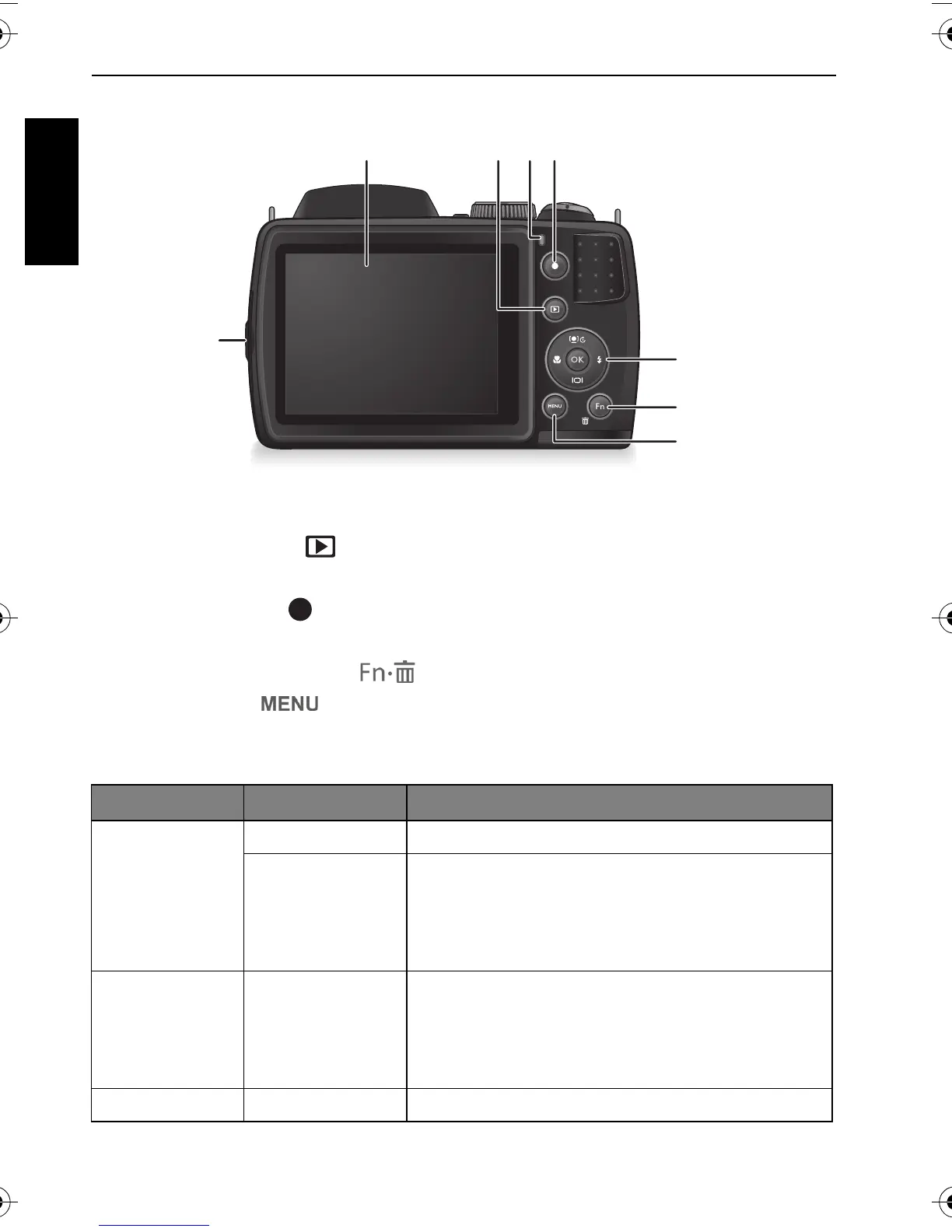
Rear view
1. USB / AV port
2. LCD display
3. PLAYBACK button
4. Status LED
5. RECORD button
6. Multifunctional buttons (including a 4-way control and an button)
7. Function / Delete button
8. MENU button
LED Indicator
Indicator State Description
Status LED No light The digital camera is off.
Solid green • The digital camera is ready to capture
images.
• The digital camera is powering on, or is in
the power-saving mode.
Status LED Blinking green • The digital camera cannot focus.
• The digital camera is capturing a video clip.
• The flash is charging, or the USB
communication/transfer is in progress.
Self-timer LED Blinking red The self-timer function is activated.
GH600 UM - EN.book Page 14 Friday, October 14, 2011 4:33 PM


 To Next Page