Introduction
11
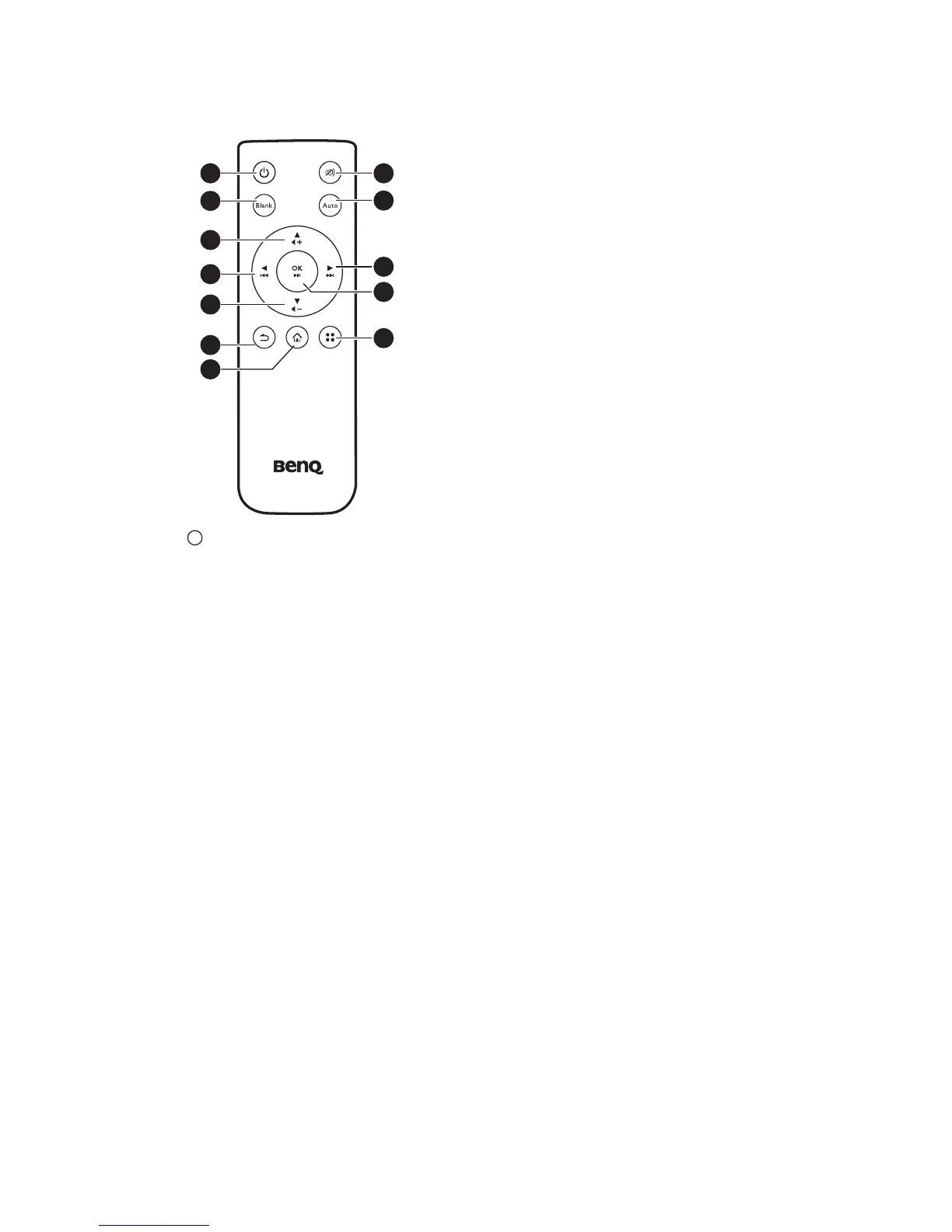
Remote control
1. POWER
Toggles the projector between standby
mode and on. See "Starting up the
projector" on page 26 and "Shutting down
the projector" on page 65 for details.
2. Blank
Toggles Blank on and off. See "Hiding the
image" on page 28 for details.
3. Up/Volume up key
When the On-Screen Display (OSD)
menu is on:
- Navigate up to select the desired menu
items.
- Make adjustments. (e.g. manual
keystone...)
When the On-Screen Display (OSD)
menu is off: (Only applied to SD card,
internal memory and USB Drive)
- Magnifies the volume level.
4. Left key
When the On-Screen Display (OSD)
menu is on:
- Navigate left to select the desired menu
items.
- Make adjustments. (e.g. brightness,
contrast...)
When the On-Screen Display (OSD)
menu is off: (Only applied to SD card,
internal memory and USB Drive)
- Play previous video and audio file.
- Press and hold to rewind video and
audio file.
5. Down/Volume down key
When the On-Screen Display (OSD)
menu is on:
- Navigate to down to select the desired
menu items.
- Make adjustments. (e.g. manual
keystone...)
When the On-Screen Display (OSD)
menu is off: (Only applied to SD card,
internal memory and USB Drive)
- Reduces the volume level.
6. Back
Returns to upper level of OSD.
Closes pop-up setting menu of OSD.
Leave current application of OSD.
7. Home
Directly returns to home screen from
lower level of OSD.
Exits application/pop-up message and
back to home screen directly.
8. Mute
Toggles projector audio between on and
off.
9. Auto
Automatically determines the best
picture timings for the displayed
computer image. See "Auto-adjusting the
image" on page 27 for details.



 To Next Page