English
54
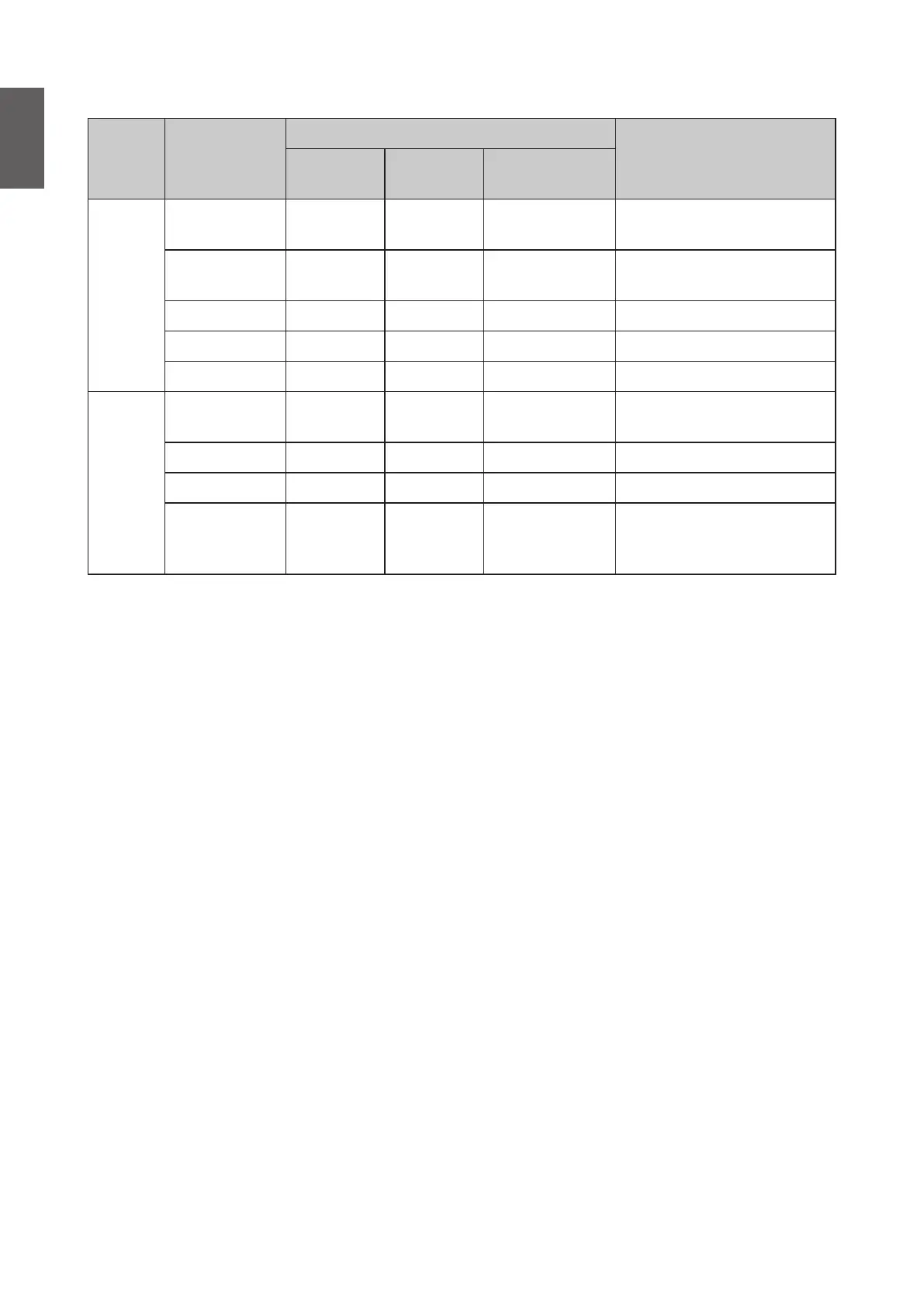
HDbaseT control function table
Control
Side
Function
Standby Mode
Remark
Eco
(< 0.5W)
Network
(<2W)
Normal
(>2W)
Projector
Front-IR
(Wireless)
O O
O (Can disable
by OSD)
Rear-IR
(Wireless)
O O
O (Can disable
by OSD)
RS-232 O O X
RJ45/LAN X O X
Wired Remote O O O
HDBaseT TX Box
HDBT-IR
(Wireless)
X X O
RS-232 X X O
RJ45/LAN X X O
Wired Remote X X O
User can connect wired
remote at HDBaseT TX side
to get the wired function.
O: Enable X: Disable
• Baud Rate
Press
◄
/
►
to select RS-232 baud rate. The options are 2400, 4800, 9600, 14400, 19200,
38400, 57600 and 1152000.
• Test Pattern
Press
◄
/
►
to select the test pattern. The options are Off, Grid, White, Red, Green, Blue,
Black, RGB Ramps, Color Bar, Step Bars, CheckBoard, Horizental Lines, Vertical Lines,
Diagonal Lines, Horizontal Ramp and Vertical Ramps.
• Projector ID Setting
Press
◄
/
►
to enable or disable the projector ID.
• Closed Caption
Press ENTER to enter the Closed Caption menu. See "Closed Caption menu" on page 57
for more details.
• 12 Trigger
Press
◄
/
►
to enable or disable 12V trigger function.
• Standby Settings
Press ENTER to enter the Standby Settings menu. See "Standby Settings menu" on
page 57 for more details.
• Network Settings
Press ENTER to enter the Network Settings menu. See "Network Settings menu" on
page 58 for more details.
• Reset All Settings
Press ENTER to reset all settings to default value.



 To Next Page