English
67
Note:
Do not wash the lter with the water or other liquid matter.
Resetting the lter timer
6. After the startup logo, open the On-Screen Display (OSD) menu. Go to the SYSTEM
SETUP: Basic > Operation Settings > Filter Settings menu. Press ENTER. The Filter
Settings page displays. Highlight Reset Filter Timer. A warning message displays asking if you
want to reset the lter timer. Highlight Reset and press ENTER. The lter time will be reset
to '0'.
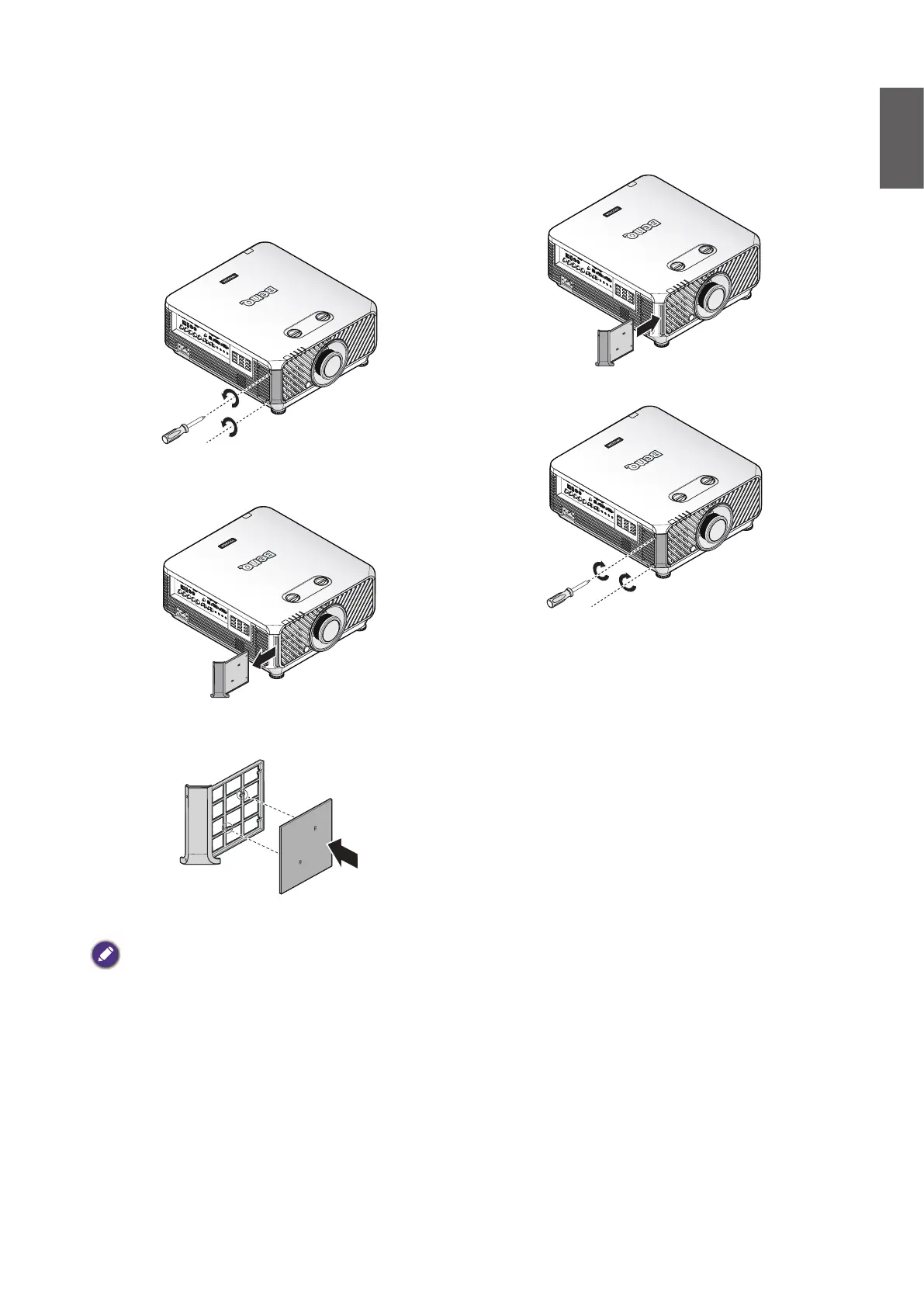
1. Turn off the projector and unplug the power
cord from the outlet. Remove any dust on
the projector and around the air vents.
Loosen the two captive screws that secure
the lter cover.
2. Remove the lter module from the
projector.
3. Replace the new lter module with the lter
cover.
4. Replace the lter cover into the projector
by pushing gently in the direction shown.
5. Tighten the screws.
Replacing the front lter



 To Next Page