Set up for Interactive Function12
Set up for Interactive Function
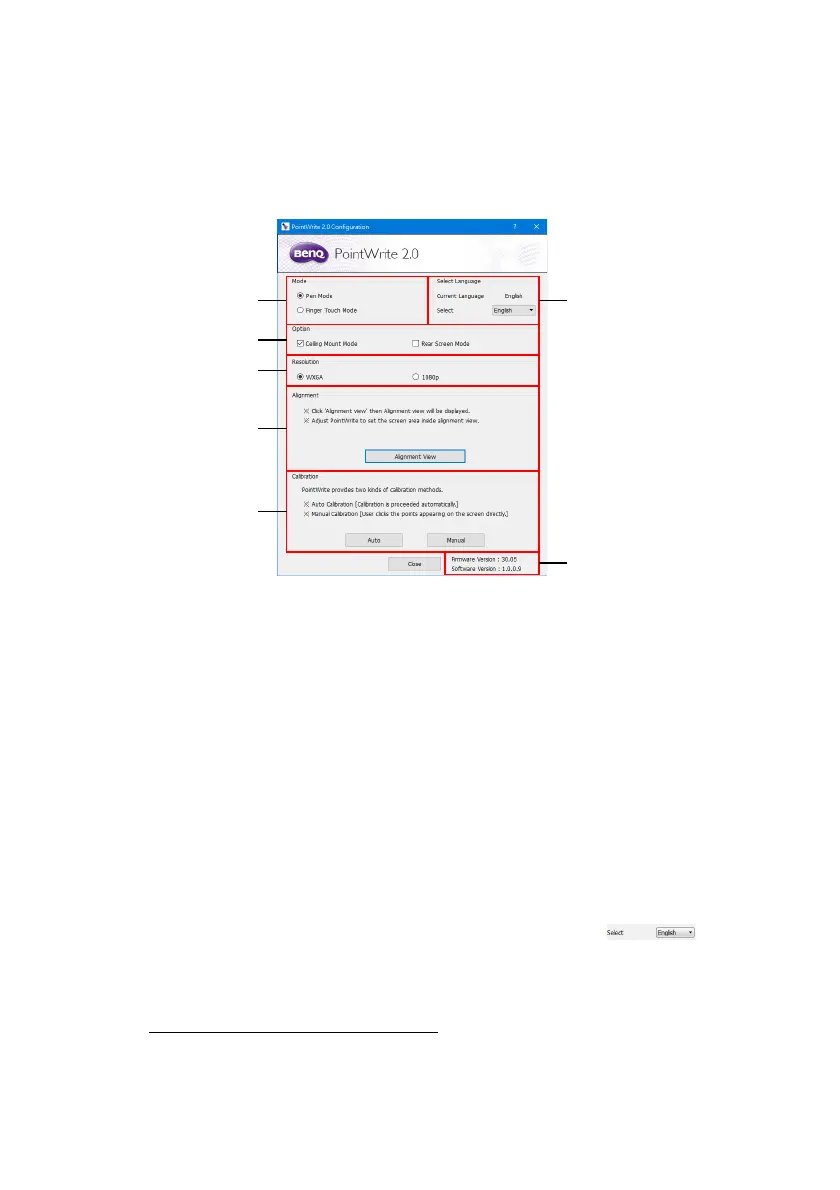
To use the PointWrite, the proper setting of the PointWrite configuration is needed. The
Configuration setting window will help you to set up PointWrite correctly.
Configuration Setting.
1. PointWrite Mode:
• Pen Mode: Default selection
• Finger Touch Mode: Only available when PointWrite Module works with
BenQ PointWrite Touch module
3
. When selecting Finger Touch mode, pen and
finger can be used simultaneously.
2. PointWrite Option:
• Ceiling Mount Mode: Click this item if you mount the projector on the ceiling.
When the projector is placed on the table, do not click this item.
• Rear Screen Mode: If the projector is installed on the rear screen system, click
this item.
3. Resolution: Select Projector resolution.
4. PointWrite Alignment: See "Alignment View" on page 13.
5. PointWrite Calibration: See "PointWrite Calibration" on page 14.
6. PointWrite Language: The default language is the same as the language for your
operating system. If you want to change the language, click on and
then language list will display. After selecting your preferred language, quit the
PointWrite and start the PointWrite again.
7. Information: Shows the camera firmware version.
3.
PW30U is compatible with selected PointWrite Touch module, which is an optional
accessary and will be available soon.



 To Next Page