About PointWrite Pen8
About PointWrite Pen
The PointWrite Pen provides the following 4 actions:
Click: Touch an icon or a menu on the screen.
Double Click: Touch an icon or a menu on the screen two times.
Right Button Click: Touch an icon or menu for at least 1.5 seconds.
Drag: Touch and drag an object on the screen.
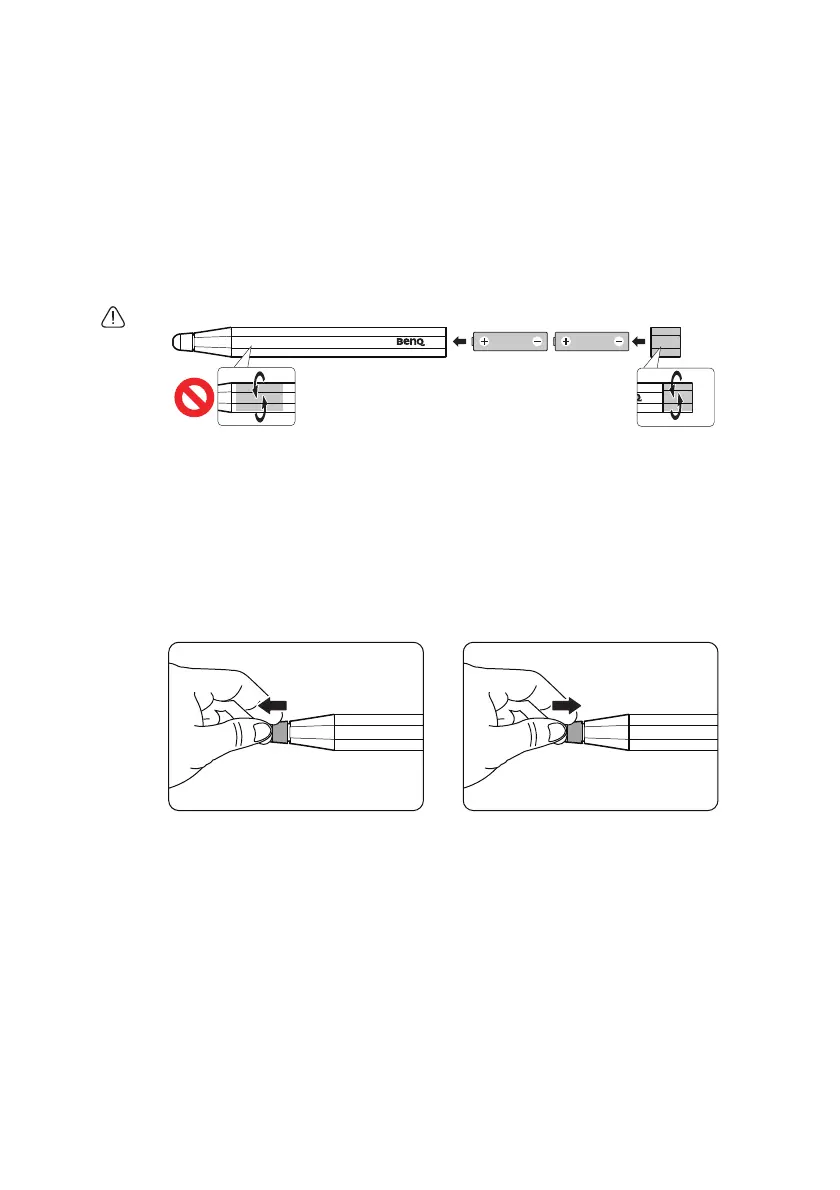
Installing the Batteries
Caution: When inserting the batteries into the PointWrite Pen, make sure the battery polarities are correct.
Remark:
To save the battery power, the pen will power off automatically when pen nib is pressed
over than 30 seconds.
Replacing the Pen Tip
1. Removing the pen tip
Hold the pen tip with your fingers. Shake and pull the pen tip out of the pen.
2. Inserting the pen tip
Push the pen tip gently, but not abruptly.



 To Next Page