15
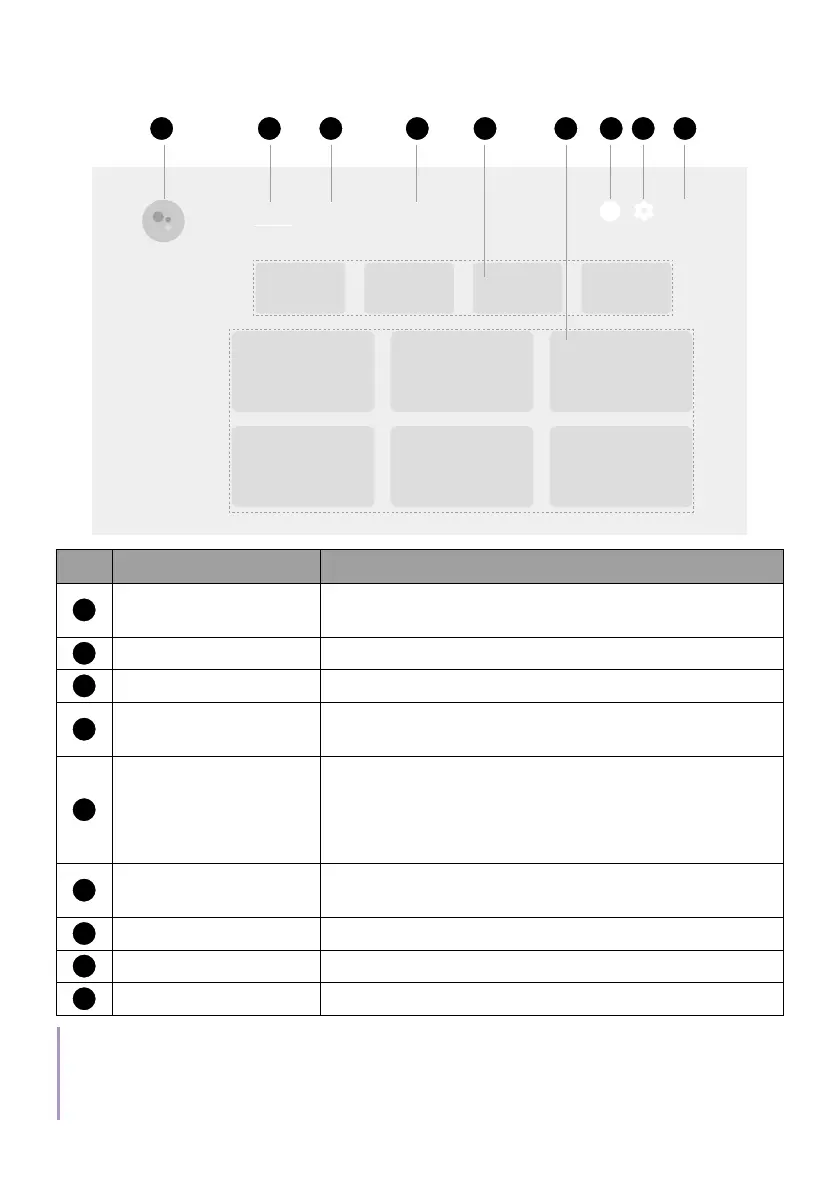
Android TV
home screen
8:28
1
1 32 8 95 6
Search Discover AppsHome
4 7
No. Item Descriptions
1
Google Assistant
Press the Google Assistant button on your
remote control to talk to Google.
2
Home Access to Home screen.
3
Discover Access to personalized recommendations.
4
Apps
Access to all the installed apps and Google
Play.
5
Recommended
apps/My favorites
• Access to the recommended apps or video
on demand services.
• Access to the apps that have been added
to favorites by the Bookmark key.
6
Recommended
content
Access to the content recommended by the
specified channel/streaming service.
7
Notification Access to notifications.
8
Settings Access to the QS02 settings.
9
System time Displays system time.
Note
The screenshots and user interface in this document are for reference only and may be subject to
change without prior notice.



 To Next Page