10
Getting started
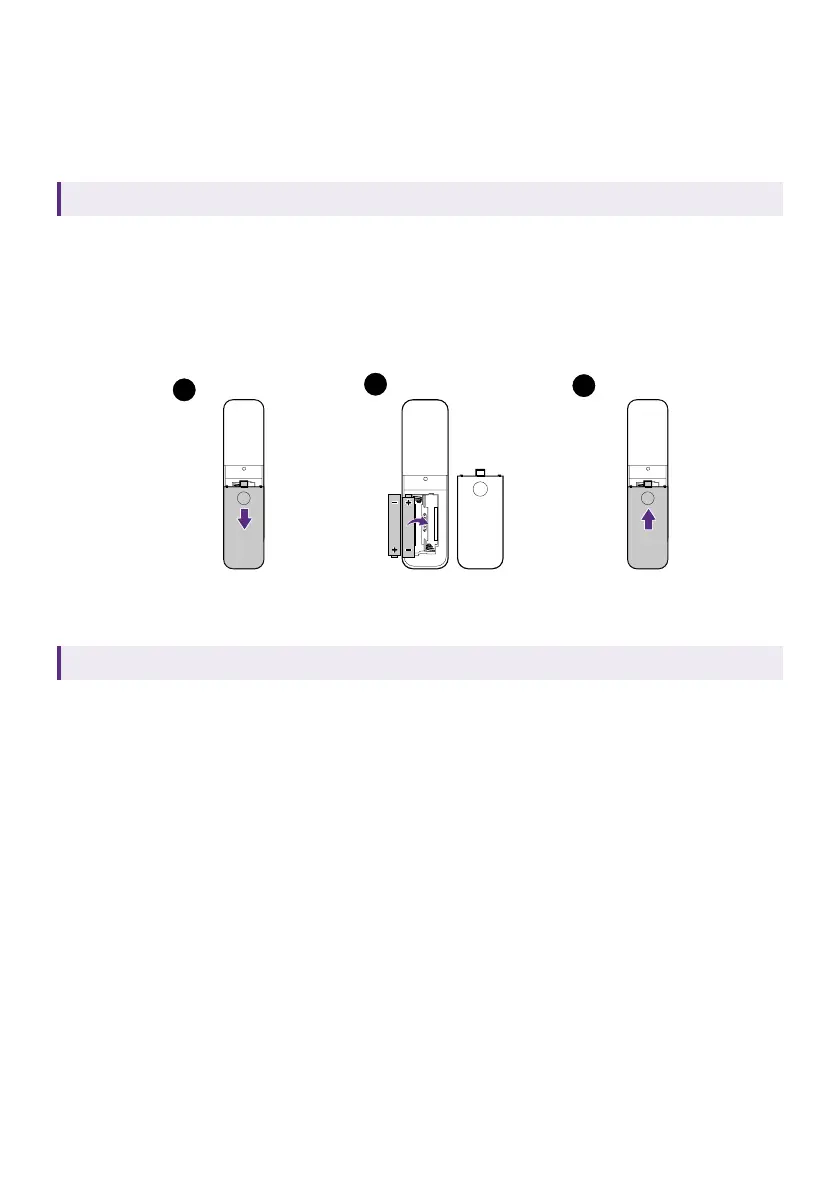
Placing the remote control batteries
Applicable for C008 only. Availability of C008 may vary by country/region.
1. Slide to open the battery cover.
2. Insert two AAA batteries (purchased separately) to the battery
compartment as illustrated. Make sure that the positive and negative
ends are positioned correctly.
3. Replace the battery cover.
1
3
2
Remote control effective range
Applicable for C008 only. Availability of C008 may vary by country/region.
Effective angle: within 30 degrees
Effective range: within 8 meters (~ 26 feet)
Make sure that there are no obstacles between the remote control and the
IR sensor(s) on the dongle or projector that might obstruct the infra-red
beam.
Connection and pairing with a
bundled projector
1. If the QS02 dongle came with a BenQ projector, refer to the quick start
guide or user manual of the purchased projector for the specified
HDMI port to install the dongle.
2. A micro USB cable should be available next to that HDMI port to
supply power to the dongle. Make sure to connect the USB cable to
the micro USB port on the dongle.



 To Next Page