7
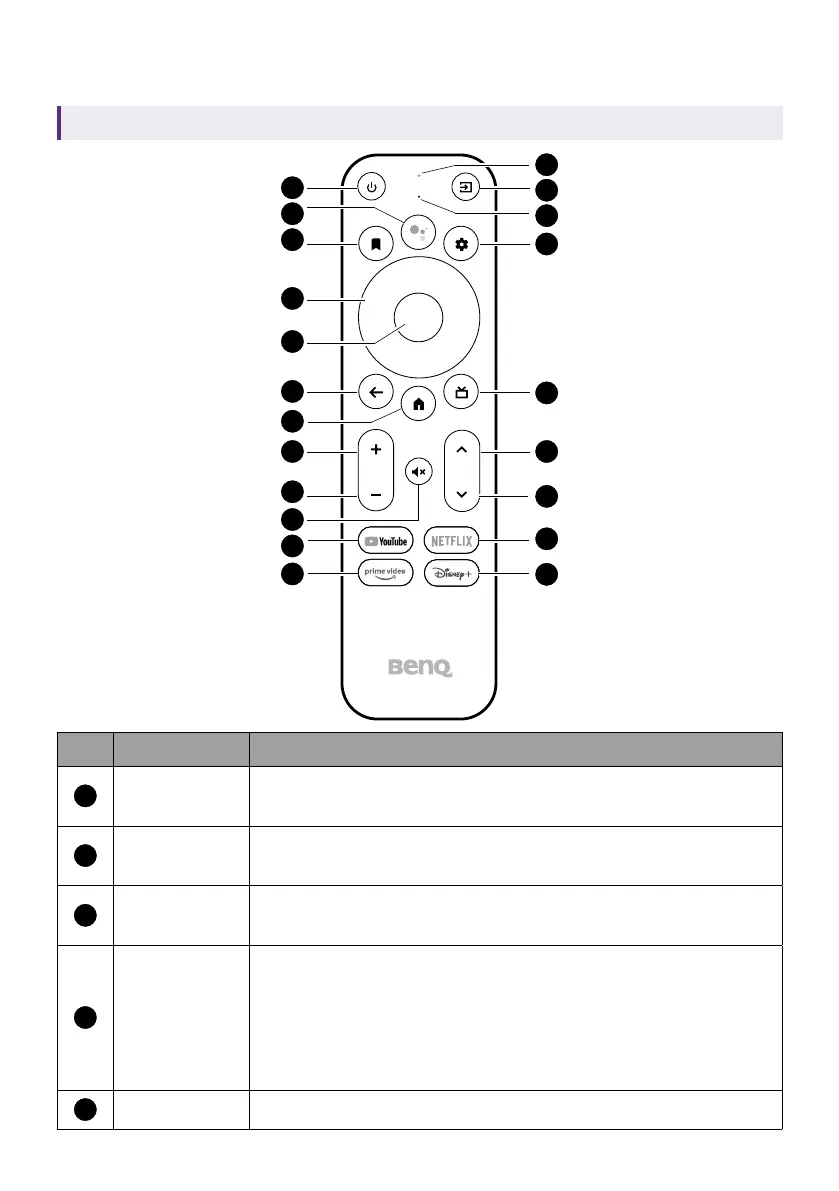
Remote control
Applicable for C008 only. Availability of C008 may vary by country/region.
1
2
3
4
5
7
8
16
17
18
19
20
21
6
9
11
12
13
14
15
10
No. Item Descriptions
1
Power
Toggles the projector between standby mode and on
(after initial power up from the keypad).
2
Google
Assistant
Press the Google Assistant button on your remote to
talk to Google.
3
Watchlist
Shows a list of options to open/move the selected
app or add it to favorites.
4
Arrow keys
Moves through the menu items or toggle through the
available options.
When the On-Screen Display (OSD) menu is activated,
these keys are used as directional arrows to select
the desired menu items and to make adjustments.
5
OK Confirms the selection.



 To Next Page