9
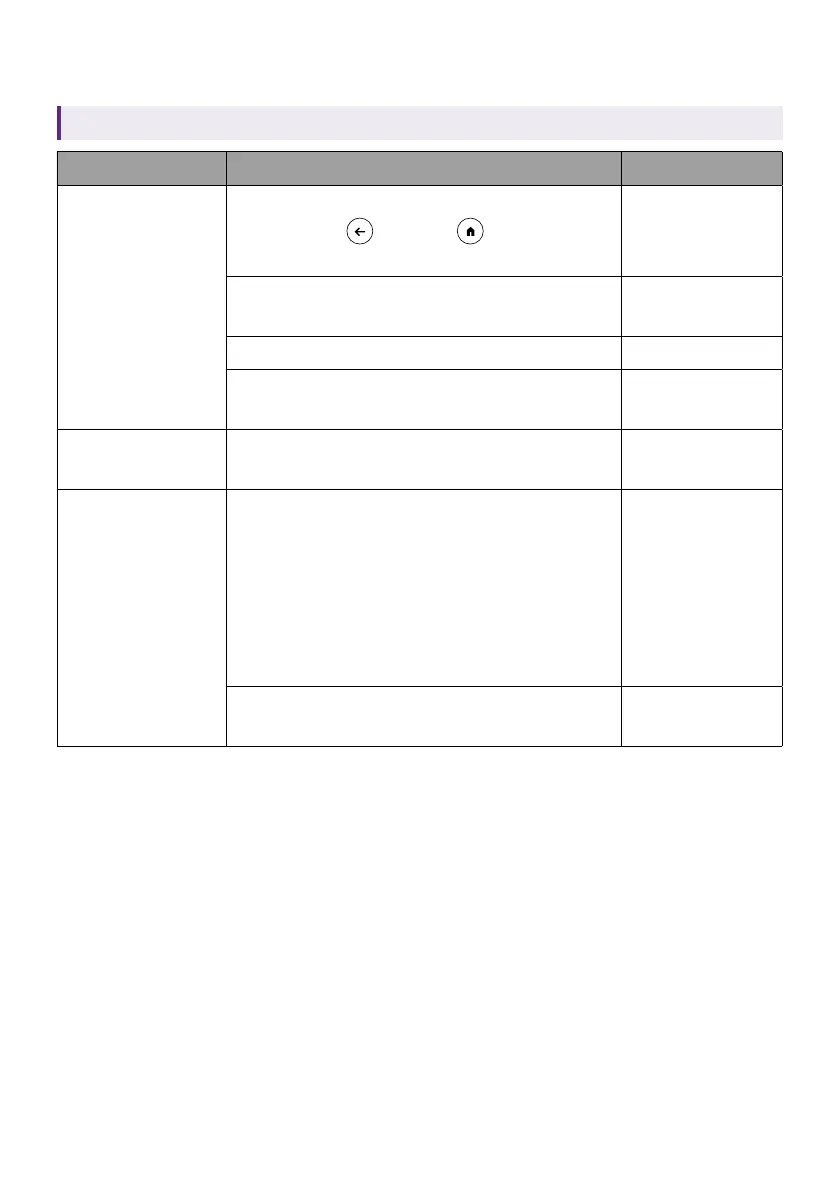
LED indicator on the remote control
Applicable for C008 only. Availability of C008 may vary by country/region.
Scenario Status LED indicator
Bluetooth
pairing
Pairing enabled by pressing and
holding the
and the buttons at
the same time for 10 seconds
Green - solid
Waiting for pairing and connecting
Green -
flashing
Connected successfully N/A
Pairing failed
Red - flashing 4
times
Using Google
Assistant
Press the Google Assistant button to
talk to Google
Green - solid or
flashing
Sending IR
signal to control
your projector
Pressing one of the following IR
learning keys:
• Power
• Volume up
• Volume down
• Mute
• Input
Red - flashing
once
Pressing any of the keys that is not IR
learning key
Green - flashing
once



 To Next Page