18
Wireless projection from a PC (via
Chromecast built-in)
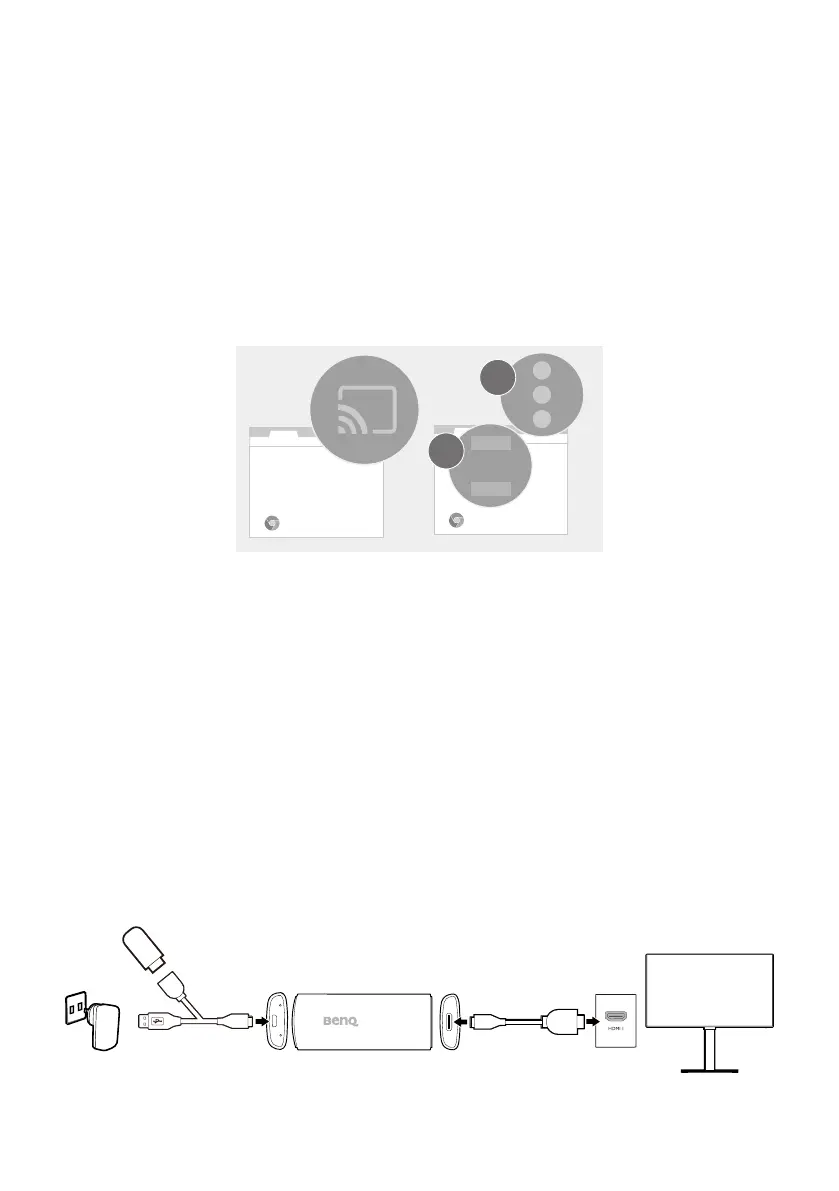
1. Connect your computer to the same wireless network as the dongle.
2. Enable the screen mirroring (cast) function from your computer.
Available name and access to the screen mirroring function may vary
by program. Note that the dongle is named QS02 by default. If you
have changed the name, look for the new name from the device list.
Chrome
Chrome
Cast
1
2
Working as a USB reader
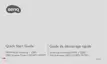
The QS02 dongle can work as a USB reader to play files stored on a USB
flash drive directly when connecting to a display without PC connection.
1. Connect the dongle to the HDMI port on your display via the provided
HDMI adapter.
2. Supply power to the dongle by a USB power adapter via the provided
USB splitter cable. Make sure the power outlet is able to provide
5V/1.5A power.
3. Connect a USB flash drive to the USB type-A female connector.
4. Switch the input source to USB storage. You are ready to choose the
files from the USB flash drive for playback now.



 To Next Page