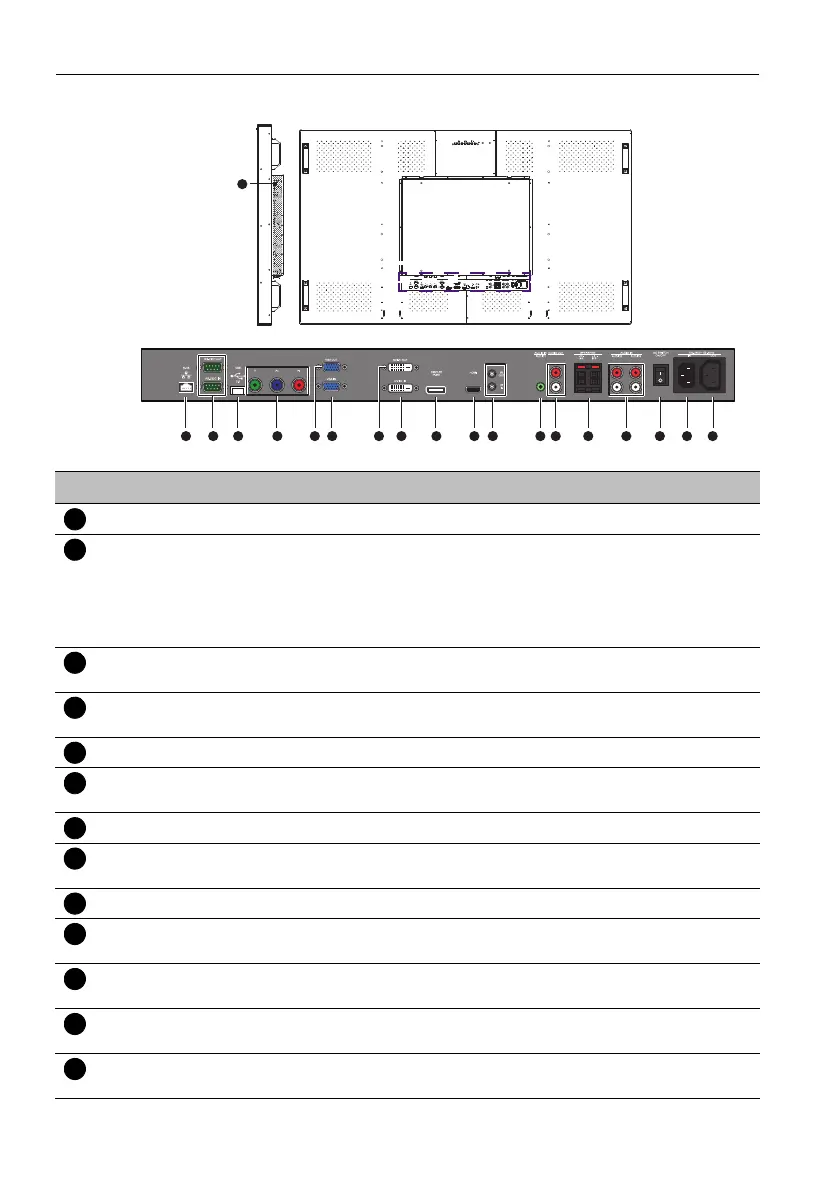
Parts of the display and their functions12
Input/output terminals
1 2 3 64 95 87
10 14 15 16 17 181211 13
No. Name Description
RJ45 Connects to the RJ45 port on your Ethernet or router.
RS-232C IN/OUT For external control and multi-display operation.
• RS-232C IN: receives control signals from a computer or
another display.
• RS-232C OUT: outputs control signals from the RS-232C IN
to another display.
USB Connects to a USB flash drive (for firmware updates and display
cloning only).
VIDEO IN
(COMPONENT)
Receives component video (YPbPr) signals from an external
device (such as a DVD player, HDTV device or Laser disc player).
VGA OUT Outputs analog RGB signals from the VGA IN to another display.
VGA IN Receives analog RGB signals from an external device (such as a
computer).
DVI-D OUT Outputs DVI-D signals from the DVI-D IN to another display.
DVI-D IN Receives DVI signals from an external device (such as a
computer).
DISPLAY PORT Connects to a DisplayPort compatible device.
VIDEO IN (HDMI) Receives HDMI signals from an external device (such as a Blu-ray
disc player).
IR OUT/IN For use with an IR Extender - to ensure better responsiveness
from the remote control.
AUDIO IN
(AUDIO1)
Receives audio signals from an external device (such as a
computer).
AUDIO OUT (R/L) Outputs audio signals from an audio or HDMI input source to an
external device.


 To Next Page